

Ticketing Solution Overview
Note: This is an early preview version. Features are still being improved and we are continuously working on enhancements. Feedback is welcome!
1. Background (Why)
Industry/Role/Management Problems Solved
Enterprises face various types of service requests in daily operations: equipment repairs, IT support, customer complaints, consultations, etc. These requests come from scattered sources (CRM systems, field engineers, emails, public forms, etc.), have different processing workflows, and lack unified tracking and management mechanisms.
Typical Business Scenarios:
- Equipment Repair: After-sales team handles equipment repair requests, needs to record device-specific information like serial numbers, fault codes, spare parts
- IT Support: IT department handles internal employee requests for password resets, software installations, network issues
- Customer Complaints: Customer service team handles multi-channel complaints, some emotionally charged customers need priority handling
- Customer Self-Service: End customers want to conveniently submit service requests and track processing progress
Target User Profile
| Dimension | Description |
|---|---|
| Company Size | SMBs to mid-large enterprises with substantial customer service needs |
| Role Structure | Customer service teams, IT support, after-sales teams, operations management |
| Digital Maturity | Beginner to intermediate, seeking to upgrade from Excel/email management to systematic management |
Pain Points of Current Mainstream Solutions
- High Cost / Slow Customization: SaaS ticketing systems are expensive, custom development cycles are long
- System Fragmentation, Data Silos: Business data scattered across different systems, difficult to unify analysis and decision-making
- Fast Business Changes, Hard to Evolve: When business requirements change, systems are difficult to adjust quickly
- Slow Service Response: Requests flowing between different systems cannot be dispatched promptly
- Opaque Process: Customers cannot track ticket progress, frequent inquiries increase customer service pressure
- Quality Difficult to Guarantee: Lack of SLA monitoring, timeouts and negative feedback cannot be alerted in time
2. Product Benchmarking (Benchmark)
Mainstream Products in the Market
- SaaS: Salesforce, Zendesk, Odoo, etc.
- Custom Systems / Internal Systems
Benchmarking Dimensions
- Feature Coverage
- Flexibility
- Extensibility
- AI Usage Approach
NocoBase Solution Differentiators
Platform-level Advantages:
- Configuration-First: From underlying data tables to business types, SLA, skill routing - all managed through configuration
- Low-Code Rapid Development: Faster than custom development, more flexible than SaaS
What Traditional Systems Cannot Do or Cost Too Much:
- AI-Native Integration: Leveraging NocoBase's AI plugins for intelligent classification, form assistance, knowledge recommendations
- All Designs Can Be Replicated by Users: Users can extend based on templates
- T-Shaped Data Architecture: Main table + business extension tables, adding new business types only requires adding extension tables
3. Design Principles
- Low Cognitive Cost
- Business Before Technology
- Evolvable, Not One-Time Completion
- Configuration First, Code as Fallback
- Human-AI Collaboration, Not AI Replacing Humans
- All Designs Should Be Replicable by Users
4. Solution Overview
Summary Introduction
A universal ticketing platform built on NocoBase low-code platform, achieving:
- Unified Entry: Multi-source integration, standardized processing
- Intelligent Distribution: AI-assisted classification, load-balanced assignment
- Polymorphic Business: Core main table + business extension tables, flexible extension
- Closed-Loop Feedback: SLA monitoring, customer ratings, negative feedback follow-up
Ticket Processing Flow
Core Module List
| Module | Description |
|---|---|
| Ticket Intake | Public forms, customer portal, agent-created, API/Webhook, email parsing |
| Ticket Management | Ticket CRUD, status flow, assignment/transfer, comment communication, operation logs |
| Business Extension | Equipment repair, IT support, customer complaints and other business extension tables |
| SLA Management | SLA configuration, timeout alerts, timeout escalation |
| Customer Management | Customer main table, contact management, customer portal |
| Rating System | Multi-dimensional scoring, quick tags, NPS, negative feedback alerts |
| AI Assistance | Intent classification, sentiment analysis, knowledge recommendation, reply assistance, tone polishing |
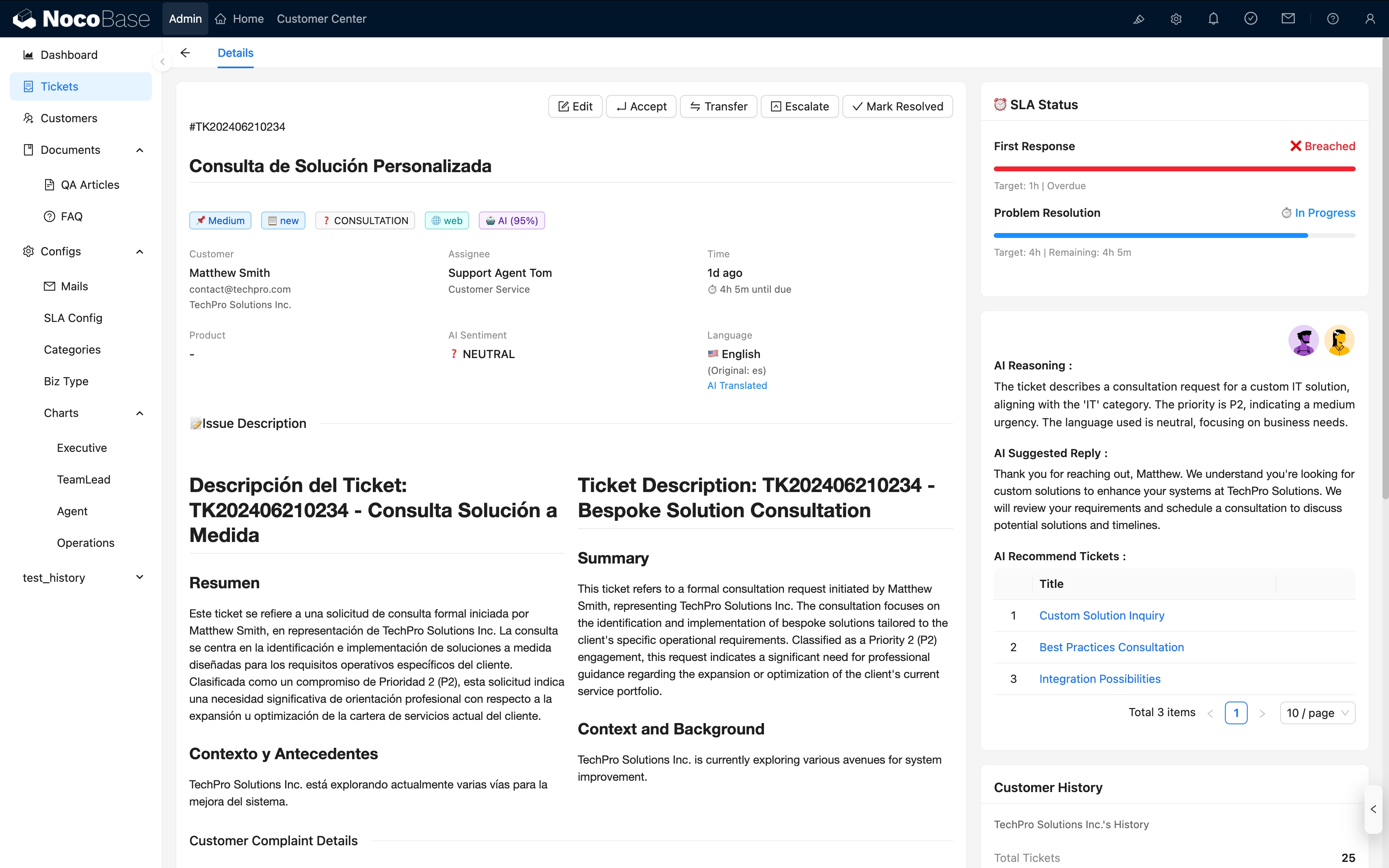
Core Interface Display
5. AI Employees
AI Employee Types and Scenarios
- Customer Service Assistant, Sales Assistant, Data Analyst, Auditor
- Assisting humans, not replacing them
AI Employee Value Quantification
In this solution, AI employees can:
| Value Dimension | Specific Effects |
|---|---|
| Improve Efficiency | Automatic classification reduces manual sorting time by 50%+; knowledge recommendations accelerate problem resolution |
| Reduce Costs | Simple questions auto-replied, reducing manual customer service workload |
| Empower Human Employees | Emotion alerts help customer service prepare in advance; reply polishing improves communication quality |
| Improve Customer Satisfaction | Faster response, more accurate assignment, more professional replies |
6. Highlights
1. T-Shaped Data Architecture
- All tickets share the main table with unified flow logic
- Business extension tables carry type-specific fields, flexible extension
- Adding new business types only requires adding extension tables, without affecting the main flow
2. Complete Ticket Lifecycle
- New → Assigned → Processing → Pending → Resolved → Closed
- Supports complex scenarios like transfer, return, reopen
- SLA timing accurate to pending pause
3. Multi-Channel Unified Integration
- Public forms, customer portal, API, email, agent-created
- Idempotency check prevents duplicate creation
4. AI-Native Integration
- Not "adding an AI button", but integrated into every step
- Intent recognition, sentiment analysis, knowledge recommendation, reply polishing
7. Installation & Deployment
How to Install and Use
Use migration management to migrate and integrate various partial applications into other applications.
8. Roadmap (Continuously Updated)
- System Embedding: Support embedding the ticketing module into various business systems like ERP, CRM, etc.
- Ticket Interconnection: Upstream/downstream system ticket integration and status callbacks for cross-system ticket collaboration
- AI Automation: AI employees embedded in workflows, supporting background auto-execution for unattended processing
- Multi-Tenancy: Horizontal scaling via multi-space/multi-app architecture, enabling distribution to different service teams for independent operation
- Knowledge Base RAG: Automatic vectorization of all data (tickets, customers, products, etc.) for intelligent retrieval and knowledge recommendations
- Multi-Language Support: Interface and content support for multiple languages, enabling cross-border/cross-regional team collaboration