logologo
Get Started
Guide
Development
Plugins
API
Home
English
简体中文
日本語
한국어
Español
Português
Deutsch
Français
Русский
Italiano
Türkçe
Українська
Tiếng Việt
Bahasa Indonesia
ไทย
Polski
Nederlands
Čeština
العربية
עברית
हिन्दी
Svenska
Get Started
Guide
Development
Plugins
API
Home
logologo

Quick Start

Introduction
Write a Block Plugin
Previous PageIntroduction

#Write Your First Block Plugin

Before starting, it's recommended to read "Write Your First Plugin" to learn how to quickly create a basic plugin. Next, we'll extend it by adding a simple Block feature.

#Step 1: Create Block Model File

Create a new file in the plugin directory: client/models/SimpleBlockModel.tsx

#Step 2: Write Model Content

Define and implement a basic block model in the file, including its rendering logic:

import { BlockModel } from '@nocobase/client';
import React from 'react';
import { tExpr } from '../utils';

export class SimpleBlockModel extends BlockModel {
  renderComponent() {
    return (
      <div>
        <h1>Hello, NocoBase!</h1>
        <p>This is a simple block rendered by SimpleBlockModel.</p>
      </div>
    );
  }
}

SimpleBlockModel.define({
  label: tExpr('Hello block'),
});

#Step 3: Register Block Model

Export the newly created model in the client/models/index.ts file:

import { ModelConstructor } from '@nocobase/flow-engine';
import { SimpleBlockModel } from './SimpleBlockModel';

export default {
  SimpleBlockModel,
} as Record<string, ModelConstructor>;

#Step 4: Activate and Experience the Block

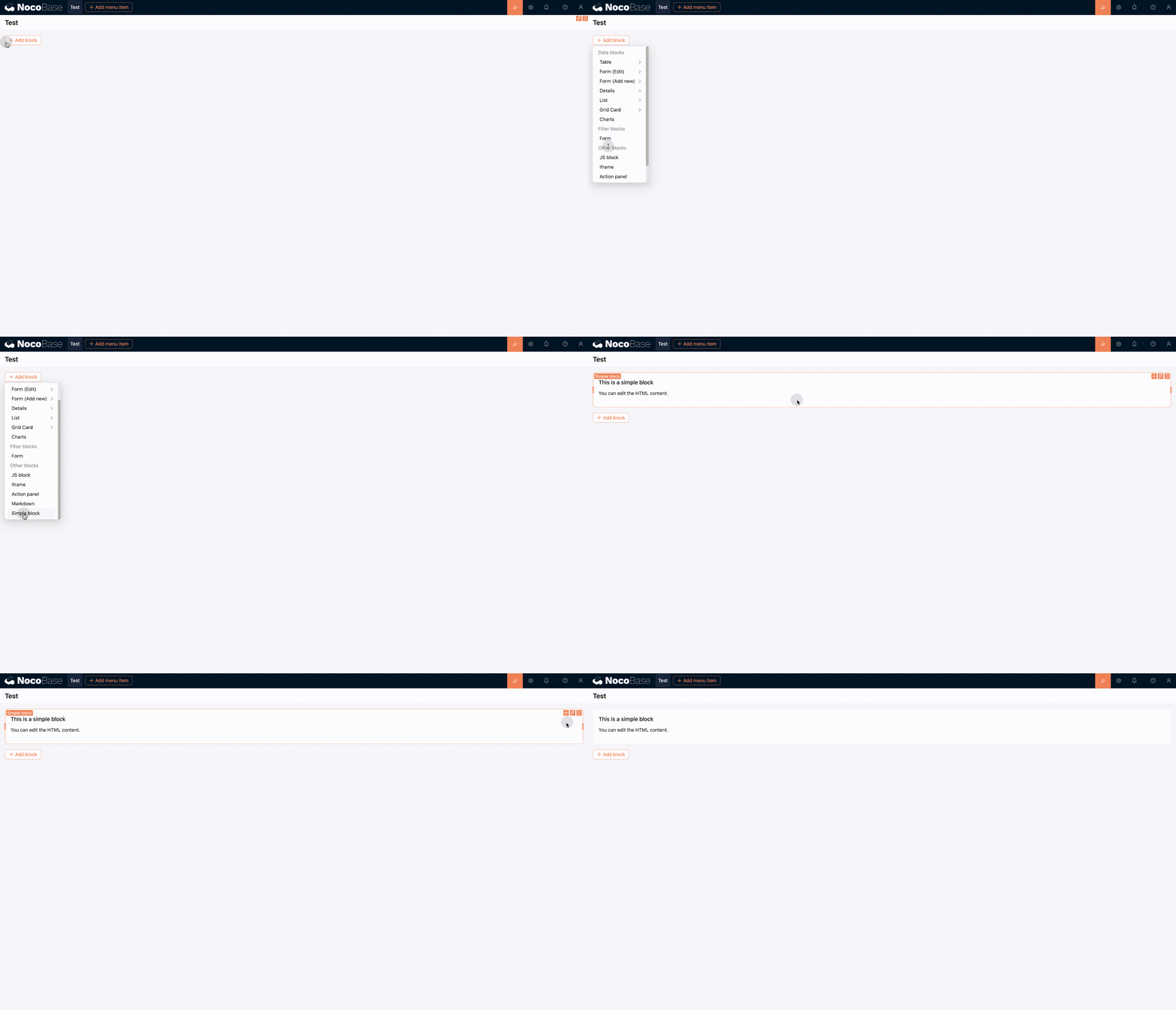
After enabling the plugin, you'll see the new Hello block option in the "Add Block" dropdown menu.

Demo effect:
20251102223200_rec_

#Step 5: Add Configuration Capability to Block

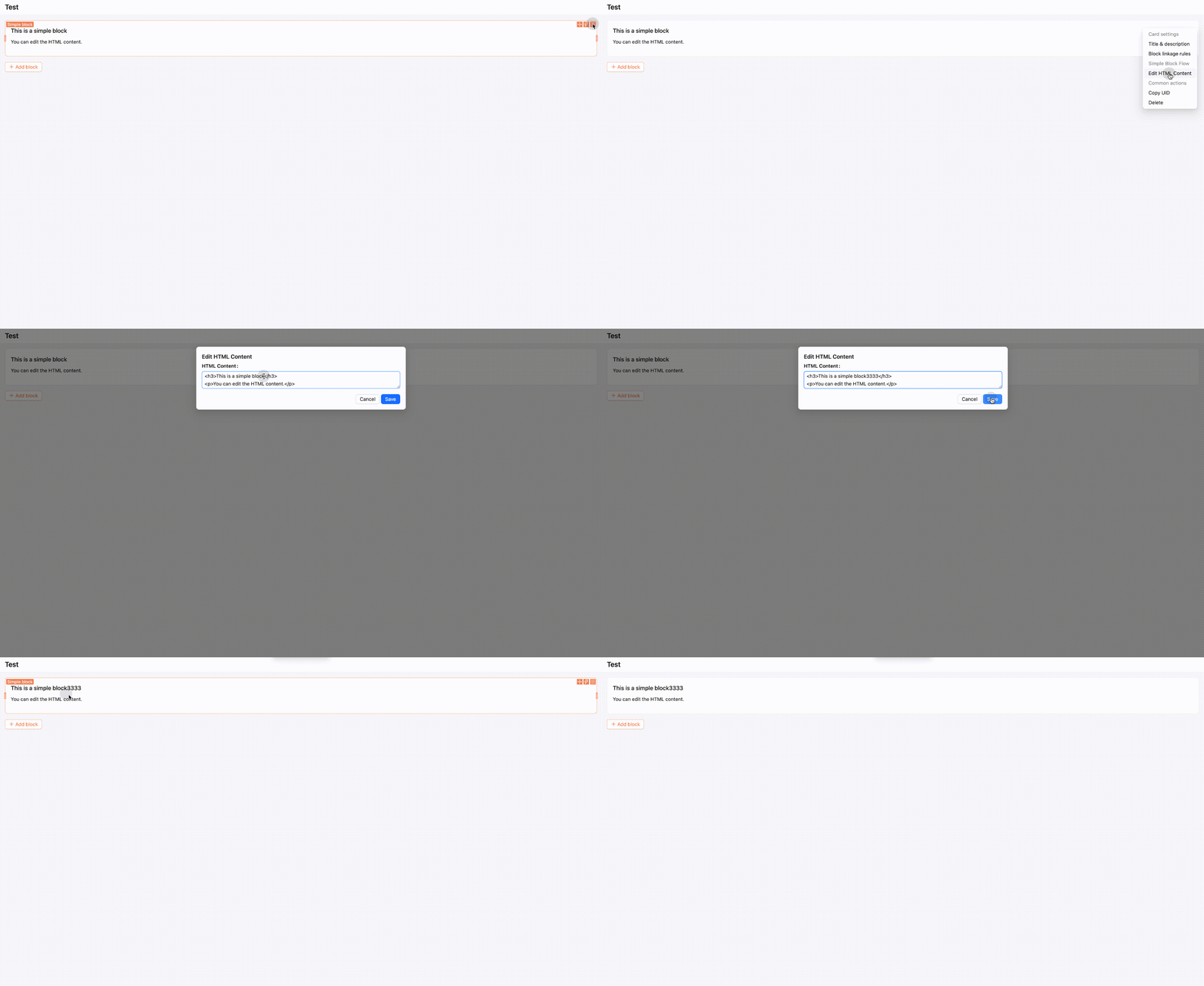
Next, we'll add configurable functionality to the block through Flow, enabling users to edit block content in the interface.

Continue editing the SimpleBlockModel.tsx file:

import { BlockModel } from '@nocobase/client';
import React from 'react';
import { tExpr } from '../locale';

export class SimpleBlockModel extends BlockModel {
  renderComponent() {
    return <div dangerouslySetInnerHTML={{ __html: this.props.html }} />;
  }
}

SimpleBlockModel.define({
  label: tExpr('Simple block'),
});

SimpleBlockModel.registerFlow({
  key: 'flow1',
  title: tExpr('Simple Block Flow'),
  on: 'beforeRender',
  steps: {
    editHtml: {
      title: tExpr('Edit HTML Content'),
      uiSchema: {
        html: {
          type: 'string',
          title: tExpr('HTML Content'),
          'x-decorator': 'FormItem',
          'x-component': 'Input.TextArea',
        },
      },
      defaultParams: {
        html: `<h3>This is a simple block</h3>
<p>You can edit the HTML content.</p>`,
      },
      handler(ctx, params) {
        ctx.model.props.html = params.html;
      },
    },
  },
});

Demo effect:

20251102222856_rec_

#Summary

This article introduces how to create a simple block plugin, including:

  • How to define and implement a block model
  • How to register a block model
  • How to add configurable functionality through Flow

Complete source code reference: Simple Block Example