

logologo
เริ่มต้น
คู่มือ
การพัฒนา
ปลั๊กอิน
API
English
简体中文
日本語
한국어
Deutsch
Français
Español
Português
Русский
Italiano
Türkçe
Українська
Tiếng Việt
Bahasa Indonesia
ไทย
Polski
Nederlands
Čeština
العربية
עברית
हिन्दी
Svenska
เริ่มต้น
คู่มือ
การพัฒนา
ปลั๊กอิน
API
logologo

การยืนยันตัวตนผู้ใช้

ภาพรวม
การจัดการเครื่องมือยืนยันตัวตน

ประเภทการยืนยันตัวตน

รหัสผ่าน
SMS

OIDC

การกำหนดค่า

ตัวอย่าง

เข้าสู่ระบบด้วย Google
เข้าสู่ระบบด้วย Microsoft

SAML

การกำหนดค่า

ตัวอย่าง

เข้าสู่ระบบด้วย Google
LDAP
CAS
WeChat Work
DingTalk
คีย์ API

คู่มือการพัฒนา

ขยายประเภทการยืนยันตัวตน
การอ้างอิง API

การตรวจสอบ

ภาพรวม

ประเภทการตรวจสอบ

SMS
เครื่องมือยืนยันตัวตน TOTP

คู่มือการพัฒนา

ขยายประเภทการตรวจสอบ
ขยายสถานการณ์การตรวจสอบ
ขยายผู้ให้บริการ SMS
การอ้างอิง API
การยืนยันตัวตนแบบสองปัจจัย (2FA)
Previous Pageขยายสถานการณ์การตรวจสอบ
Next Pageการอ้างอิง API
TIP

เอกสารนี้แปลโดย AI หากมีข้อมูลที่ไม่ถูกต้อง โปรดดูเวอร์ชันภาษาอังกฤษ

#ขยายผู้ให้บริการ SMS

บทความนี้จะอธิบายหลักๆ ว่าจะขยายผู้ให้บริการ SMS ในฟังก์ชัน การยืนยัน: SMS ได้อย่างไรโดยใช้ปลั๊กอินครับ/ค่ะ

#ฝั่งไคลเอนต์

#ลงทะเบียนฟอร์มการตั้งค่า

เมื่อผู้ใช้ตั้งค่าตัวยืนยัน SMS หลังจากเลือกประเภทผู้ให้บริการ SMS แล้ว จะมีฟอร์มการตั้งค่าที่เกี่ยวข้องกับประเภทผู้ให้บริการนั้นๆ ปรากฏขึ้นมาครับ/ค่ะ ฟอร์มการตั้งค่านี้ นักพัฒนาจะต้องลงทะเบียนด้วยตนเองที่ฝั่งไคลเอนต์
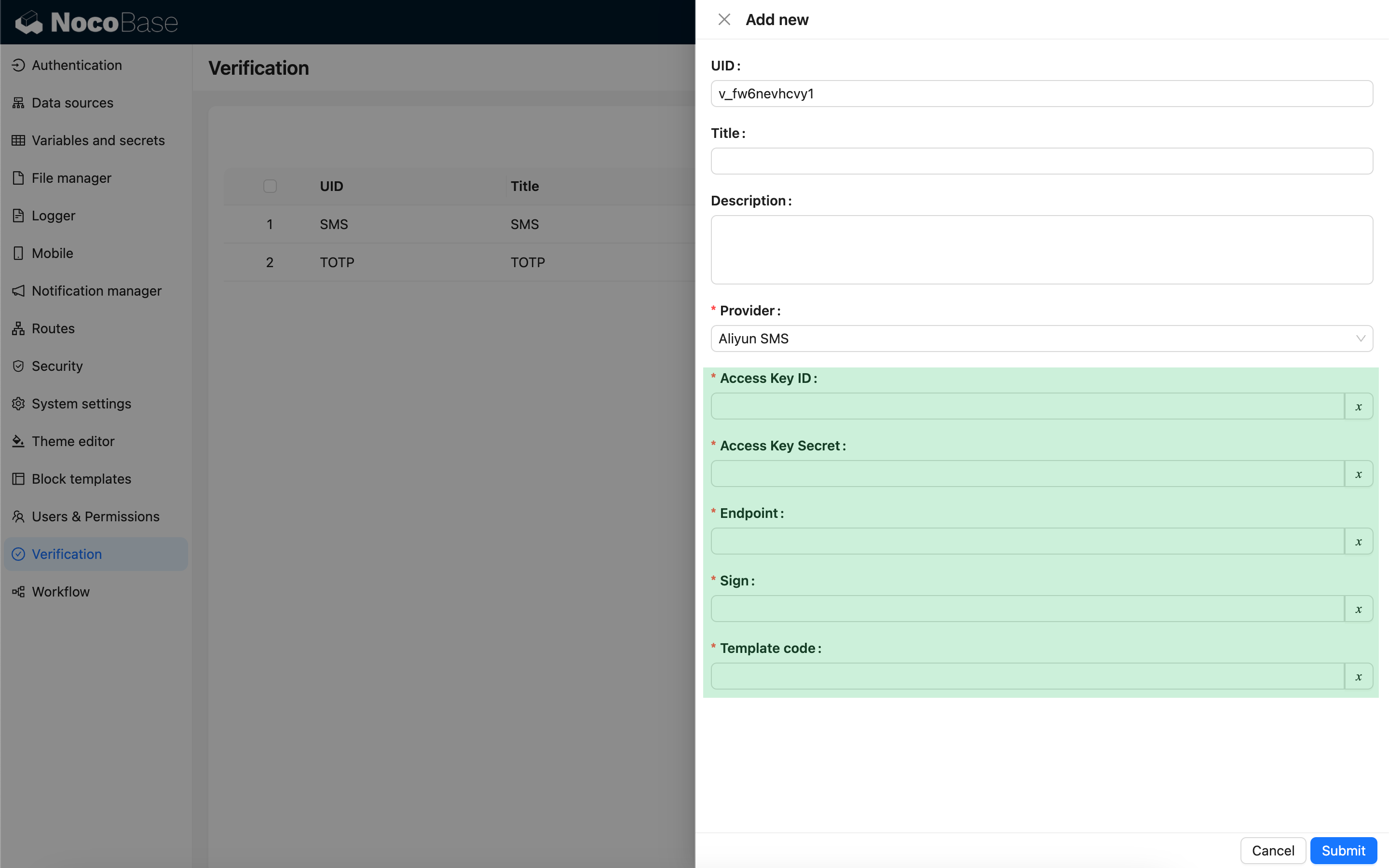
import { Plugin, SchemaComponent } from '@nocobase/client';
import PluginVerificationClient from '@nocobase/plugin-verification/client';
import React from 'react';

const CustomSMSProviderSettingsForm: React.FC = () => {
  return <SchemaComponent schema={{
    type: 'void',
    properties: {
      accessKeyId: {
        title: `{{t("Access Key ID", { ns: "${NAMESPACE}" })}}`,
        type: 'string',
        'x-decorator': 'FormItem',
        'x-component': 'TextAreaWithGlobalScope',
        required: true,
      },
      accessKeySecret: {
        title: `{{t("Access Key Secret", { ns: "${NAMESPACE}" })}}`,
        type: 'string',
        'x-decorator': 'FormItem',
        'x-component': 'TextAreaWithGlobalScope',
        'x-component-props': { password: true },
        required: true,
      },
    }
  }} />
}

class PluginCustomSMSProviderClient extends Plugin {
  async load() {
    const plugin = this.app.pm.get('verification') as PluginVerificationClient;
    plugin.smsOTPProviderManager.registerProvider('custom-sms-provider-name', {
      components: {
        AdminSettingsForm: CustomSMSProviderSettingsForm,
      },
    });
  }
}

#ฝั่งเซิร์ฟเวอร์

#พัฒนาอินเทอร์เฟซสำหรับส่ง

ปลั๊กอินการยืนยันได้ห่อหุ้มกระบวนการสร้างรหัสผ่านแบบใช้ครั้งเดียว (OTP) ไว้แล้วครับ/ค่ะ ดังนั้น นักพัฒนาเพียงแค่ต้องพัฒนาส่วนตรรกะการส่งข้อความเพื่อโต้ตอบกับผู้ให้บริการ SMS เท่านั้น

class CustomSMSProvider extends SMSProvider {
  constructor(options) {
    super(options);
    // options คือออบเจกต์การตั้งค่าจากฝั่งไคลเอนต์
    const options = this.options;
    // ...
  }

  async send(phoneNumber: string, data: { code: string }) {
    // ...
  }
}

#ลงทะเบียนประเภทการยืนยัน

หลังจากพัฒนาอินเทอร์เฟซสำหรับส่งเสร็จแล้ว ก็จำเป็นต้องลงทะเบียนครับ/ค่ะ

import { Plugin } from '@nocobase/server';
import PluginVerificationServer from '@nocobase/plugin-verification';
import { tval } from '@nocobase/utils';

class PluginCustomSMSProviderServer extends Plugin {
  async load() {
    const plugin = this.app.pm.get('verification') as PluginVerificationServer;
    // ชื่อ (name) ต้องตรงกับที่ใช้บนฝั่งไคลเอนต์
    plugin.smsOTPProviderManager.registerProvider('custom-sms-provider-name', {
      title: tval('Custom SMS provider', { ns: namespace }),
      provider: CustomSMSProvider,
    });
  }
}