logologo
Get Started
Guide
Development
Plugins
API
Home
English
简体中文
日本語
한국어
Español
Português
Deutsch
Français
Русский
Italiano
Türkçe
Українська
Tiếng Việt
Bahasa Indonesia
ไทย
Polski
Nederlands
Čeština
العربية
עברית
हिन्दी
Svenska
Get Started
Guide
Development
Plugins
API
Home
logologo

Ticketing Solution

Solution Overview
Detailed Design
Installation
More Content

CRM

Solution Overview
Detailed Design
Installation
Legacy CRM (v1)
More Content
Previous PageSolution Overview
Next PageInstallation

#CRM 2.0 System Detailed Design

#1. System Overview and Design Philosophy

#1.1 System Positioning

This system is a CRM 2.0 Sales Management Platform built on the NocoBase no-code platform. The core objective is:

Let sales focus on building customer relationships, not data entry and repetitive analysis.

The system automates routine tasks through workflows and utilizes AI to assist with lead scoring, opportunity analysis, and other tasks, helping sales teams improve efficiency.

#1.2 Design Philosophy

#Philosophy 1: Complete Sales Funnel

End-to-end Sales Process: design-2026-02-24-00-05-26

Why design it this way?

Traditional MethodIntegrated CRM
Multiple systems used for different stagesSingle system covering the entire lifecycle
Manual data transfer between systemsAutomated data flow and conversion
Inconsistent customer viewsUnified 360-degree customer view
Fragmented data analysisEnd-to-end sales pipeline analysis

#Philosophy 2: Configurable Sales Pipeline

design-2026-02-24-00-06-04

Different industries can customize sales pipeline stages without modifying code.

#Philosophy 3: Modular Design

  • Core modules (Customers + Opportunities) are mandatory; other modules can be enabled as needed.
  • Disabling modules does not require code changes; it is done via NocoBase interface configuration.
  • Each module is designed independently to reduce coupling.

#2. Module Architecture and Customization

#2.1 Module Overview

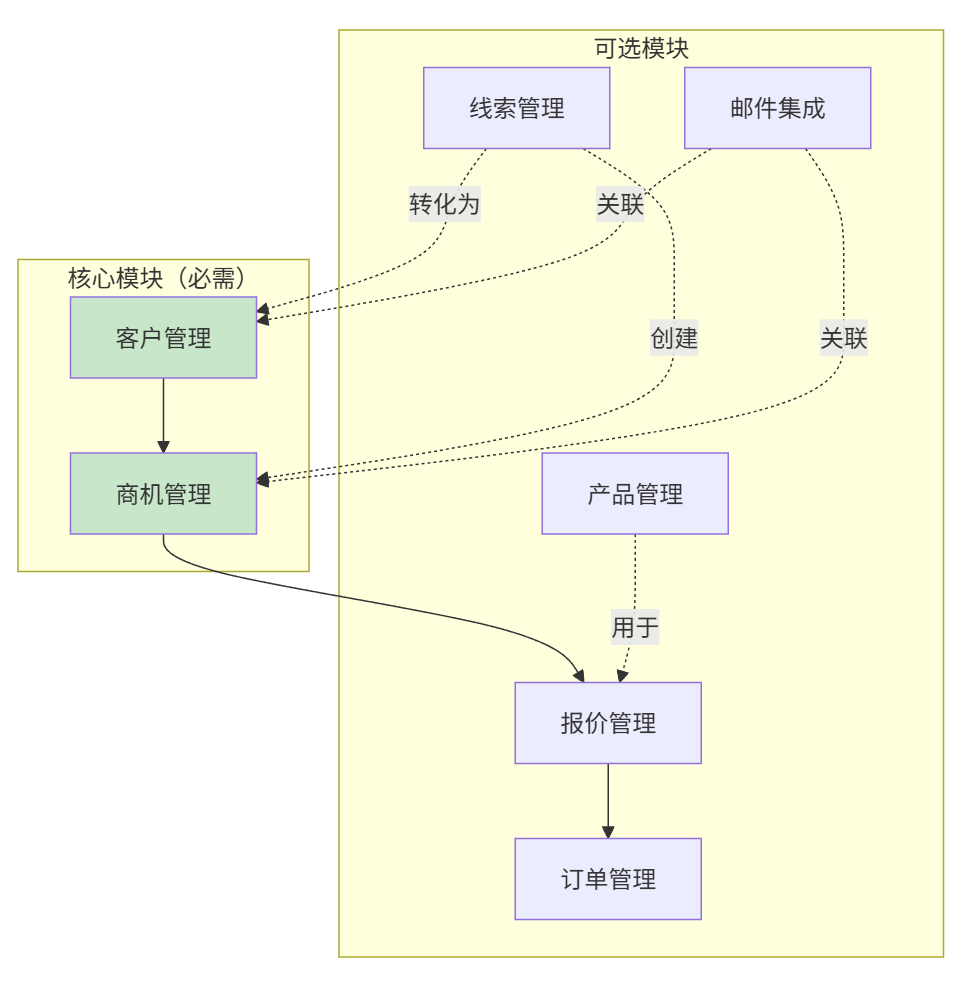
The CRM system adopts a modular architecture design—each module can be independently enabled or disabled based on business requirements. design-2026-02-24-00-06-14
#2.2 Module Dependencies

ModuleMandatoryDependenciesDisabling Condition
Customer Management✅ Yes-Cannot be disabled (Core)
Opportunity Management✅ YesCustomer ManagementCannot be disabled (Core)
Lead ManagementOptional-When lead acquisition is not required
Quotation ManagementOptionalOpportunities, ProductsSimple transactions not requiring formal quotes
Order ManagementOptionalOpportunities (or Quotations)When order/payment tracking is not required
Product ManagementOptional-When a product catalog is not required
Email IntegrationOptionalCustomers, ContactsWhen using an external email system

#2.3 Pre-configured Versions

VersionIncluded ModulesUse CaseNumber of Collections
LiteCustomers + OpportunitiesSimple transaction tracking6
StandardLite + Leads + Quotations + Orders + ProductsFull sales cycle15
EnterpriseStandard + Email IntegrationFull functionality including email17

#2.4 Module-to-Collection Mapping

#Core Module Collections (Always Required)

CollectionModuleDescription
nb_crm_customersCustomer ManagementCustomer/Company records
nb_crm_contactsCustomer ManagementContacts
nb_crm_customer_sharesCustomer ManagementCustomer sharing permissions
nb_crm_opportunitiesOpportunity ManagementSales opportunities
nb_crm_opportunity_stagesOpportunity ManagementStage configurations
nb_crm_opportunity_usersOpportunity ManagementOpportunity collaborators
nb_crm_activitiesActivity ManagementActivity records
nb_crm_commentsActivity ManagementComments/Notes
nb_crm_tagsCoreShared tags
nb_cbo_currenciesFoundation DataCurrency dictionary
nb_cbo_regionsFoundation DataCountry/Region dictionary

#2.5 How to Disable Modules

Simply hide the menu entry for the module in the NocoBase administration interface; there is no need to modify code or delete collections.


#3. Core Entities and Data Model

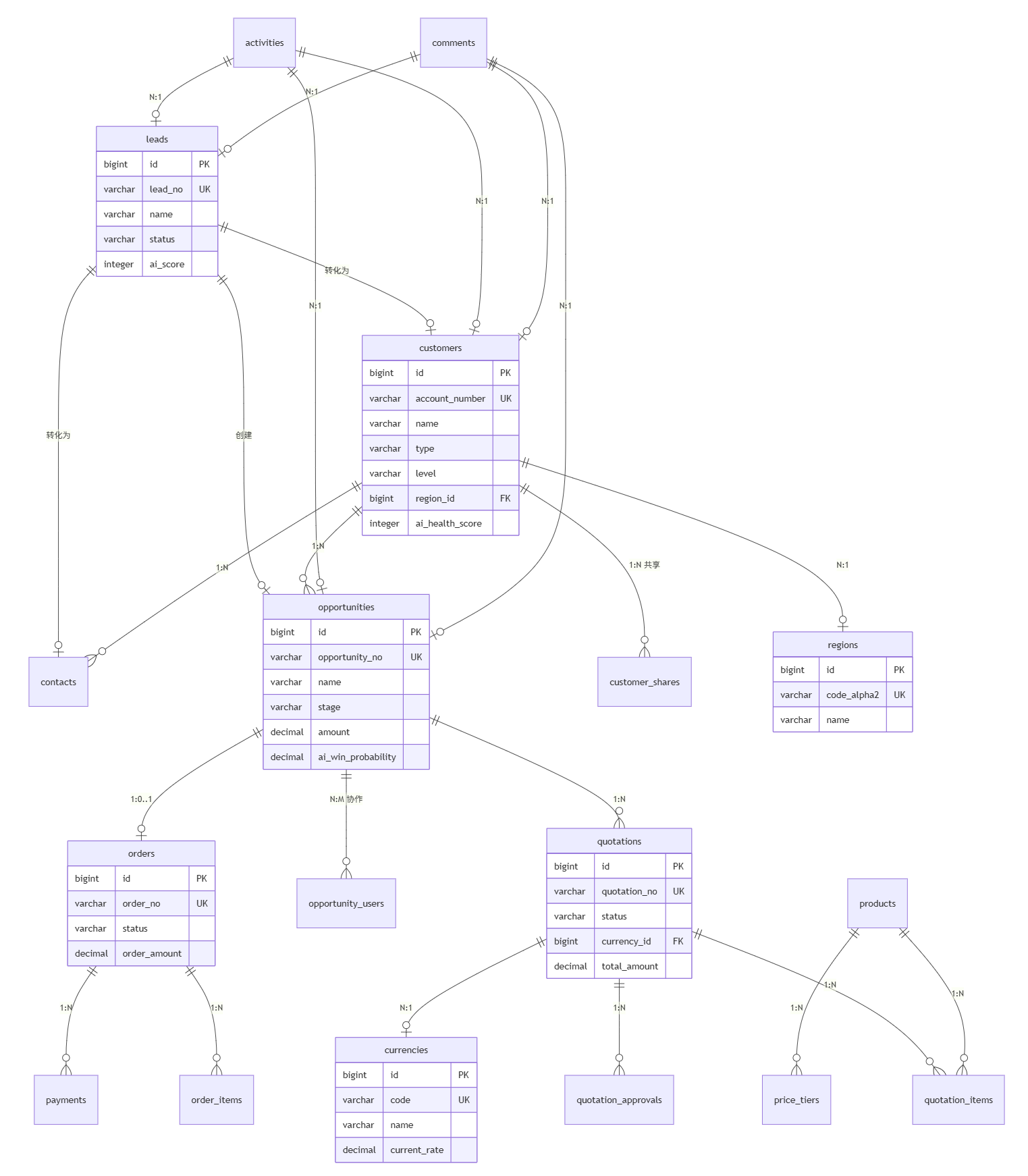
#3.1 Entity Relationship Overview

design-2026-02-24-00-06-40

#3.2 Core Collection Details

#3.2.1 Leads (nb_crm_leads)

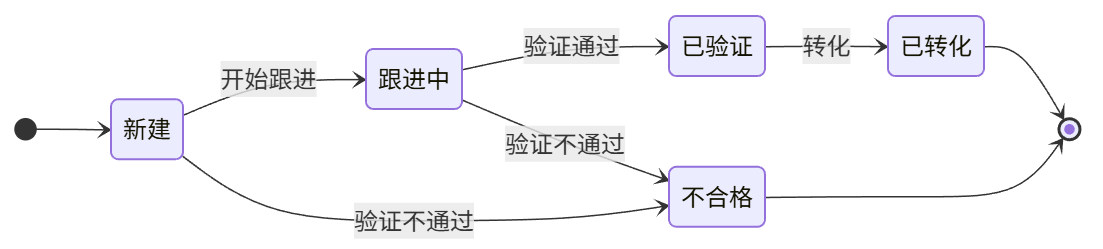
Lead management using a simplified 4-stage workflow.

Stage Process:

New → Working → Qualified → Converted to Customer/Opportunity
         ↓          ↓
    Unqualified  Unqualified

Key Fields:

FieldTypeDescription
idBIGINTPrimary Key
lead_noVARCHARLead Number (Auto-generated)
nameVARCHARContact Name
companyVARCHARCompany Name
titleVARCHARJob Title
emailVARCHAREmail
phoneVARCHARPhone
mobile_phoneVARCHARMobile
websiteTEXTWebsite
addressTEXTAddress
sourceVARCHARLead Source: website/ads/referral/exhibition/telemarketing/email/social
industryVARCHARIndustry
annual_revenueVARCHARAnnual Revenue Scale
number_of_employeesVARCHAREmployee Count Scale
statusVARCHARStatus: new/working/qualified/unqualified
ratingVARCHARRating: hot/warm/cold
owner_idBIGINTOwner (FK → users)
ai_scoreINTEGERAI Quality Score 0-100
ai_convert_probDECIMALAI Conversion Probability
ai_best_contact_timeVARCHARAI Recommended Contact Time
ai_tagsJSONBAI Generated Tags
ai_scored_atTIMESTAMPAI Scoring Time
ai_next_best_actionTEXTAI Next Best Action Suggestion
ai_nba_generated_atTIMESTAMPAI Suggestion Generation Time
is_convertedBOOLEANConverted Flag
converted_atTIMESTAMPConversion Time
converted_customer_idBIGINTConverted Customer ID
converted_contact_idBIGINTConverted Contact ID
converted_opportunity_idBIGINTConverted Opportunity ID
lost_reasonTEXTLost Reason
disqualification_reasonTEXTDisqualification Reason
descriptionTEXTDescription

#3.2.2 Customers (nb_crm_customers)

Customer/Company management supporting international business.

Key Fields:

FieldTypeDescription
idBIGINTPrimary Key
nameVARCHARCustomer Name (Required)
account_numberVARCHARCustomer Number (Auto-generated, Unique)
phoneVARCHARPhone
websiteTEXTWebsite
addressTEXTAddress
industryVARCHARIndustry
typeVARCHARType: prospect/customer/partner/competitor
number_of_employeesVARCHAREmployee Count Scale
annual_revenueVARCHARAnnual Revenue Scale
levelVARCHARLevel: normal/important/vip
statusVARCHARStatus: potential/active/dormant/churned
countryVARCHARCountry
region_idBIGINTRegion (FK → nb_cbo_regions)
preferred_currencyVARCHARPreferred Currency: CNY/USD/EUR
owner_idBIGINTOwner (FK → users)
parent_idBIGINTParent Company (FK → self)
source_lead_idBIGINTSource Lead ID
ai_health_scoreINTEGERAI Health Score 0-100
ai_health_gradeVARCHARAI Health Grade: A/B/C/D
ai_churn_riskDECIMALAI Churn Risk 0-100%
ai_churn_risk_levelVARCHARAI Churn Risk Level: low/medium/high
ai_health_dimensionsJSONBAI Health Dimension Scores
ai_recommendationsJSONBAI Recommendation List
ai_health_assessed_atTIMESTAMPAI Health Assessment Time
ai_tagsJSONBAI Generated Tags
ai_best_contact_timeVARCHARAI Recommended Contact Time
ai_next_best_actionTEXTAI Next Best Action Suggestion
ai_nba_generated_atTIMESTAMPAI Suggestion Generation Time
descriptionTEXTDescription
is_deletedBOOLEANSoft Delete Flag

#3.2.3 Opportunities (nb_crm_opportunities)

Sales opportunity management with configurable pipeline stages.

Key Fields:

FieldTypeDescription
idBIGINTPrimary Key
opportunity_noVARCHAROpportunity Number (Auto-generated, Unique)
nameVARCHAROpportunity Name (Required)
amountDECIMALExpected Amount
currencyVARCHARCurrency
exchange_rateDECIMALExchange Rate
amount_usdDECIMALUSD Equivalent Amount
customer_idBIGINTCustomer (FK)
contact_idBIGINTPrimary Contact (FK)
stageVARCHARStage Code (FK → stages.code)
stage_sortINTEGERStage Sort Order (Redundant for easy sorting)
stage_entered_atTIMESTAMPTime Entered Current Stage
days_in_stageINTEGERDays in Current Stage
win_probabilityDECIMALManual Win Probability
ai_win_probabilityDECIMALAI Predicted Win Probability
ai_analyzed_atTIMESTAMPAI Analysis Time
ai_confidenceDECIMALAI Prediction Confidence
ai_trendVARCHARAI Prediction Trend: up/stable/down
ai_risk_factorsJSONBAI Identified Risk Factors
ai_recommendationsJSONBAI Recommendation List
ai_predicted_closeDATEAI Predicted Close Date
ai_next_best_actionTEXTAI Next Best Action Suggestion
ai_nba_generated_atTIMESTAMPAI Suggestion Generation Time
expected_close_dateDATEExpected Close Date
actual_close_dateDATEActual Close Date
owner_idBIGINTOwner (FK → users)
last_activity_atTIMESTAMPLast Activity Time
stagnant_daysINTEGERDays Without Activity
loss_reasonTEXTLoss Reason
competitor_idBIGINTCompetitor (FK)
lead_sourceVARCHARLead Source
campaign_idBIGINTMarketing Campaign ID
expected_revenueDECIMALExpected Revenue = amount × probability
descriptionTEXTDescription

#3.2.4 Quotations (nb_crm_quotations)

Quotation management supporting multi-currency and approval workflows.

Status Flow:

Draft → Pending Approval → Approved → Sent → Accepted/Rejected/Expired
              ↓
           Rejected → Edit → Draft

Key Fields:

FieldTypeDescription
idBIGINTPrimary Key
quotation_noVARCHARQuotation No. (Auto-generated, Unique)
nameVARCHARQuotation Name
versionINTEGERVersion Number
opportunity_idBIGINTOpportunity (FK, Required)
customer_idBIGINTCustomer (FK)
contact_idBIGINTContact (FK)
owner_idBIGINTOwner (FK → users)
currency_idBIGINTCurrency (FK → nb_cbo_currencies)
exchange_rateDECIMALExchange Rate
subtotalDECIMALSubtotal
discount_rateDECIMALDiscount Rate
discount_amountDECIMALDiscount Amount
shipping_handlingDECIMALShipping/Handling
tax_rateDECIMALTax Rate
tax_amountDECIMALTax Amount
total_amountDECIMALTotal Amount
total_amount_usdDECIMALUSD Equivalent Amount
statusVARCHARStatus: draft/pending_approval/approved/sent/accepted/rejected/expired
submitted_atTIMESTAMPSubmission Time
approved_byBIGINTApprover (FK → users)
approved_atTIMESTAMPApproval Time
rejected_atTIMESTAMPRejection Time
sent_atTIMESTAMPSent Time
customer_response_atTIMESTAMPCustomer Response Time
expired_atTIMESTAMPExpiration Time
valid_untilDATEValid Until
payment_termsTEXTPayment Terms
terms_conditionTEXTTerms and Conditions
addressTEXTShipping Address
descriptionTEXTDescription

#3.2.5 Orders (nb_crm_orders)

Order management including payment tracking.

Key Fields:

FieldTypeDescription
idBIGINTPrimary Key
order_noVARCHAROrder Number (Auto-generated, Unique)
customer_idBIGINTCustomer (FK)
contact_idBIGINTContact (FK)
opportunity_idBIGINTOpportunity (FK)
quotation_idBIGINTQuotation (FK)
owner_idBIGINTOwner (FK → users)
currencyVARCHARCurrency
exchange_rateDECIMALExchange Rate
order_amountDECIMALOrder Amount
paid_amountDECIMALPaid Amount
unpaid_amountDECIMALUnpaid Amount
statusVARCHARStatus: pending/confirmed/in_progress/shipped/delivered/completed/cancelled
payment_statusVARCHARPayment Status: unpaid/partial/paid
order_dateDATEOrder Date
delivery_dateDATEExpected Delivery Date
actual_delivery_dateDATEActual Delivery Date
shipping_addressTEXTShipping Address
logistics_companyVARCHARLogistics Company
tracking_noVARCHARTracking Number
terms_conditionTEXTTerms and Conditions
descriptionTEXTDescription

#3.3 Collection Summary

#CRM Business Collections

No.Collection NameDescriptionType
1nb_crm_leadsLead ManagementBusiness
2nb_crm_customersCustomers/CompaniesBusiness
3nb_crm_contactsContactsBusiness
4nb_crm_opportunitiesSales OpportunitiesBusiness
5nb_crm_opportunity_stagesStage ConfigurationConfiguration
6nb_crm_opportunity_usersOpportunity Collaborators (Sales Team)Association
7nb_crm_quotationsQuotationsBusiness
8nb_crm_quotation_itemsQuotation ItemsBusiness
9nb_crm_quotation_approvalsApproval RecordsBusiness
10nb_crm_ordersOrdersBusiness
11nb_crm_order_itemsOrder ItemsBusiness
12nb_crm_paymentsPayment RecordsBusiness
13nb_crm_productsProduct CatalogBusiness
14nb_crm_product_categoriesProduct CategoriesConfiguration
15nb_crm_price_tiersTiered PricingConfiguration
16nb_crm_activitiesActivity RecordsBusiness
17nb_crm_commentsComments/NotesBusiness
18nb_crm_competitorsCompetitorsBusiness
19nb_crm_tagsTagsConfiguration
20nb_crm_lead_tagsLead-Tag AssociationAssociation
21nb_crm_contact_tagsContact-Tag AssociationAssociation
22nb_crm_customer_sharesCustomer Sharing PermissionsAssociation
23nb_crm_exchange_ratesExchange Rate HistoryConfiguration

#Foundation Data Collections (Common Modules)

No.Collection NameDescriptionType
1nb_cbo_currenciesCurrency DictionaryConfiguration
2nb_cbo_regionsCountry/Region DictionaryConfiguration

#3.4 Auxiliary Collections

#3.4.1 Comments (nb_crm_comments)

Generic comments/notes collection that can be associated with various business objects.

FieldTypeDescription
idBIGINTPrimary Key
contentTEXTComment Content
lead_idBIGINTAssociated Lead (FK)
customer_idBIGINTAssociated Customer (FK)
opportunity_idBIGINTAssociated Opportunity (FK)
order_idBIGINTAssociated Order (FK)

#3.4.2 Customer Shares (nb_crm_customer_shares)

Enables multi-person collaboration and permission sharing for customers.

FieldTypeDescription
idBIGINTPrimary Key
customer_idBIGINTCustomer (FK, Required)
shared_with_user_idBIGINTShared With User (FK, Required)
shared_by_user_idBIGINTShared By User (FK)
permission_levelVARCHARPermission Level: read/write/full
shared_atTIMESTAMPSharing Time

#3.4.3 Opportunity Collaborators (nb_crm_opportunity_users)

Supports sales team collaboration on opportunities.

FieldTypeDescription
opportunity_idBIGINTOpportunity (FK, Composite PK)
user_idBIGINTUser (FK, Composite PK)
roleVARCHARRole: owner/collaborator/viewer

#3.4.4 Regions (nb_cbo_regions)

Country/Region foundation data dictionary.

FieldTypeDescription
idBIGINTPrimary Key
code_alpha2VARCHARISO 3166-1 Alpha-2 Code (Unique)
code_alpha3VARCHARISO 3166-1 Alpha-3 Code (Unique)
code_numericVARCHARISO 3166-1 Numeric Code
nameVARCHARCountry/Region Name
is_activeBOOLEANIs Active
sort_orderINTEGERSort Order

#4. Lead Lifecycle

Lead management uses a simplified 4-stage workflow. When a new lead is created, a workflow can automatically trigger AI scoring to help sales quickly identify high-quality leads.

#4.1 Status Definitions

StatusNameDescription
newNewJust created, awaiting contact
workingWorkingActively following up
qualifiedQualifiedReady for conversion
unqualifiedUnqualifiedNot a fit

#4.2 Status Flowchart

design-2026-02-24-00-25-32

#4.3 Lead Conversion Process

The conversion interface provides three options simultaneously; users can choose to create or associate:

  • Customer: Create a new customer OR associate with an existing customer.
  • Contact: Create a new contact (associated with the customer).
  • Opportunity: An opportunity must be created. design-2026-02-24-00-25-22
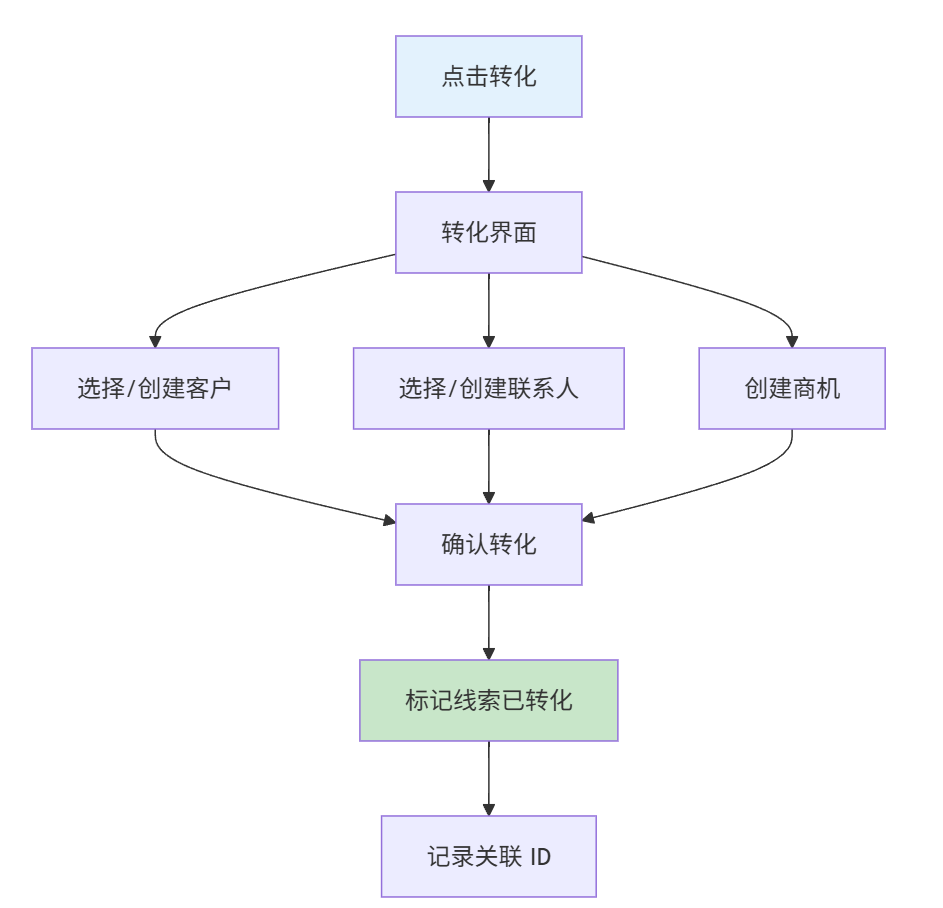
Post-conversion Records:

  • converted_customer_id: Associated Customer ID
  • converted_contact_id: Associated Contact ID
  • converted_opportunity_id: Created Opportunity ID

#5. Opportunity Lifecycle

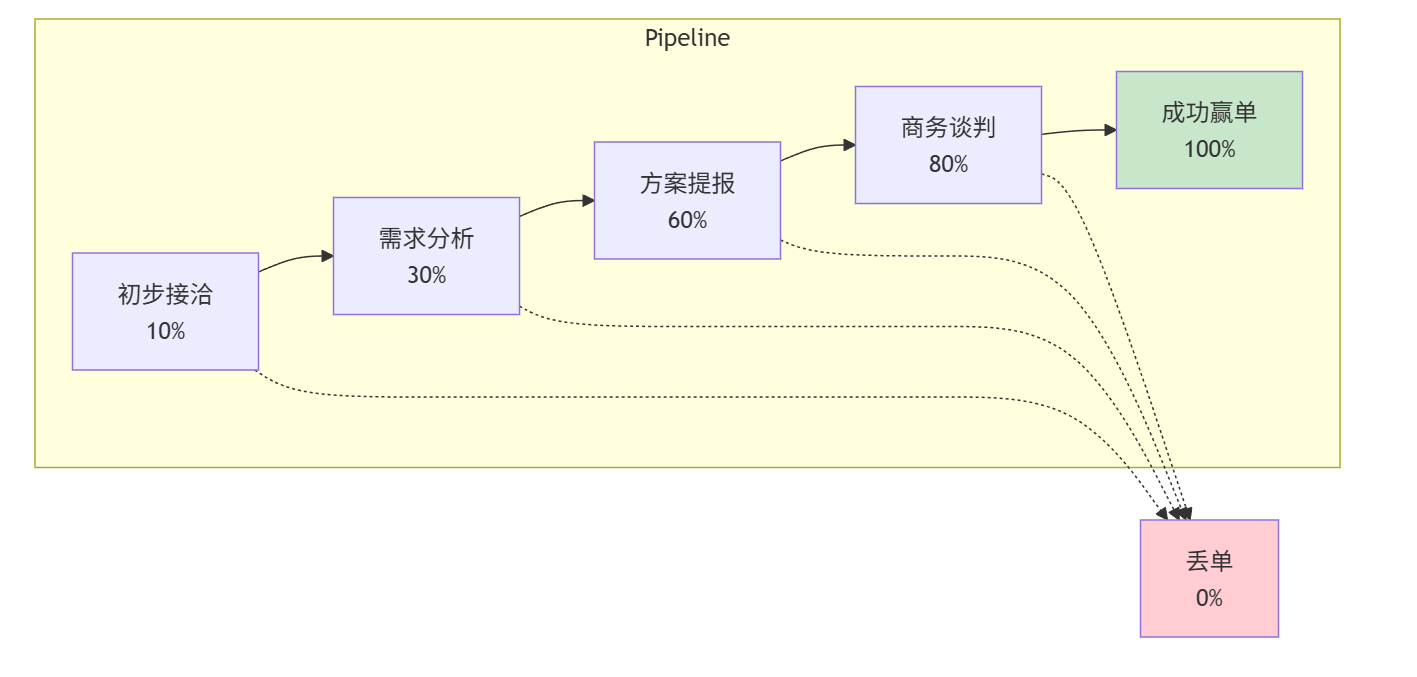
Opportunity management uses configurable sales pipeline stages. When an opportunity stage changes, it can automatically trigger AI win probability prediction to help sales identify risks and opportunities.

#5.1 Configurable Stages

Stages are stored in the nb_crm_opportunity_stages collection and can be customized:

CodeNameOrderDefault Win Probability
prospectingProspecting110%
analysisNeeds Analysis230%
proposalProposal/Price Quote360%
negotiationNegotiation/Review480%
wonClosed Won5100%
lostClosed Lost60%

#5.2 Pipeline Flow

design-2026-02-24-00-20-31

#5.3 Stagnation Detection

Opportunities without activity will be flagged:

Days Without ActivityAction
7 DaysYellow Warning
14 DaysOrange Reminder to Owner
30 DaysRed Reminder to Manager
-- Calculate stagnation days
UPDATE nb_crm_opportunities
SET stagnant_days = EXTRACT(DAY FROM NOW() - last_activity_at)
WHERE stage NOT IN ('won', 'lost');

#5.4 Win/Loss Handling

When Won:

  1. Update stage to 'won'.
  2. Record actual close date.
  3. Update customer status to 'active'.
  4. Trigger order creation (if a quotation was accepted).

When Lost:

  1. Update stage to 'lost'.
  2. Record loss reason.
  3. Record competitor ID (if lost to a competitor).
  4. Notify manager.

#6. Quotation Lifecycle

#6.1 Status Definitions

StatusNameDescription
draftDraftIn preparation
pending_approvalPending ApprovalAwaiting approval
approvedApprovedReady to send
sentSentSent to customer
acceptedAcceptedAccepted by customer
rejectedRejectedRejected by customer
expiredExpiredPast validity date

#6.2 Approval Rules (To be finalized)

Approval workflows are triggered based on the following conditions:

ConditionApproval Level
Discount > 10%Sales Manager
Discount > 20%Sales Director
Amount > $100KFinance + General Manager

#6.3 Multi-currency Support

#Design Philosophy

Use USD as the unified base currency for all reports and analysis. Each amount record stores:

  • Original currency and amount (what the customer sees)
  • Exchange rate at the time of transaction
  • USD equivalent amount (for internal comparison)

#Currency Dictionary (nb_cbo_currencies)

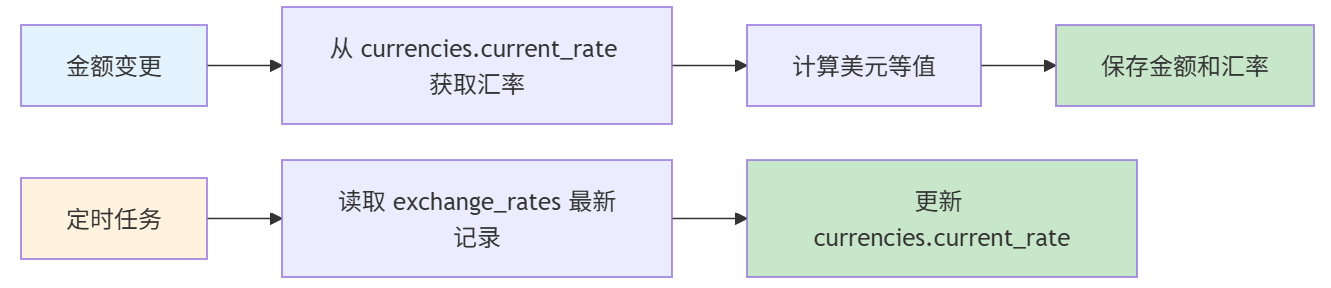
Currency configuration uses a common foundation data collection, supporting dynamic management. The current_rate field stores the current exchange rate, updated by a scheduled task from the most recent record in nb_crm_exchange_rates.

FieldTypeDescription
idBIGINTPrimary Key
codeVARCHARCurrency Code (Unique): USD/CNY/EUR/GBP/JPY
nameVARCHARCurrency Name
symbolVARCHARCurrency Symbol
decimal_placesINTEGERDecimal Places
current_rateDECIMALCurrent Rate to USD (Synced from history)
is_activeBOOLEANIs Active
sort_orderINTEGERSort Order

#Exchange Rate History (nb_crm_exchange_rates)

Records historical exchange rate data. A scheduled task syncs the latest rates to nb_cbo_currencies.current_rate.

FieldTypeDescription
idBIGINTPrimary Key
currency_codeVARCHARCurrency Code (CNY/EUR/GBP/JPY)
rate_to_usdDECIMAL(10,6)Rate to USD
effective_dateDATEEffective Date
sourceVARCHARSource: manual/api
createdAtTIMESTAMPCreation Time

Note: Quotations are associated with the nb_cbo_currencies collection via the currency_id foreign key, and the exchange rate is retrieved directly from the current_rate field. Opportunities and orders use a currency VARCHAR field to store the currency code.

#Amount Field Pattern

Collections containing amounts follow this pattern:

FieldTypeDescription
currencyVARCHARTransaction Currency
amountDECIMALOriginal Amount
exchange_rateDECIMALExchange Rate to USD at transaction
amount_usdDECIMALUSD Equivalent (Calculated)

Applied to:

  • nb_crm_opportunities.amount → amount_usd
  • nb_crm_quotations.total_amount → total_amount_usd

#Workflow Integration

design-2026-02-24-00-21-00

Exchange Rate Retrieval Logic:

  1. Retrieve exchange rate directly from nb_cbo_currencies.current_rate during business operations.
  2. USD Transactions: Rate = 1.0, no lookup required.
  3. current_rate is synced by a scheduled task from the latest nb_crm_exchange_rates record.

#6.4 Version Management

When a quotation is rejected or expired, it can be duplicated as a new version:

QT-20260119-001 v1 → Rejected
QT-20260119-001 v2 → Sent
QT-20260119-001 v3 → Accepted

#7. Order Lifecycle

#7.1 Order Overview

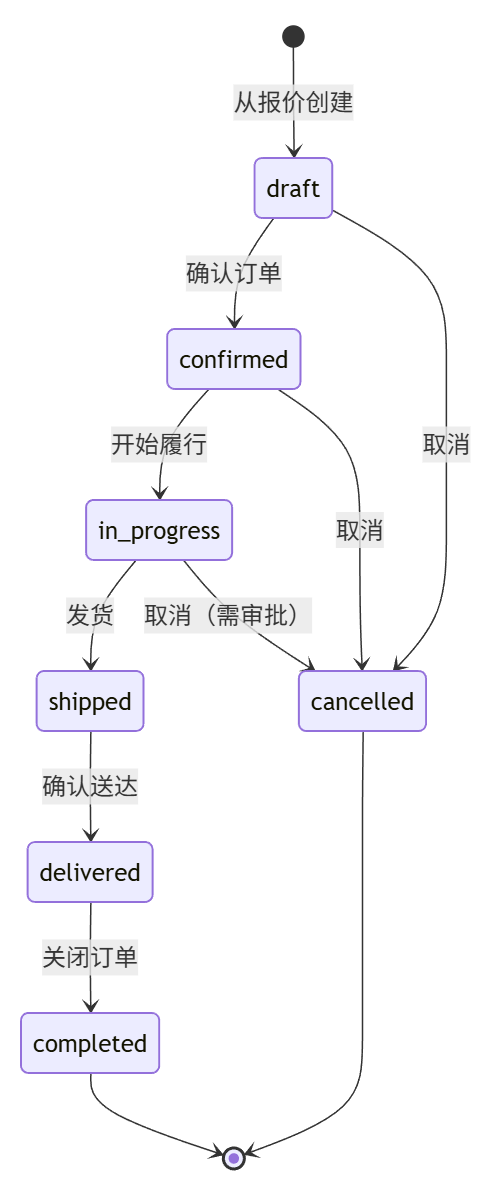
Orders are created when a quotation is accepted, representing a confirmed business commitment. design-2026-02-24-00-21-21
#7.2 Order Status Definitions

StatusCodeDescriptionAllowed Actions
DraftdraftOrder created, not yet confirmedEdit, Confirm, Cancel
ConfirmedconfirmedOrder confirmed, awaiting fulfillmentStart Fulfillment, Cancel
In Progressin_progressOrder being processed/producedUpdate Progress, Ship, Cancel (requires approval)
ShippedshippedProducts shipped to customerMark as Delivered
DelivereddeliveredCustomer received goodsComplete Order
CompletedcompletedOrder fully completedNone
CancelledcancelledOrder cancelledNone

#7.3 Order Data Model

#nb_crm_orders

FieldTypeDescription
idBIGINTPrimary Key
order_noVARCHAROrder Number (Auto-generated, Unique)
customer_idBIGINTCustomer (FK)
contact_idBIGINTContact (FK)
opportunity_idBIGINTOpportunity (FK)
quotation_idBIGINTQuotation (FK)
owner_idBIGINTOwner (FK → users)
statusVARCHAROrder Status
payment_statusVARCHARPayment Status: unpaid/partial/paid
order_dateDATEOrder Date
delivery_dateDATEExpected Delivery Date
actual_delivery_dateDATEActual Delivery Date
currencyVARCHAROrder Currency
exchange_rateDECIMALRate to USD
order_amountDECIMALTotal Order Amount
paid_amountDECIMALPaid Amount
unpaid_amountDECIMALUnpaid Amount
shipping_addressTEXTShipping Address
logistics_companyVARCHARLogistics Company
tracking_noVARCHARTracking Number
terms_conditionTEXTTerms and Conditions
descriptionTEXTDescription

#nb_crm_order_items

FieldTypeDescription
idBIGINTPrimary Key
order_idFKParent Order
product_idFKProduct Reference
product_nameVARCHARProduct Name Snapshot
quantityINTQuantity Ordered
unit_priceDECIMALUnit Price
discount_percentDECIMALDiscount Percentage
line_totalDECIMALLine Item Total
notesTEXTLine Item Notes

#7.4 Payment Tracking

#nb_crm_payments

FieldTypeDescription
idBIGINTPrimary Key
order_idBIGINTAssociated Order (FK, Required)
customer_idBIGINTCustomer (FK)
payment_noVARCHARPayment No. (Auto-generated, Unique)
amountDECIMALPayment Amount (Required)
currencyVARCHARPayment Currency
payment_methodVARCHARMethod: transfer/check/cash/credit_card/lc
payment_dateDATEPayment Date
bank_accountVARCHARBank Account Number
bank_nameVARCHARBank Name
notesTEXTPayment Notes

#8. Customer Lifecycle

#8.1 Customer Overview

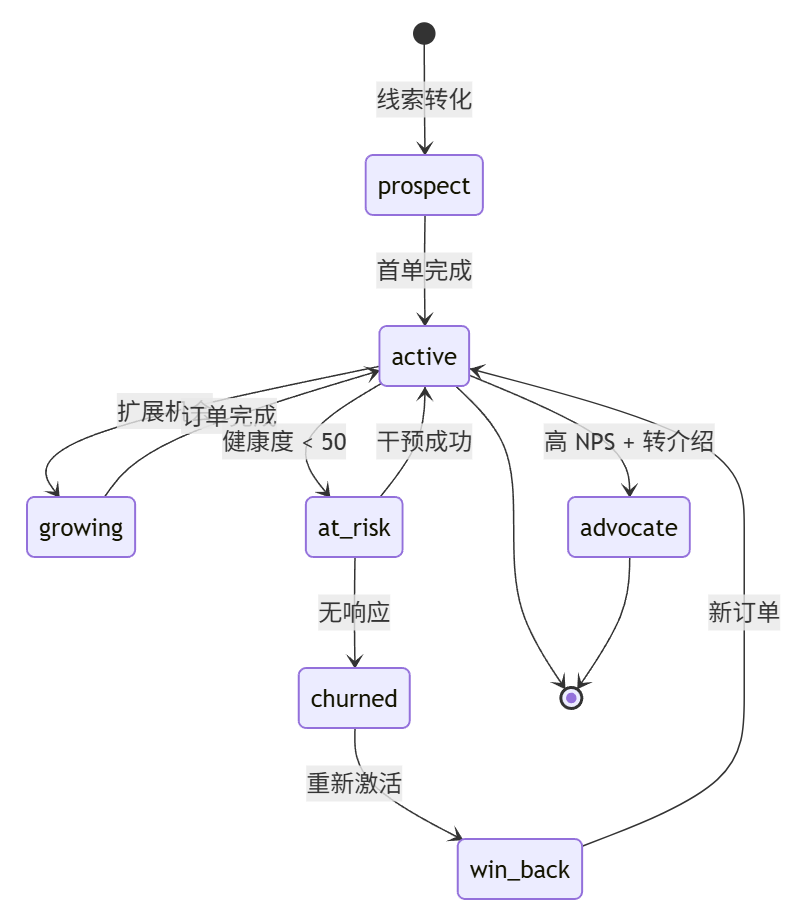
Customers are created during lead conversion or when an opportunity is won. The system tracks the complete lifecycle from acquisition to advocacy. design-2026-02-24-00-21-34
#8.2 Customer Status Definitions

StatusCodeHealthDescription
ProspectprospectN/AConverted lead, no orders yet
Activeactive≥70Paying customer, good interaction
Growinggrowing≥80Customer with expansion opportunities
At Riskat_risk<50Customer showing signs of churn
ChurnedchurnedN/ANo longer active
Win Backwin_backN/AFormer customer being reactivated
Advocateadvocate≥90High satisfaction, provides referrals

#8.3 Customer Health Scoring

Customer health is calculated based on multiple factors:

FactorWeightMetric
Purchase Recency25%Days since last order
Purchase Frequency20%Number of orders per period
Monetary Value20%Total and average order value
Engagement15%Email open rates, meeting participation
Support Health10%Ticket volume and resolution rate
Product Usage10%Active usage metrics (if applicable)

Health Thresholds:

if (health_score >= 90) status = 'advocate';
else if (health_score >= 70) status = 'active';
else if (health_score >= 50) status = 'growing';
else status = 'at_risk';

#8.4 Customer Segmentation

#Automated Segmentation

SegmentConditionSuggested Action
VIPLTV > $100KWhite-glove service, executive sponsorship
EnterpriseCompany Size > 500Dedicated Account Manager
Mid-MarketCompany Size 50-500Regular check-ins, scaled support
StartupCompany Size < 50Self-service resources, community
Dormant90+ Days No ActivityReactivation marketing

#9. Email Integration

#9.1 Overview

NocoBase provides a built-in email integration plugin supporting Gmail and Outlook. Once emails are synced, workflows can automatically trigger AI analysis of email sentiment and intent, helping sales quickly understand customer attitudes.

#9.2 Email Syncing

Supported Providers:

  • Gmail (via OAuth 2.0)
  • Outlook/Microsoft 365 (via OAuth 2.0)

Sync Behavior:

  • Bi-directional sync of sent and received emails.
  • Automatic association of emails to CRM records (Leads, Contacts, Opportunities).
  • Attachments stored in the NocoBase file system.

#9.3 Email-CRM Association (To be finalized)
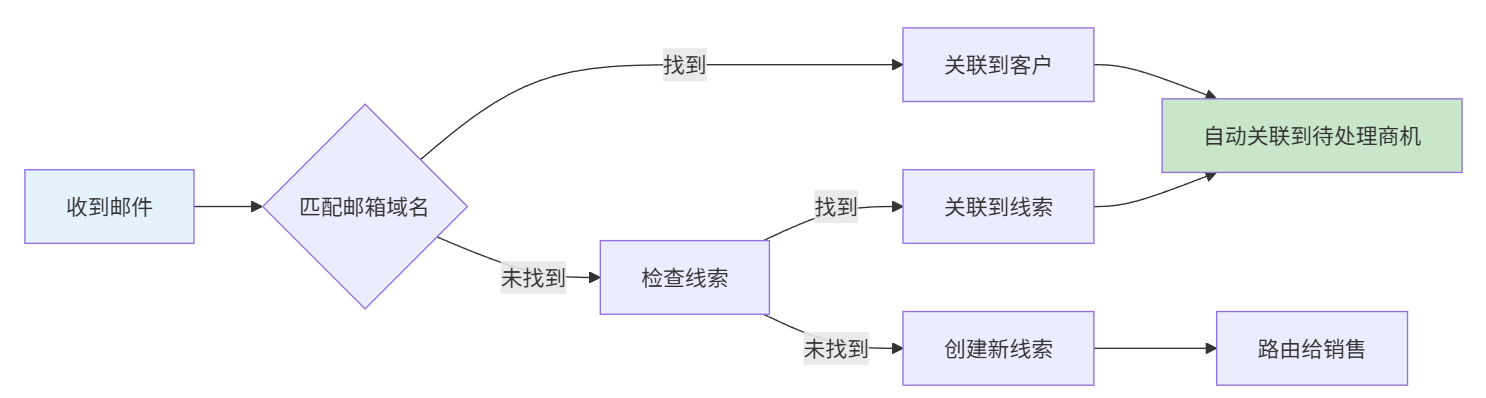
design-2026-02-24-00-21-51

#9.4 Email Templates

Sales can use preset templates:

Template CategoryExamples
Initial OutreachCold email, Warm intro, Event follow-up
Follow-upMeeting follow-up, Proposal follow-up, No-response nudge
QuotationQuote attached, Quote revision, Quote expiring
OrderOrder confirmation, Shipping notification, Delivery confirmation
Customer SuccessWelcome, Check-in, Review request

#10. AI-Assisted Capabilities

#10.1 AI Employee Team

The CRM system integrates the NocoBase AI plugin, utilizing the following built-in AI employees configured with CRM-specific tasks:

IDNameBuilt-in RoleCRM Extension Capabilities
vizVizData AnalystSales data analysis, pipeline forecasting
daraDaraChart ExpertData visualization, report development, dashboard design
ellisEllisEditorEmail reply drafting, communication summaries, business email drafting
lexiLexiTranslatorMulti-language customer communication, content translation
orinOrinOrganizerDaily priorities, next-step suggestions, follow-up planning

#10.2 AI Task List

AI capabilities are divided into two independent categories:

#I. AI Employees (Frontend Block Triggered)

Users interact directly with AI through frontend AI Employee blocks to obtain analysis and suggestions.

EmployeeTaskDescription
VizSales Data AnalysisAnalyze pipeline trends and conversion rates
VizPipeline ForecastingPredict revenue based on weighted pipeline
DaraChart GenerationGenerate sales report charts
DaraDashboard DesignDesign data dashboard layouts
EllisReply DraftingGenerate professional email replies
EllisCommunication SummarySummarize email threads
EllisBusiness Email DraftingMeeting invites, follow-ups, thank-you emails, etc.
OrinDaily PrioritiesGenerate a prioritized task list for the day
OrinNext Best ActionRecommend next steps for each opportunity
LexiContent TranslationTranslate marketing materials, proposals, and emails

#II. Workflow LLM Nodes (Backend Automated Execution)

LLM nodes nested within workflows, triggered automatically by collection events, action events, or scheduled tasks, independent of AI Employees.

TaskTrigger MethodDescriptionTarget Field
Lead ScoringCollection Event (Create/Update)Evaluate lead qualityai_score, ai_convert_prob
Win Probability PredictionCollection Event (Stage Change)Predict opportunity success likelihoodai_win_probability, ai_risk_factors

Note: Workflow LLM nodes use prompts and Schema output for structured JSON, which is parsed and written to business data fields without user intervention.

#10.3 AI Fields in Database

TableAI FieldDescription
nb_crm_leadsai_scoreAI Score 0-100
ai_convert_probConversion Probability
ai_best_contact_timeBest Contact Time
ai_tagsAI Generated Tags (JSONB)
ai_scored_atScoring Time
ai_next_best_actionNext Best Action Suggestion
ai_nba_generated_atSuggestion Generation Time
nb_crm_opportunitiesai_win_probabilityAI Predicted Win Probability
ai_analyzed_atAnalysis Time
ai_confidencePrediction Confidence
ai_trendTrend: up/stable/down
ai_risk_factorsRisk Factors (JSONB)
ai_recommendationsRecommendation List (JSONB)
ai_predicted_closePredicted Close Date
ai_next_best_actionNext Best Action Suggestion
ai_nba_generated_atSuggestion Generation Time
nb_crm_customersai_health_scoreHealth Score 0-100
ai_health_gradeHealth Grade: A/B/C/D
ai_churn_riskChurn Risk 0-100%
ai_churn_risk_levelChurn Risk Level: low/medium/high
ai_health_dimensionsDimension Scores (JSONB)
ai_recommendationsRecommendation List (JSONB)
ai_health_assessed_atHealth Assessment Time
ai_tagsAI Generated Tags (JSONB)
ai_best_contact_timeBest Contact Time
ai_next_best_actionNext Best Action Suggestion
ai_nba_generated_atSuggestion Generation Time

#11. Workflow Engine

#11.1 Implemented Workflows

Workflow NameTrigger TypeStatusDescription
Leads CreatedCollection EventEnabledTriggered when a lead is created
CRM Overall AnalyticsAI Employee EventEnabledOverall CRM data analysis
Lead ConversionPost-action EventEnabledLead conversion process
Lead AssignmentCollection EventEnabledAutomated lead assignment
Lead ScoringCollection EventDisabledLead scoring (To be finalized)
Follow-up ReminderScheduled TaskDisabledFollow-up reminders (To be finalized)

#11.2 To-be-implemented Workflows

WorkflowTrigger TypeDescription
Opportunity Stage AdvancementCollection EventUpdate win probability and record time on stage change
Opportunity Stagnation DetectionScheduled TaskDetect inactive opportunities and send reminders
Quotation ApprovalPost-action EventMulti-level approval process
Order GenerationPost-action EventAutomatically generate order after quote acceptance

#12. Menu and Interface Design

#12.1 Admin Structure

MenuTypeDescription
DashboardsGroupDashboards
- DashboardPageDefault Dashboard
- SalesManagerPageSales Manager View
- SalesRepPageSales Rep View
- ExecutivePageExecutive View
LeadsPageLead Management
CustomersPageCustomer Management
OpportunitiesPageOpportunity Management
- TableTabOpportunity List
ProductsPageProduct Management
- CategoriesTabProduct Categories
OrdersPageOrder Management
SettingsGroupSettings
- Stage SettingsPageOpportunity Stage Configuration
- Exchange RatePageExchange Rate Settings
- ActivityPageActivity Records
- EmailsPageEmail Management
- ContactsPageContact Management
- Data AnalysisPageData Analysis

#12.2 Dashboard Views

#Sales Manager View

ComponentTypeData
Pipeline ValueKPI CardTotal pipeline amount by stage
Team LeaderboardTableRep performance ranking
Risk AlertsAlert ListHigh-risk opportunities
Win Rate TrendLine ChartMonthly win rate
Stagnant DealsListDeals requiring attention

#Sales Rep View

ComponentTypeData
My Quota ProgressProgress BarMonthly Actual vs. Quota
Pending OpportunitiesKPI CardCount of my pending opportunities
Closing This WeekListDeals expected to close soon
Overdue ActivitiesAlertExpired tasks
Quick ActionsButtonsLog activity, Create opportunity

#Executive View

ComponentTypeData
Annual RevenueKPI CardYear-to-date revenue
Pipeline ValueKPI CardTotal pipeline amount
Win RateKPI CardOverall win rate
Customer HealthDistributionHealth score distribution
ForecastChartMonthly revenue forecast

Document Version: v2.0 | Updated: 2026-02-06