TIP
Tento dokument byl přeložen umělou inteligencí. V případě nepřesností se prosím obraťte na anglickou verzi
Rozšíření typů notifikačních kanálů
NocoBase umožňuje rozšířit typy notifikačních kanálů podle potřeby, například o SMS notifikace nebo push notifikace do aplikací.
Klient
Registrace typu kanálu
Rozhraní pro konfiguraci kanálů a zpráv na straně klienta se registrují pomocí metody registerChannelType, kterou poskytuje klientský plugin pro správu notifikací:
import PluginNotificationManagerClient from '@nocobase/plugin-notification-manager/client';

class PluginNotificationExampleClient extends Plugin {
  async afterAdd() {}

  async beforeLoad() {}

  async load() {
    const notification = this.pm.get(PluginNotificationManagerClient);
    notification.registerChannelType({
      title: 'Example SMS', // Název typu kanálu
      type: 'example-sms', // Identifikátor typu kanálu
      components: {
        ChannelConfigForm, // Formulář pro konfiguraci kanálu
        MessageConfigForm, // Formulář pro konfiguraci zprávy
      },
    });
  }
}

export default PluginNotificationExampleClient;
Server
Rozšíření abstraktní třídy
Jádrem vývoje na straně serveru je rozšíření abstraktní třídy BaseNotificationChannel a implementace metody send. Tato metoda obsahuje obchodní logiku pro odesílání notifikací prostřednictvím rozšířeného pluginu.
import { BaseNotificationChannel } from '@nocobase/plugin-notification-manager';

export class ExampleServer extends BaseNotificationChannel {
  async send(args): Promise<any> {
    console.log('ExampleServer send', args);
    return { status: 'success', message: args.message };
  }
}
Registrace serveru
Dále je potřeba zavolat metodu registerChannelType jádra notifikačního serveru, abyste zaregistrovali implementační třídu serveru, kterou jste vyvinuli, do jádra:
import PluginNotificationManagerServer from '@nocobase/plugin-notification-manager';
import { Plugin } from '@nocobase/server';
import { ExampleServer } from './example-server';
export class PluginNotificationExampleServer extends Plugin {
  async load() {
    const notificationServer = this.pm.get(PluginNotificationManagerServer) as PluginNotificationManagerServer;
    notificationServer.registerChannelType({ type: 'example-sms', Channel: ExampleServer });
  }
}

export default PluginNotificationExampleServer;
Kompletní příklad
Níže je uveden ukázkový rozšířený plugin pro notifikace, který podrobně popisuje, jak takový rozšířený plugin vyvinout.
Předpokládejme, že chceme do NocoBase přidat funkci SMS notifikací pomocí SMS brány určité platformy.
Vytvoření pluginu
- Spusťte příkaz pro vytvoření pluginu:
yarn pm add @nocobase/plugin-notification-example
Vývoj klienta
Pro klientskou část potřebujeme vyvinout dva formulářové komponenty: ChannelConfigForm (formulář pro konfiguraci kanálu) a MessageConfigForm (formulář pro konfiguraci zprávy).
Pro odesílání SMS zpráv je vyžadován API klíč a tajný klíč (secret). Obsah našeho formuláře pro kanál bude tedy zahrnovat především tyto dvě položky. V adresáři src/client vytvořte nový soubor ChannelConfigForm.tsx s následujícím obsahem:
import React from 'react';
import { SchemaComponent } from '@nocobase/client';
import useLocalTranslation from './useLocalTranslation';

const ChannelConfigForm = () => {
  const t = useLocalTranslation();
  return (
    <SchemaComponent
      scope={{ t }}
      schema={{
        type: 'object',
        properties: {
          apiKey: {
            'x-decorator': 'FormItem',
            type: 'string',
            title: '{{t("Transport")}}',
            'x-component': 'Input',
          },
          secret: {
            'x-decorator': 'FormItem',
            type: 'string',
            title: '{{t("Transport")}}',
            'x-component': 'Input',
          },
        },
      }}
    />
  );
};

export default ChannelConfigForm;
Formulář pro konfiguraci zpráv zahrnuje především nastavení příjemců (receivers) a obsahu zprávy (content). V adresáři src/client vytvořte nový soubor MessageConfigForm.tsx. Komponenta přijímá variableOptions jako parametr proměnných. Formulář obsahu se konfiguruje v uzlu pracovního postupu a obvykle potřebuje spotřebovávat proměnné uzlu pracovního postupu. Konkrétní obsah souboru je následující:
import React from 'react';
import { SchemaComponent } from '@nocobase/client';
import useLocalTranslation from './useLocalTranslation';

const MessageConfigForm = ({ variableOptions }) => {
  const { t } = useLocalTranslation();
  return (
    <SchemaComponent
      scope={{ t }}
      schema={{
        type: 'object',
        properties: {
          to: {
            type: 'array',
            required: true,
            title: `{{t("Receivers")}}`,
            'x-decorator': 'FormItem',
            'x-component': 'ArrayItems',
            items: {
              type: 'void',
              'x-component': 'Space',
              properties: {
                sort: {
                  type: 'void',
                  'x-decorator': 'FormItem',
                  'x-component': 'ArrayItems.SortHandle',
                },
                input: {
                  type: 'string',
                  'x-decorator': 'FormItem',
                  'x-component': 'Variable.Input',
                  'x-component-props': {
                    scope: variableOptions,
                    useTypedConstant: ['string'],
                    placeholder: `{{t("Phone number")}}`,
                  },
                },
                remove: {
                  type: 'void',
                  'x-decorator': 'FormItem',
                  'x-component': 'ArrayItems.Remove',
                },
              },
            },
            properties: {
              add: {
                type: 'void',
                title: `{{t("Add phone number")}}`,
                'x-component': 'ArrayItems.Addition',
              },
            },
          },
          content: {
            type: 'string',
            required: true,
            title: `{{t("Content")}}`,
            'x-decorator': 'FormItem',
            'x-component': 'Variable.RawTextArea',
            'x-component-props': {
              scope: variableOptions,
              placeholder: 'Hi,',
              autoSize: {
                minRows: 10,
              },
            },
          },
        },
      }}
    />
  );
};

export default MessageConfigForm
Registrace klientské komponenty
Po dokončení vývoje komponent pro konfiguraci formulářů je potřeba je zaregistrovat v jádru správy notifikací. Předpokládejme, že název naší platformy je „Example“. Upravený soubor src/client/index.tsx bude mít následující obsah:
import { Plugin } from '@nocobase/client';
import PluginNotificationManagerClient from '@nocobase/plugin-notification-manager/client';
import { tval } from '@nocobase/utils/client';
import ChannelConfigForm from './ChannelConfigForm';
import MessageConfigForm from './MessageConfigForm';

class PluginNotificationExampleClient extends Plugin {
  async afterAdd() {}

  async beforeLoad() {}

  async load() {
    const notification = this.pm.get(PluginNotificationManagerClient);
    notification.registerChannelType({
      title: tval('Example SMS', { ns: '@nocobase/plugin-notification-example' }),
      type: 'example-sms',
      components: {
        ChannelConfigForm,
        MessageConfigForm,
      },
    });
  }
}

export default PluginNotificationExampleClient;
Tímto je vývoj klientské části dokončen.
Vývoj serveru
Jádrem vývoje na straně serveru je rozšíření abstraktní třídy BaseNotificationChannel a implementace metody send. Metoda send obsahuje obchodní logiku pro odesílání notifikací prostřednictvím rozšířeného pluginu. Jelikož se jedná o příklad, jednoduše vypíšeme přijaté argumenty. V adresáři src/server přidejte soubor example-server.ts s následujícím obsahem:
import { BaseNotificationChannel } from '@nocobase/plugin-notification-manager';

export class ExampleServer extends BaseNotificationChannel {
  async send(args): Promise<any> {
    console.log('ExampleServer send', args);
    return { status: 'success', message: args.message };
  }
}
Dále je potřeba zaregistrovat rozšířený serverový plugin voláním metody registerChannelType jádra notifikačního serveru. Upravený soubor src/server/plugin.ts bude mít následující obsah:
import PluginNotificationManagerServer from '@nocobase/plugin-notification-manager';
import { Plugin } from '@nocobase/server';
import { ExampleServer } from './example-server';
export class PluginNotificationExampleServer extends Plugin {
  async load() {
    const notificationServer = this.pm.get(PluginNotificationManagerServer) as PluginNotificationManagerServer;
    notificationServer.registerChannelType({ type: 'example-sms', Channel: ExampleServer });
  }
}

export default PluginNotificationExampleServer;
Registrace a spuštění pluginu
- Spusťte registrační příkaz:
yarn pm add @nocobase/plugin-notification-example
- Spusťte příkaz pro povolení:
yarn pm enable @nocobase/plugin-notification-example
Konfigurace kanálu
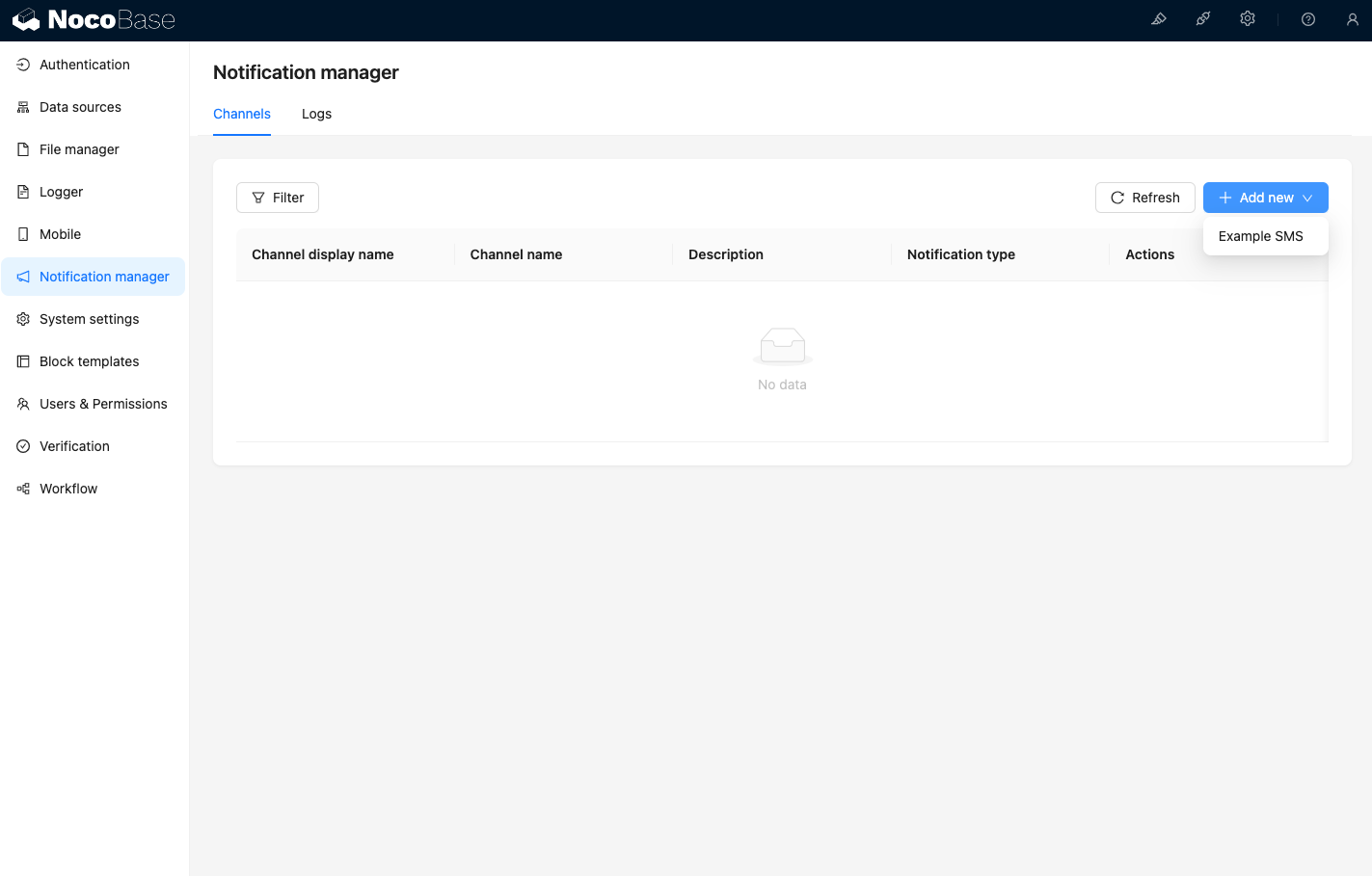
Po navštívení stránky kanálů ve správě notifikací uvidíte, že kanál Example SMS byl povolen.
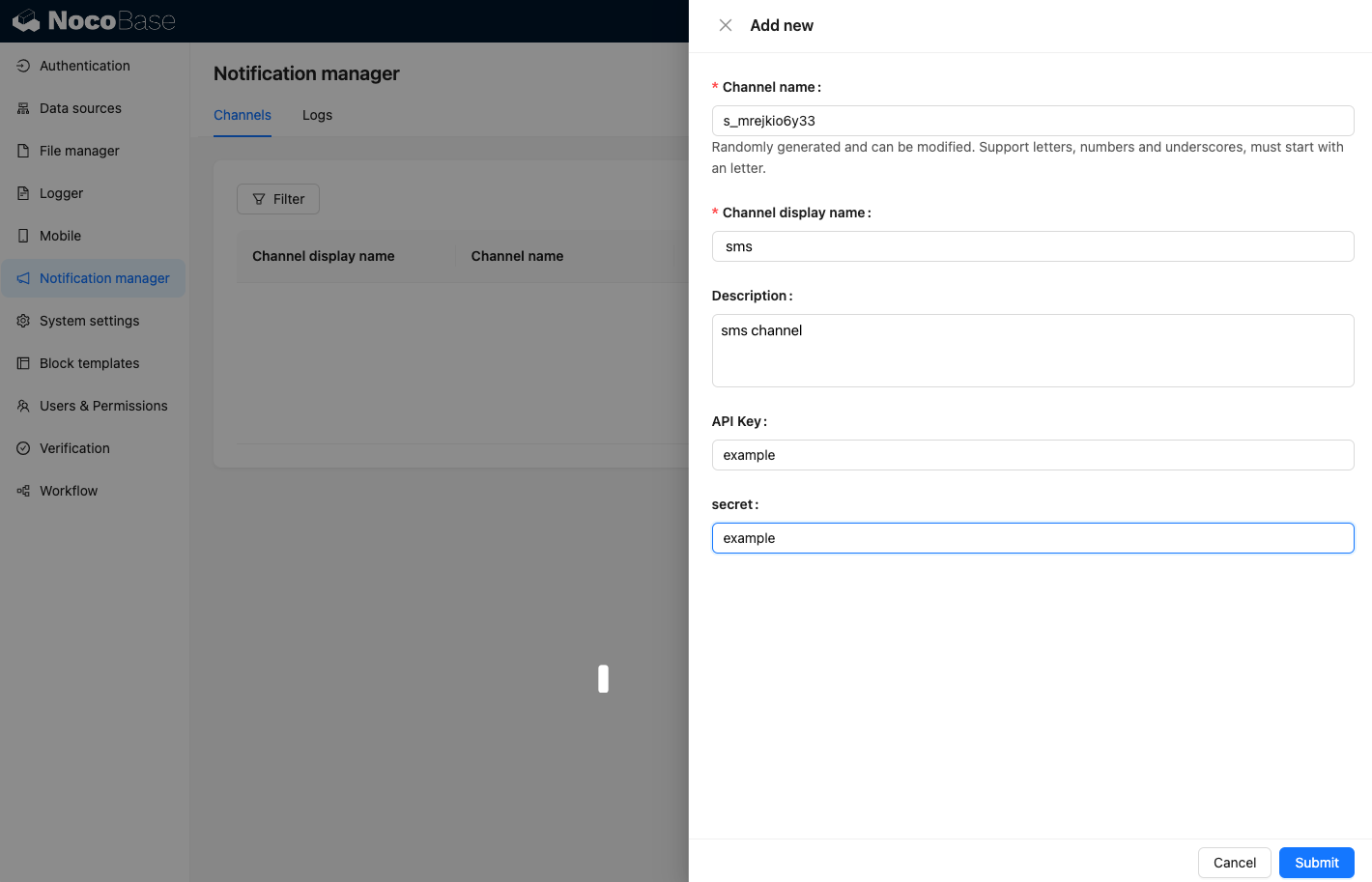
Přidejte ukázkový kanál.
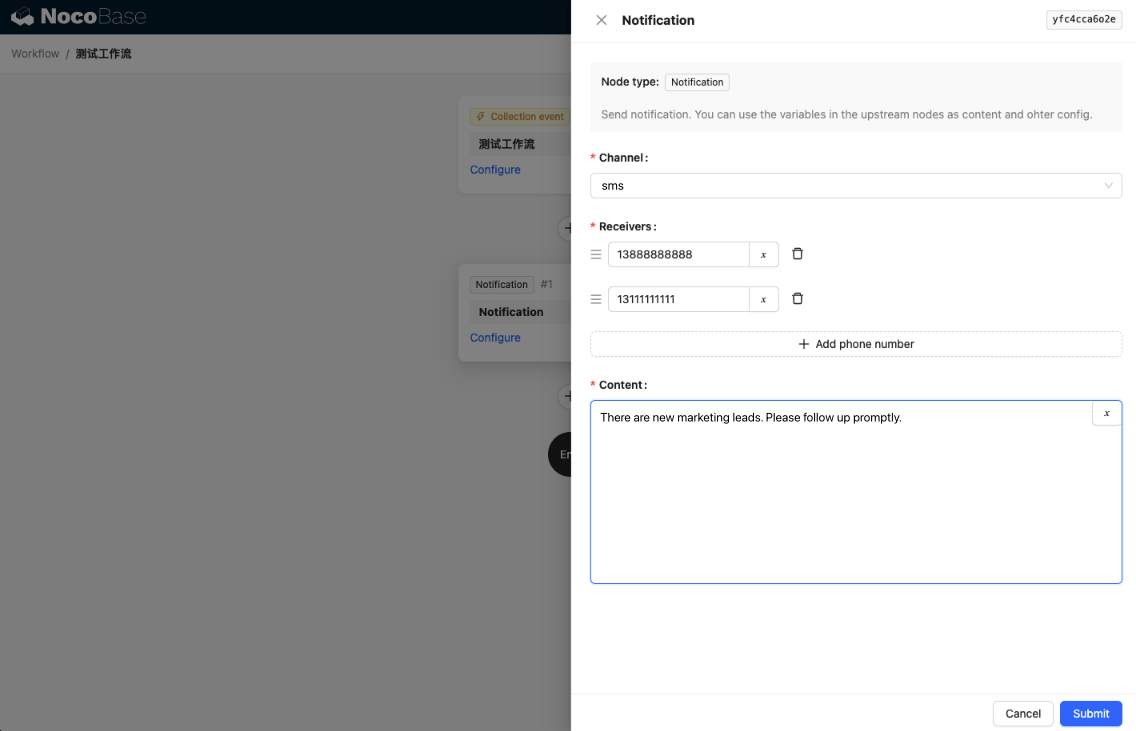
Vytvořte nový pracovní postup a nakonfigurujte notifikační uzel.
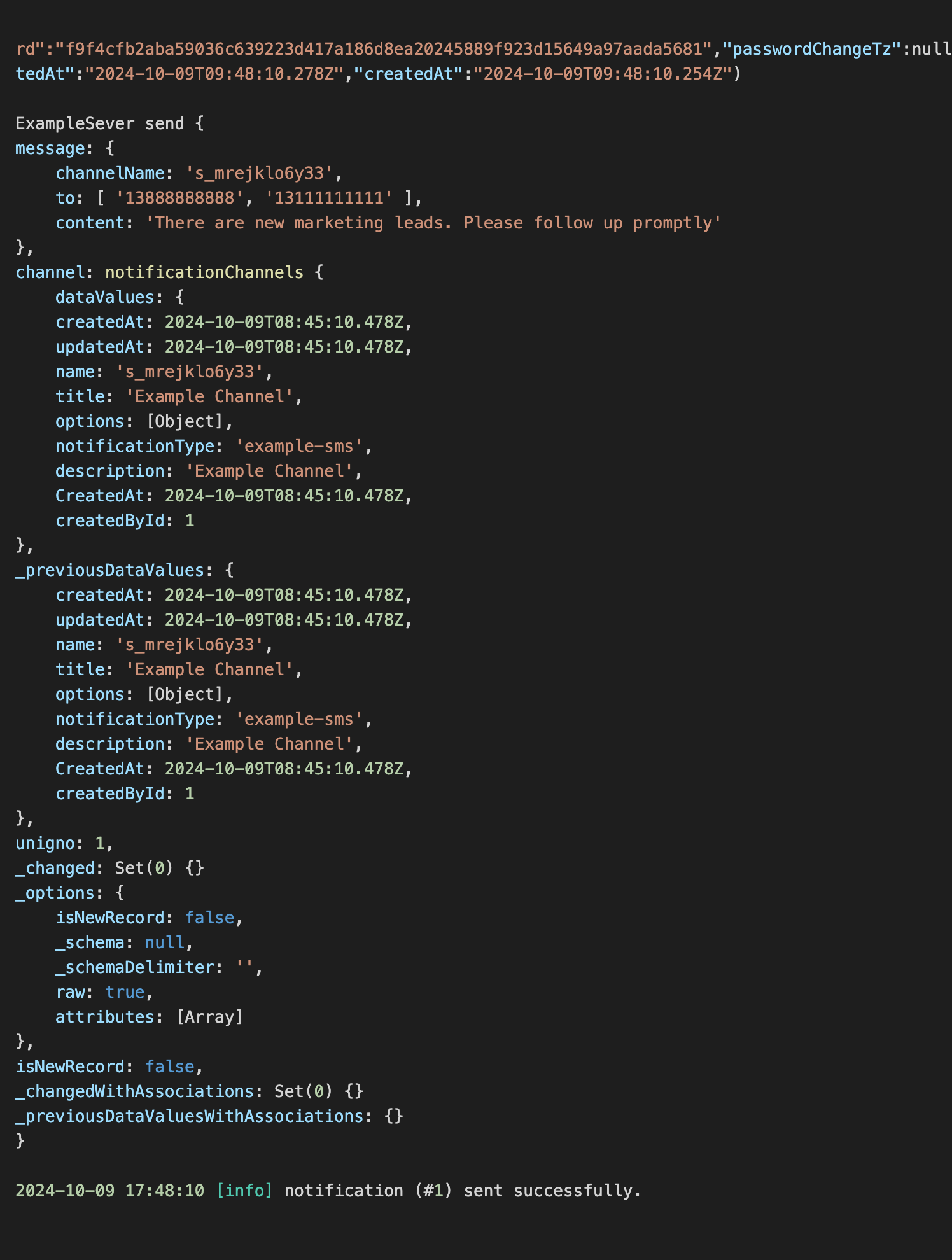
Spusťte vykonání pracovního postupu, abyste v konzoli viděli následující výstup informací.