TIP
מסמך זה תורגם על ידי בינה מלאכותית. לכל אי דיוק, אנא עיין בגרסה האנגלית
הרחבת סוגי ערוצי התראות
NocoBase תומכת בהרחבת סוגי ערוצי התראות לפי דרישה, כמו התראות SMS והתראות דחיפה לאפליקציות.
צד לקוח
רישום סוג ערוץ
ממשק תצורת ערוץ ההתראות בצד הלקוח וממשק תצורת ההודעות נרשמים באמצעות מתודת registerChannelType המסופקת על ידי תוסף ניהול ההתראות בצד הלקוח:
import PluginNotificationManagerClient from '@nocobase/plugin-notification-manager/client';

class PluginNotificationExampleClient extends Plugin {
  async afterAdd() {}

  async beforeLoad() {}

  async load() {
    const notification = this.pm.get(PluginNotificationManagerClient);
    notification.registerChannelType({
      title: 'Example SMS', // שם סוג ערוץ
      type: 'example-sms', // מזהה סוג ערוץ
      components: {
        ChannelConfigForm, // טופס תצורת ערוץ
        MessageConfigForm, // טופס תצורת הודעה
      },
    });
  }
}

export default PluginNotificationExampleClient;
צד שרת
הרחבת מחלקה אבסטרקטית
ליבת הפיתוח בצד השרת כוללת הרחבת המחלקה האבסטרקטית BaseNotificationChannel ומימוש מתודת send, המכילה את הלוגיקה העסקית לשליחת התראות דרך התוסף המורחב.
import { BaseNotificationChannel } from '@nocobase/plugin-notification-manager';

export class ExampleSever extends BaseNotificationChannel {
  async send(args): Promise<any> {
    console.log('ExampleSever send', args);
    return { status: 'success', message: args.message };
  }
}
רישום בצד השרת
יש לקרוא למתודת registerChannelType של ליבת שרת ההתראות כדי לרשום את מחלקת המימוש של השרת בליבה:
import PluginNotificationManagerServer from '@nocobase/plugin-notification-manager';
import { Plugin } from '@nocobase/server';
import { ExampleSever } from './example-server';
export class PluginNotificationExampleServer extends Plugin {
  async load() {
    const notificationServer = this.pm.get(PluginNotificationManagerServer) as PluginNotificationManagerServer;
    notificationServer.registerChannelType({ type: 'example-sms', Channel: ExampleSever });
  }
}

export default PluginNotificationExampleServer;
דוגמה מלאה
הנה דוגמה לתוסף הרחבת התראות שתתאר בפירוט כיצד לפתח תוסף כזה.
נניח שאנו רוצים להוסיף התראות SMS ל-NocoBase באמצעות שער SMS של פלטפורמה מסוימת.
יצירת תוסף
- הפעילו את הפקודה ליצירת התוסף:
yarn pm add @nocobase/plugin-notification-example
פיתוח צד לקוח
עבור צד הלקוח, נפתח שני רכיבי טופס: ChannelConfigForm (טופס תצורת ערוץ) ו-MessageConfigForm (טופס תצורת הודעה).
ChannelConfigFrom
כדי לשלוח הודעות SMS, נדרשים מפתח API וסוד (secret). צרו קובץ חדש בשם ChannelConfigForm.tsx בספריית src/client:
import React from 'react';
import { SchemaComponent } from '@nocobase/client';
import useLocalTranslation from './useLocalTranslation';

const ChannelConfigForm = () => {
  const t = useLocalTranslation();
  return (
    <SchemaComponent
      scope={{ t }}
      schema={{
        type: 'object',
        properties: {
          apiKey: {
            'x-decorator': 'FormItem',
            type: 'string',
            title: '{{t("Transport")}}',
            'x-component': 'Input',
          },
          secret: {
            'x-decorator': 'FormItem',
            type: 'string',
            title: '{{t("Transport")}}',
            'x-component': 'Input',
          },
        },
      }}
    />
  );
};

export default ChannelConfigForm;
טופס תצורת ההודעה כולל בעיקר את התצורה עבור נמענים (receivers) ותוכן ההודעה (content). צרו קובץ חדש בשם MessageConfigForm.tsx בספריית src/client. הרכיב מקבל variableOptions כפרמטר משתנה. טופס התוכן מוגדר בצומת תהליך עבודה ובדרך כלל צריך לצרוך משתנים מצומת תהליך עבודה. תוכן הקובץ הספציפי הוא כדלקמן:
import React from 'react';
import { SchemaComponent } from '@nocobase/client';
import useLocalTranslation from './useLocalTranslation';

const MessageConfigForm = ({ variableOptions }) => {
  const { t } = useLocalTranslation();
  return (
    <SchemaComponent
      scope={{ t }}
      schema={{
        type: 'object',
        properties: {
          to: {
            type: 'array',
            required: true,
            title: `{{t("מקבלים")}}`,
            'x-decorator': 'FormItem',
            'x-component': 'ArrayItems',
            items: {
              type: 'void',
              'x-component': 'Space',
              properties: {
                sort: {
                  type: 'void',
                  'x-decorator': 'FormItem',
                  'x-component': 'ArrayItems.SortHandle',
                },
                input: {
                  type: 'string',
                  'x-decorator': 'FormItem',
                  'x-component': 'Variable.Input',
                  'x-component-props': {
                    scope: variableOptions,
                    useTypedConstant: ['string'],
                    placeholder: `{{t("מספר טלפון")}}`,
                  },
                },
                remove: {
                  type: 'void',
                  'x-decorator': 'FormItem',
                  'x-component': 'ArrayItems.Remove',
                },
              },
            },
            properties: {
              add: {
                type: 'void',
                title: `{{t("הוסף מספר טלפון")}}`,
                'x-component': 'ArrayItems.Addition',
              },
            },
          },
          content: {
            type: 'string',
            required: true,
            title: `{{t("תוכן")}}`,
            'x-decorator': 'FormItem',
            'x-component': 'Variable.RawTextArea',
            'x-component-props': {
              scope: variableOptions,
              placeholder: 'Hi,',
              autoSize: {
                minRows: 10,
              },
            },
          },
        },
      }}
    />
  );
};

export default MessageConfigForm
רישום רכיבי צד לקוח
לאחר פיתוח רכיבי תצורת הטפסים, יש לרשום אותם בליבת ניהול ההתראות. נניח ששם הפלטפורמה הוא "Example". ערכו את src/client/index.tsx באופן הבא:
import { Plugin } from '@nocobase/client';
import PluginNotificationManagerClient from '@nocobase/plugin-notification-manager/client';
import { tval } from '@nocobase/utils/client';
import ChannelConfigForm from './ChannelConfigForm';
import MessageConfigForm from './MessageConfigForm';

class PluginNotificationExampleClient extends Plugin {
  async afterAdd() {}

  async beforeLoad() {}

  async load() {
    const notification = this.pm.get(PluginNotificationManagerClient);
    notification.registerChannelType({
      title: tval('Example SMS', { ns: '@nocobase/plugin-notification-example' }),
      type: 'example-sms',
      components: {
        ChannelConfigForm,
        MessageConfigForm,
      },
    });
  }
}

export default PluginNotificationExampleClient;
בשלב זה, פיתוח צד הלקוח הושלם.
פיתוח צד שרת
ליבת הפיתוח בצד השרת כוללת הרחבת המחלקה האבסטרקטית BaseNotificationChannel ומימוש מתודת send. מתודת send מכילה את הלוגיקה העסקית עבור תוסף ההרחבה לשליחת התראות. מכיוון שזוהי דוגמה, פשוט נדפיס את הארגומנטים שהתקבלו. בספריית src/server, הוסיפו קובץ בשם example-server.ts:
import { BaseNotificationChannel } from '@nocobase/plugin-notification-manager';

export class ExampleSever extends BaseNotificationChannel {
  async send(args): Promise<any> {
    console.log('ExampleSever send', args);
    return { status: 'success', message: args.message };
  }
}
לאחר מכן, רשמו את תוסף הרחבת השרת על ידי עריכת src/server/plugin.ts:
import PluginNotificationManagerServer from '@nocobase/plugin-notification-manager';
import { Plugin } from '@nocobase/server';
import { ExampleSever } from './example-server';
export class PluginNotificationExampleServer extends Plugin {
  async load() {
    const notificationServer = this.pm.get(PluginNotificationManagerServer) as PluginNotificationManagerServer;
    notificationServer.registerChannelType({ type: 'example-sms', Channel: ExampleSever });
  }
}

export default PluginNotificationExampleServer;
רישום והפעלת תוסף
- הפעילו את פקודת הרישום:
yarn pm add @nocobase/plugin-notification-example
- הפעילו את פקודת ההפעלה:
yarn pm enable @nocobase/plugin-notification-example
תצורת ערוץ
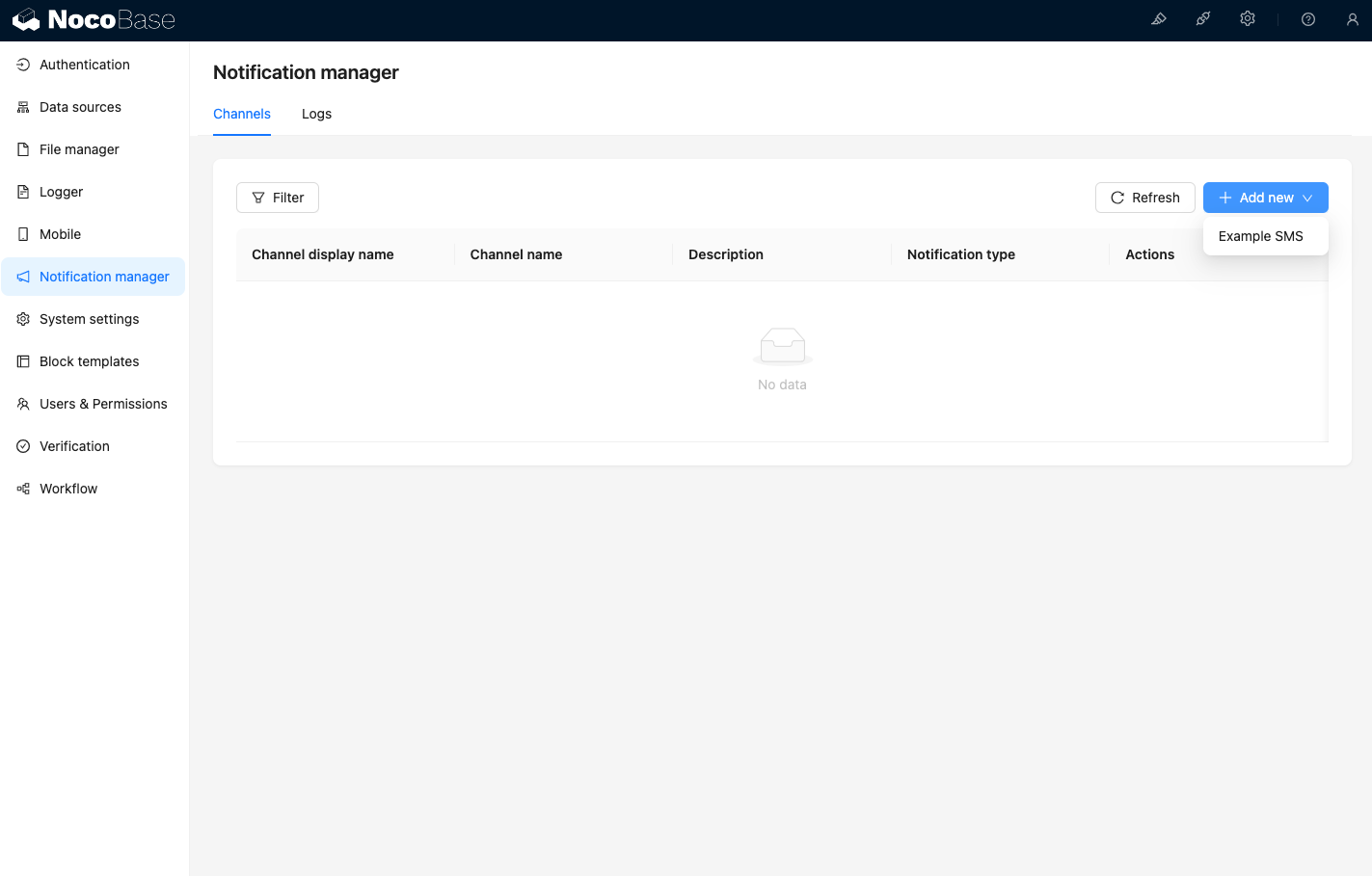
עם הכניסה לדף ערוצי ניהול ההתראות, תוכלו לראות שערוץ Example SMS הופעל.
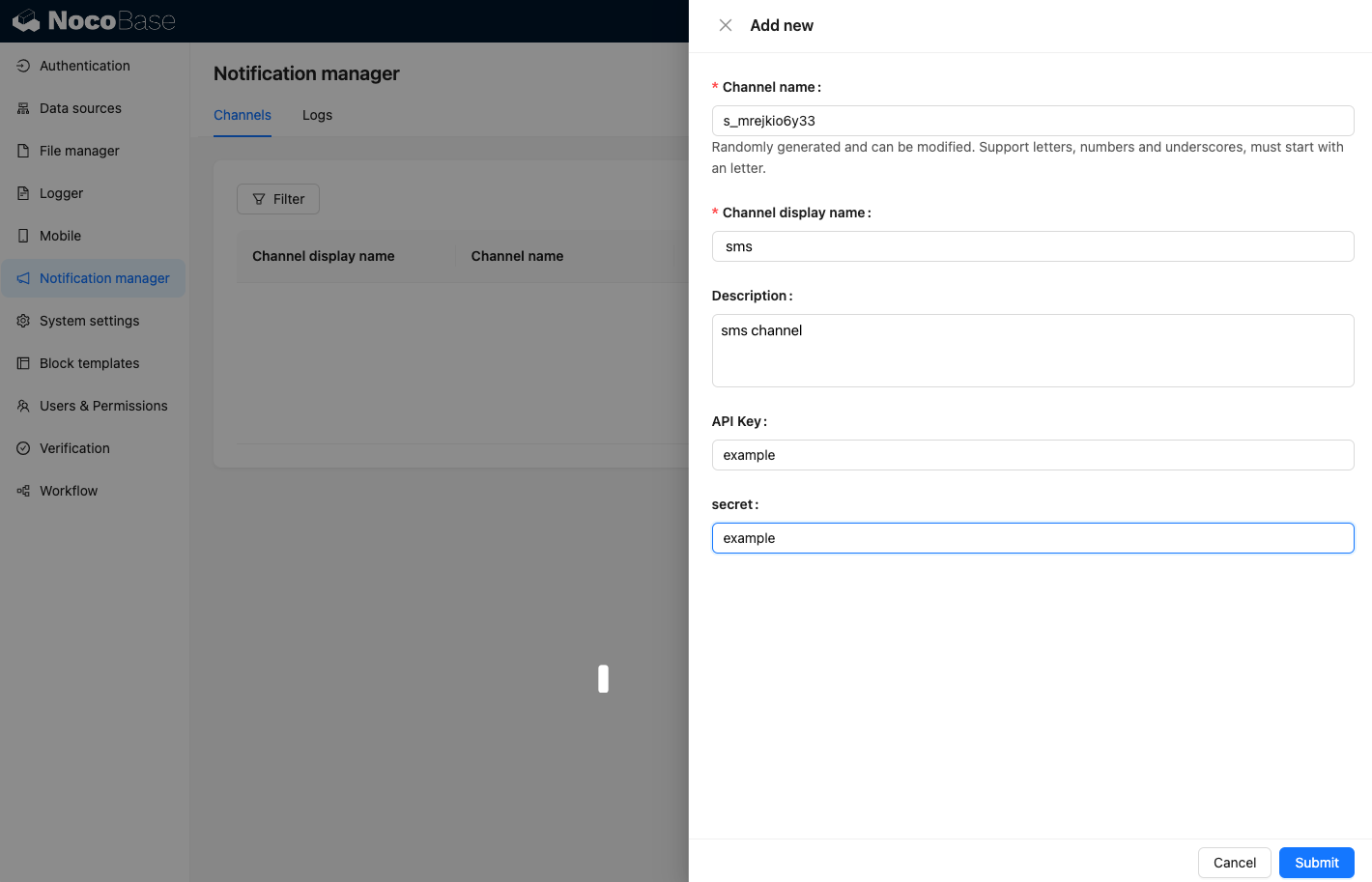
הוסיפו ערוץ לדוגמה.
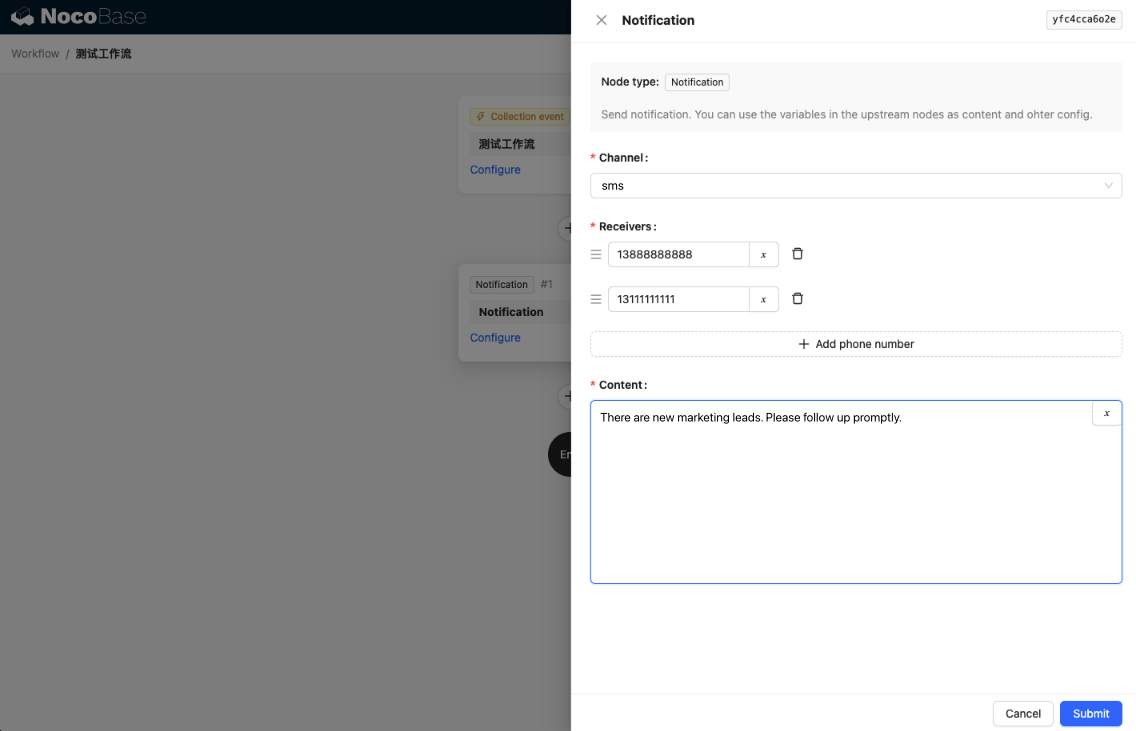
צרו תהליך עבודה חדש והגדירו את צומת ההתראות.
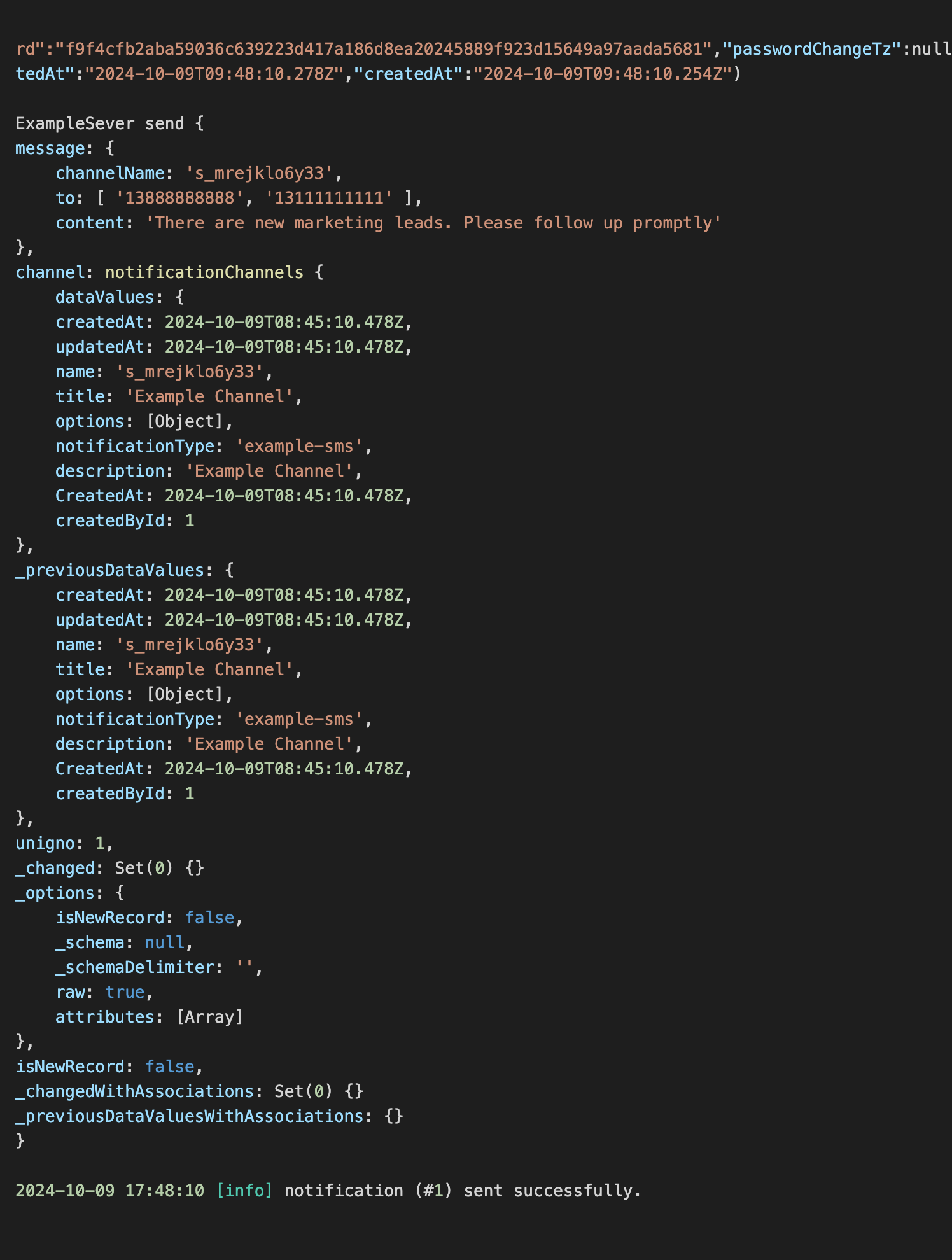
הפעילו את ביצוע תהליך העבודה כדי לראות את המידע הבא בפלט הקונסולה.