Ekstensi Tipe Channel Notifikasi
NocoBase mendukung ekstensi tipe channel notifikasi sesuai kebutuhan, seperti notifikasi SMS, push aplikasi, dan lainnya.
Client-side
Registrasi Tipe Channel
Konfigurasi channel client-side dan interface konfigurasi pesan didaftarkan melalui interface registerChannelType yang disediakan client-side notification manager:
import PluginNotificationManagerClient from '@nocobase/plugin-notification-manager/client';

class PluginNotificationExampleClient extends Plugin {
  async afterAdd() {}

  async beforeLoad() {}

  async load() {
    const notification = this.pm.get(PluginNotificationManagerClient);
    notification.registerChannelType({
      title: 'Example SMS', // Nama tipe channel
      type: 'example-sms', // Identifier tipe channel
      components: {
        ChannelConfigForm, // Form konfigurasi channel
        MessageConfigForm, // Form konfigurasi pesan
      },
    });
  }
}

export default PluginNotificationExampleClient;
Server-side
Inherit Abstract Class
Inti pengembangan server-side adalah perlu meng-inherit abstract class BaseNotificationChannel dan mengimplementasikan method send. Di dalam method send adalah logika bisnis ekstensi plugin untuk mengirim notifikasi
import { BaseNotificationChannel } from '@nocobase/plugin-notification-manager';

export class ExampleSever extends BaseNotificationChannel {
  async send(args): Promise<any> {
    console.log('ExampleSever send', args);
    return { status: 'success', message: args.message };
  }
}
Registrasi Server-side
Selanjutnya perlu memanggil method registerChannelType di kernel notification server-side, untuk mendaftarkan class implementasi server-side yang sudah dikembangkan ke kernel:
import PluginNotificationManagerServer from '@nocobase/plugin-notification-manager';
import { Plugin } from '@nocobase/server';
import { ExampleSever } from './example-server';
export class PluginNotificationExampleServer extends Plugin {
  async load() {
    const notificationServer = this.pm.get(PluginNotificationManagerServer) as PluginNotificationManagerServer;
    notificationServer.registerChannelType({ type: 'example-sms', Channel: ExampleSever });
  }
}

export default PluginNotificationExampleServer;
Contoh Lengkap
Berikut adalah contoh plugin ekstensi notifikasi untuk menjelaskan secara detail cara mengembangkan plugin ekstensi.
Asumsikan kita ingin menggunakan SMS gateway suatu platform untuk menambahkan fitur notifikasi SMS ke NocoBase.
Pembuatan Plugin
- Jalankan command pembuatan plugin
yarn pm add @nocobase/plugin-notification-example
Pengembangan Client-side
Pada bagian client-side, kita perlu mengembangkan dua komponen form, ChannelConfigForm (form konfigurasi channel) dan MessageConfigForm (form konfigurasi pesan)
ChannelConfigFrom
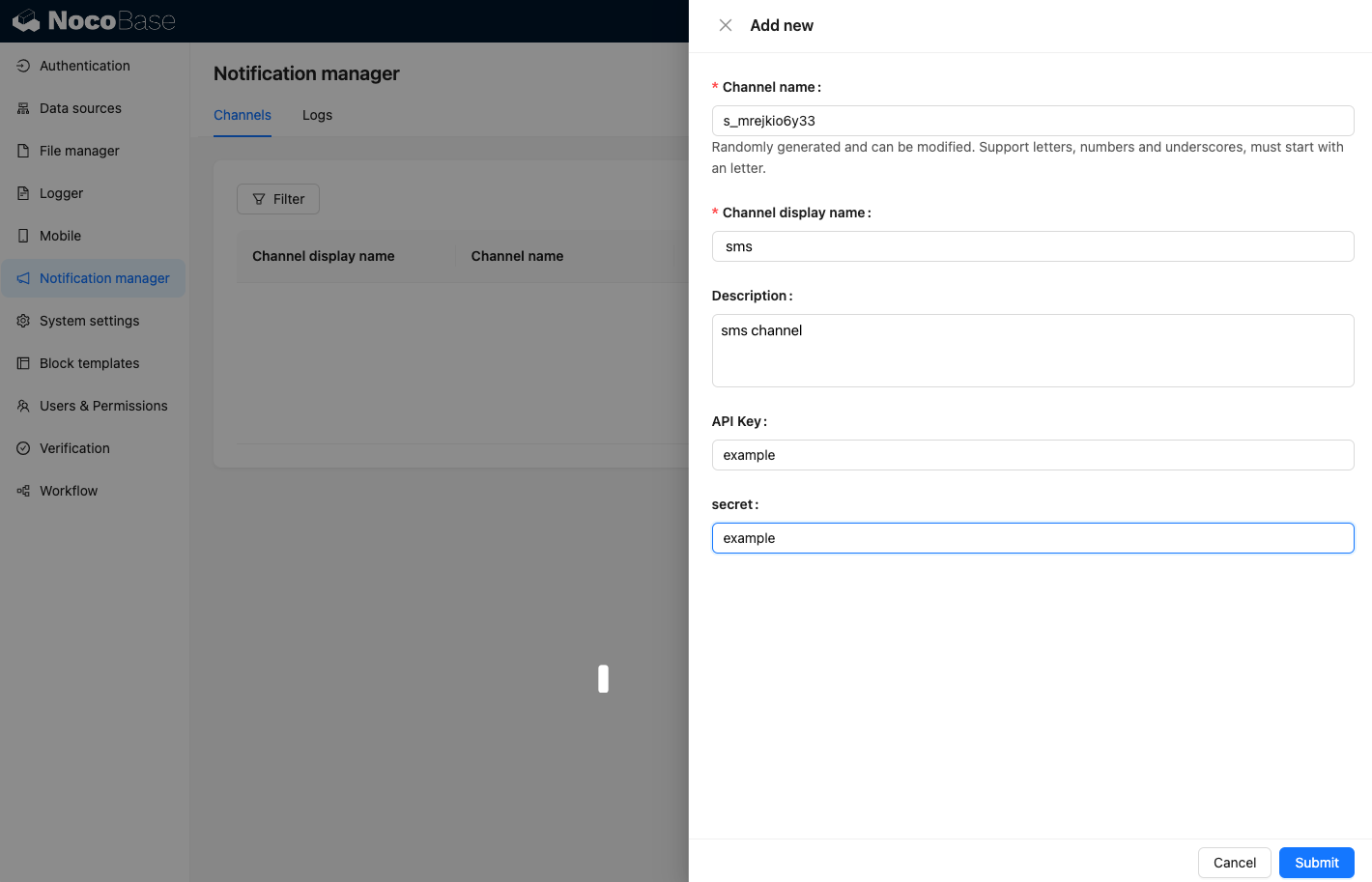
Saat mengirim SMS dari platform tertentu memerlukan APIkey dan secret, jadi konten form channel kita terutama mencakup kedua hal di atas. Buat file baru ChannelConfigForm.tsx di direktori src/client, konten file sebagai berikut:
import React from 'react';
import { SchemaComponent } from '@nocobase/client';
import useLocalTranslation from './useLocalTranslation';

const ChannelConfigForm = () => {
  const t = useLocalTranslation();
  return (
    <SchemaComponent
      scope={{ t }}
      schema={{
        type: 'object',
        properties: {
          apiKey: {
            'x-decorator': 'FormItem',
            type: 'string',
            title: '{{t("Transport")}}',
            'x-component': 'Input',
          },
          secret: {
            'x-decorator': 'FormItem',
            type: 'string',
            title: '{{t("Transport")}}',
            'x-component': 'Input',
          },
        },
      }}
    />
  );
};

export default ChannelConfigForm;
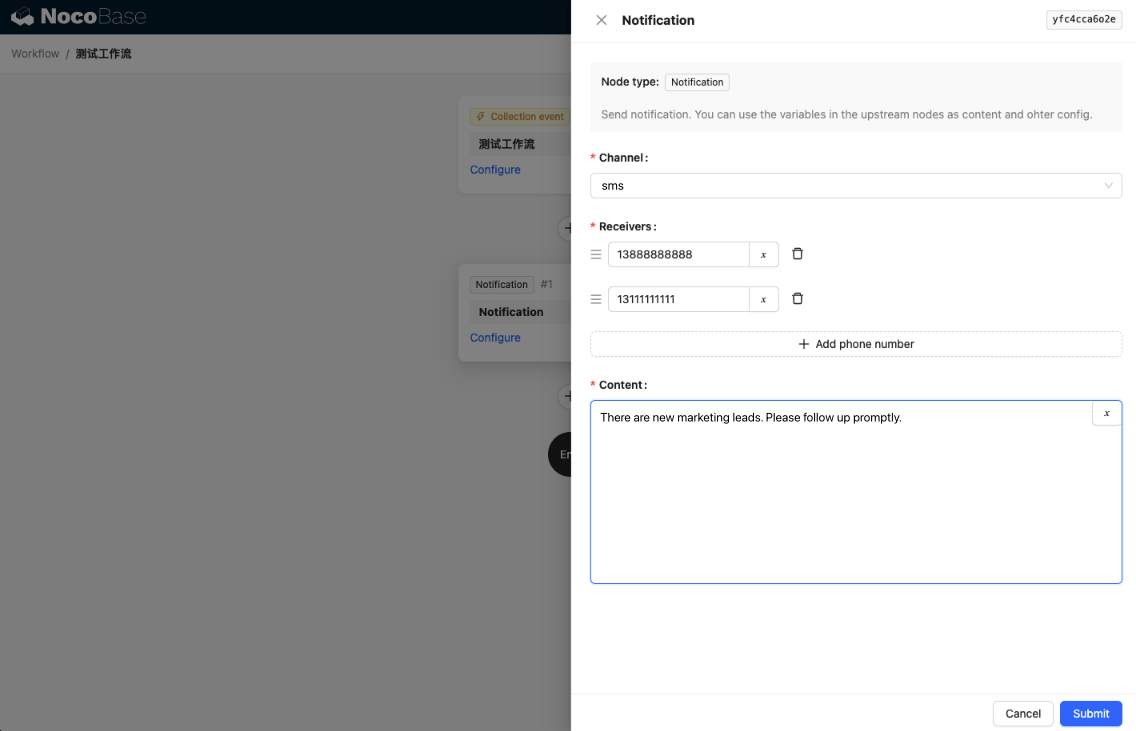
Form konfigurasi pesan, terutama mencakup konfigurasi penerima receivers dan konten pesan content. Buat file baru MessageConfigForm.tsx di direktori src/client, komponen menerima variableOptions sebagai parameter variable. Saat ini form content akan dikonfigurasi di node workflow, biasanya perlu meng-consume variable node workflow. Konten file sebagai berikut:
import React from 'react';
import { SchemaComponent } from '@nocobase/client';
import useLocalTranslation from './useLocalTranslation';

const MessageConfigForm = ({ variableOptions }) => {
  const { t } = useLocalTranslation();
  return (
    <SchemaComponent
      scope={{ t }}
      schema={{
        type: 'object',
        properties: {
          to: {
            type: 'array',
            required: true,
            title: `{{t("Receivers")}}`,
            'x-decorator': 'FormItem',
            'x-component': 'ArrayItems',
            items: {
              type: 'void',
              'x-component': 'Space',
              properties: {
                sort: {
                  type: 'void',
                  'x-decorator': 'FormItem',
                  'x-component': 'ArrayItems.SortHandle',
                },
                input: {
                  type: 'string',
                  'x-decorator': 'FormItem',
                  'x-component': 'Variable.Input',
                  'x-component-props': {
                    scope: variableOptions,
                    useTypedConstant: ['string'],
                    placeholder: `{{t("Phone number")}}`,
                  },
                },
                remove: {
                  type: 'void',
                  'x-decorator': 'FormItem',
                  'x-component': 'ArrayItems.Remove',
                },
              },
            },
            properties: {
              add: {
                type: 'void',
                title: `{{t("Add phone number")}}`,
                'x-component': 'ArrayItems.Addition',
              },
            },
          },
          content: {
            type: 'string',
            required: true,
            title: `{{t("Content")}}`,
            'x-decorator': 'FormItem',
            'x-component': 'Variable.RawTextArea',
            'x-component-props': {
              scope: variableOptions,
              placeholder: 'Hi,',
              autoSize: {
                minRows: 10,
              },
            },
          },
        },
      }}
    />
  );
};

export default MessageConfigForm
Registrasi Komponen Client-side
Setelah komponen konfigurasi form selesai dikembangkan, perlu memanggil kernel notification manager untuk registrasi. Asumsikan nama platform kita adalah Example, maka konten file src/client/index.tsx setelah diedit sebagai berikut:
import { Plugin } from '@nocobase/client';
import PluginNotificationManagerClient from '@nocobase/plugin-notification-manager/client';
import { tval } from '@nocobase/utils/client';
import ChannelConfigForm from './ChannelConfigForm';
import MessageConfigForm from './MessageConfigForm';

class PluginNotificationExampleClient extends Plugin {
  async afterAdd() {}

  async beforeLoad() {}

  async load() {
    const notification = this.pm.get(PluginNotificationManagerClient);
    notification.registerChannelType({
      title: tval('Example SMS', { ns: '@nocobase/plugin-notification-example' }),
      type: 'example-sms',
      components: {
        ChannelConfigForm,
        MessageConfigForm,
      },
    });
  }
}

export default PluginNotificationExampleClient;
Sampai di sini, pengembangan client-side sudah selesai
Pengembangan Server-side
Inti pengembangan server-side adalah perlu meng-inherit abstract class BaseNotificationChannel dan mengimplementasikan method send. Di dalam method send adalah logika bisnis ekstensi plugin untuk mengirim notifikasi. Karena ini adalah contoh, hanya menampilkan parameter yang diterima. Tambahkan file baru example-server.ts di direktori src/server, konten file sebagai berikut:
import { BaseNotificationChannel } from '@nocobase/plugin-notification-manager';

export class ExampleSever extends BaseNotificationChannel {
  async send(args): Promise<any> {
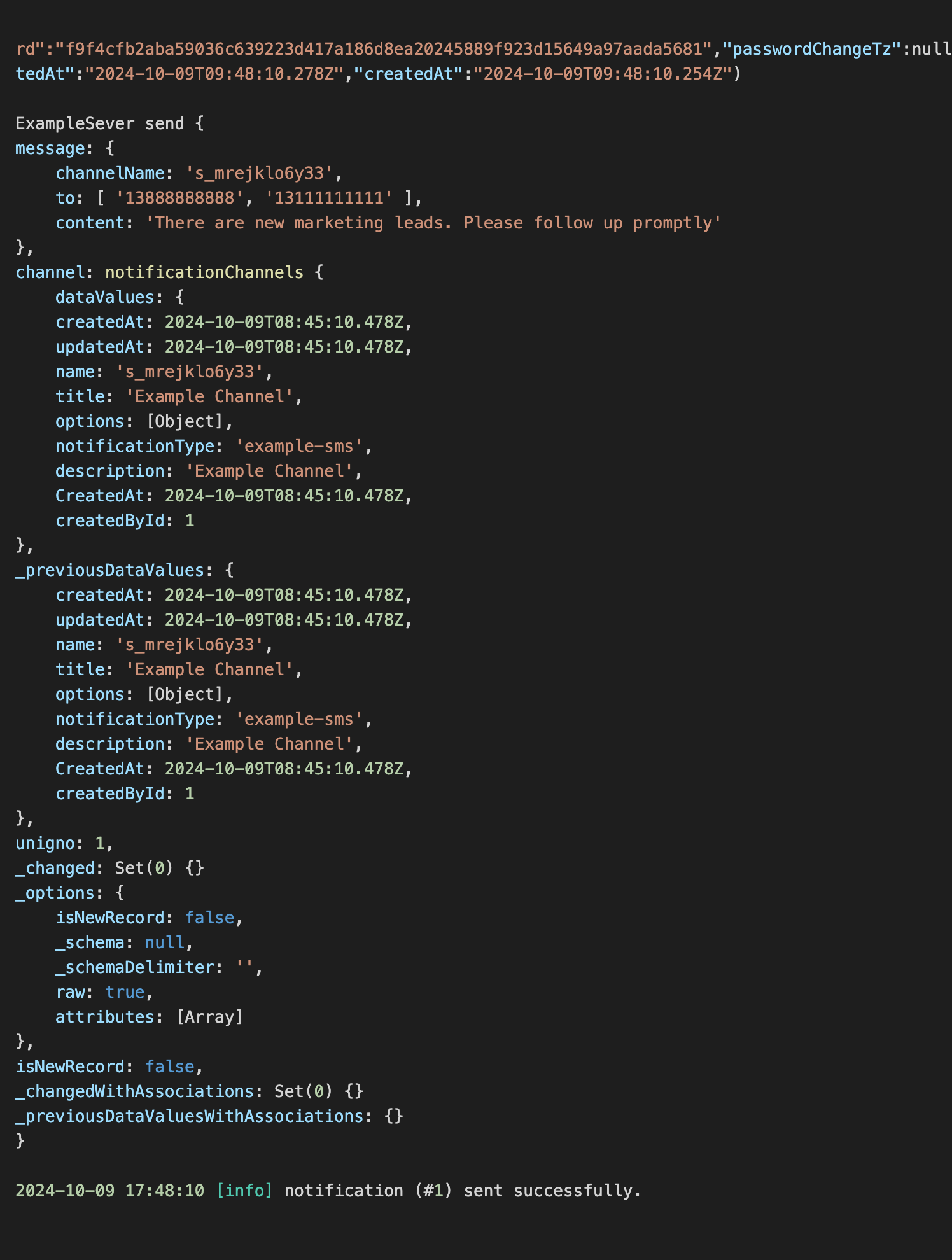
    console.log('ExampleSever send', args);
    return { status: 'success', message: args.message };
  }
}
Selanjutnya perlu memanggil method registerChannelType di kernel notification server-side untuk mendaftarkan plugin ekstensi server-side. Konten file src/clinet/plugin.ts setelah diedit sebagai berikut:
import PluginNotificationManagerServer from '@nocobase/plugin-notification-manager';
import { Plugin } from '@nocobase/server';
import { ExampleSever } from './example-server';
export class PluginNotificationExampleServer extends Plugin {
  async load() {
    const notificationServer = this.pm.get(PluginNotificationManagerServer) as PluginNotificationManagerServer;
    notificationServer.registerChannelType({ type: 'example-sms', Channel: ExampleSever });
  }
}

export default PluginNotificationExampleServer;
Registrasi dan Aktivasi Plugin
- Jalankan command registrasi
yarn p add @nocobase/plugin-notification-example
- Jalankan command aktivasi
yarn pm enable @nocobase/plugin-notification-example
Konfigurasi Channel
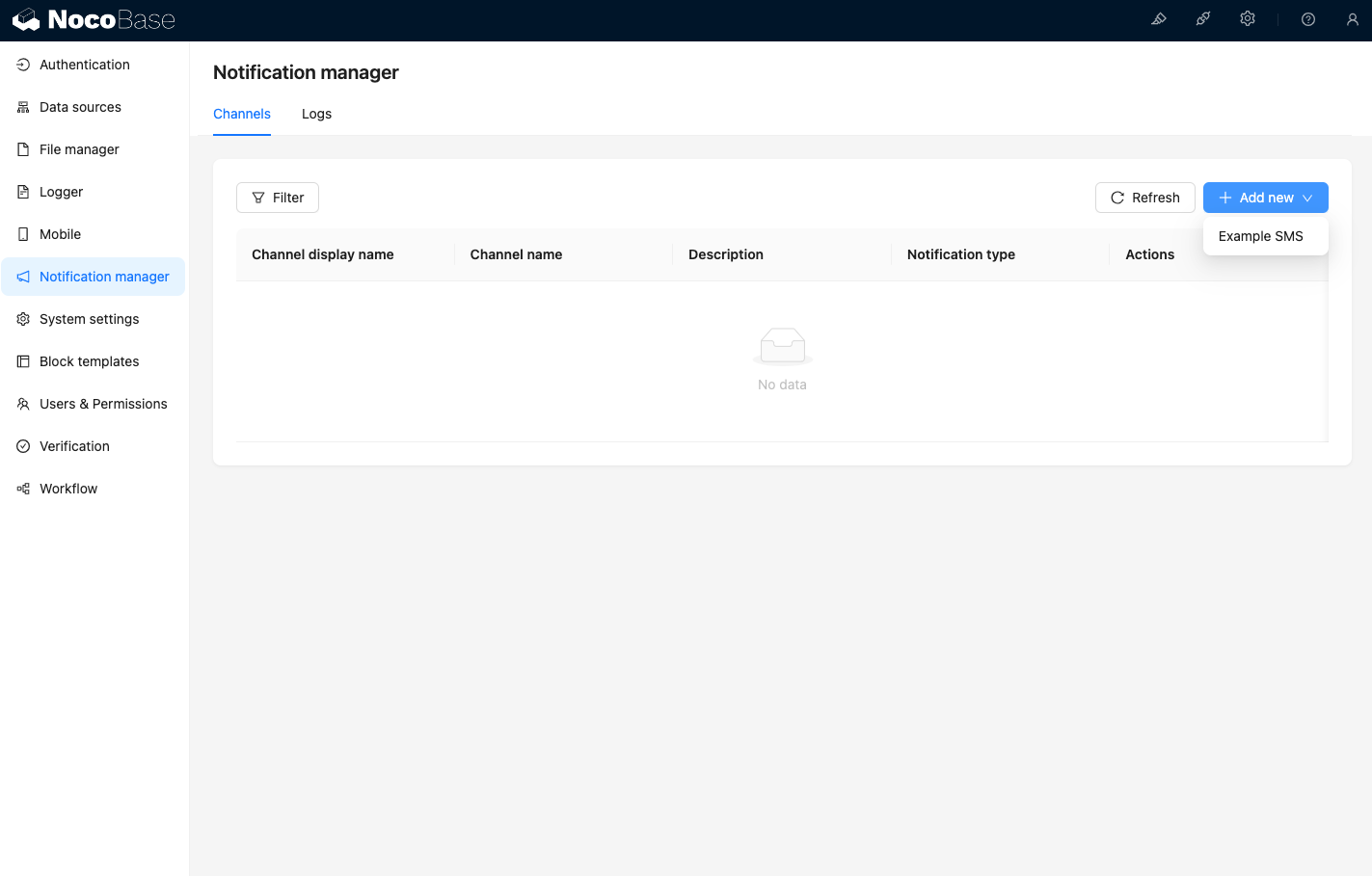
Pada saat ini akses halaman channel notification manager, Anda dapat melihat Example SMS sudah diaktifkan
Tambahkan contoh channel
Buat workflow baru dan konfigurasikan node notifikasi
Trigger eksekusi workflow, Anda dapat melihat informasi berikut di console