TIP
Bu belge AI tarafından çevrilmiştir. Herhangi bir yanlışlık için lütfen İngilizce sürümüne bakın
Bildirim Kanalı Türlerini Genişletme
NocoBase, ihtiyaç duyulduğunda SMS bildirimleri ve uygulama anlık bildirimleri gibi bildirim kanalı türlerini genişletmenize olanak tanır.
İstemci
Kanal Türü Kaydı
İstemci kanal yapılandırma ve mesaj yapılandırma arayüzleri, bildirim yönetimi eklentisi istemcisi tarafından sağlanan registerChannelType yöntemi aracılığıyla kaydedilir:
import PluginNotificationManagerClient from '@nocobase/plugin-notification-manager/client';

class PluginNotificationExampleClient extends Plugin {
  async afterAdd() {}

  async beforeLoad() {}

  async load() {
    const notification = this.pm.get(PluginNotificationManagerClient);
    notification.registerChannelType({
      title: 'Example SMS', // Kanal türü adı
      type: 'example-sms', // Kanal türü tanımlayıcısı
      components: {
        ChannelConfigForm, // Kanal yapılandırma formu
        MessageConfigForm, // Mesaj yapılandırma formu
      },
    });
  }
}

export default PluginNotificationExampleClient;
Sunucu
Soyut Sınıfı Genişletme
Sunucu tarafı geliştirmenin temelinde, BaseNotificationChannel soyut sınıfını genişletmek ve send yöntemini uygulamak yer alır. send yöntemi, genişletilmiş eklenti aracılığıyla bildirim gönderme iş mantığını içerir.
import { BaseNotificationChannel } from '@nocobase/plugin-notification-manager';

export class ExampleSever extends BaseNotificationChannel {
  async send(args): Promise<any> {
    console.log('ExampleSever send', args);
    return { status: 'success', message: args.message };
  }
}
Sunucu Kaydı
Ardından, geliştirilen sunucu uygulama sınıfını çekirdeğe kaydetmek için bildirim sunucusu çekirdeğinin registerChannelType yöntemini çağırmanız gerekir:
import PluginNotificationManagerServer from '@nocobase/plugin-notification-manager';
import { Plugin } from '@nocobase/server';
import { ExampleSever } from './example-server';
export class PluginNotificationExampleServer extends Plugin {
  async load() {
    const notificationServer = this.pm.get(PluginNotificationManagerServer) as PluginNotificationManagerServer;
    notificationServer.registerChannelType({ type: 'example-sms', Channel: ExampleSever });
  }
}

export default PluginNotificationExampleServer;
Tam Örnek
Bir bildirim genişletme eklentisi örneği üzerinden, bir eklentinin nasıl geliştirileceğini ayrıntılı olarak açıklayalım.
Diyelim ki NocoBase'e bir platformun SMS ağ geçidini kullanarak SMS bildirim özelliği eklemek istiyoruz.
Eklenti Oluşturma
- Eklentiyi oluşturmak için şu komutu çalıştırın:
yarn pm add @nocobase/plugin-notification-example
İstemci Geliştirme
İstemci tarafı için iki form bileşeni geliştirmemiz gerekiyor: ChannelConfigForm (Kanal Yapılandırma Formu) ve MessageConfigForm (Mesaj Yapılandırma Formu).
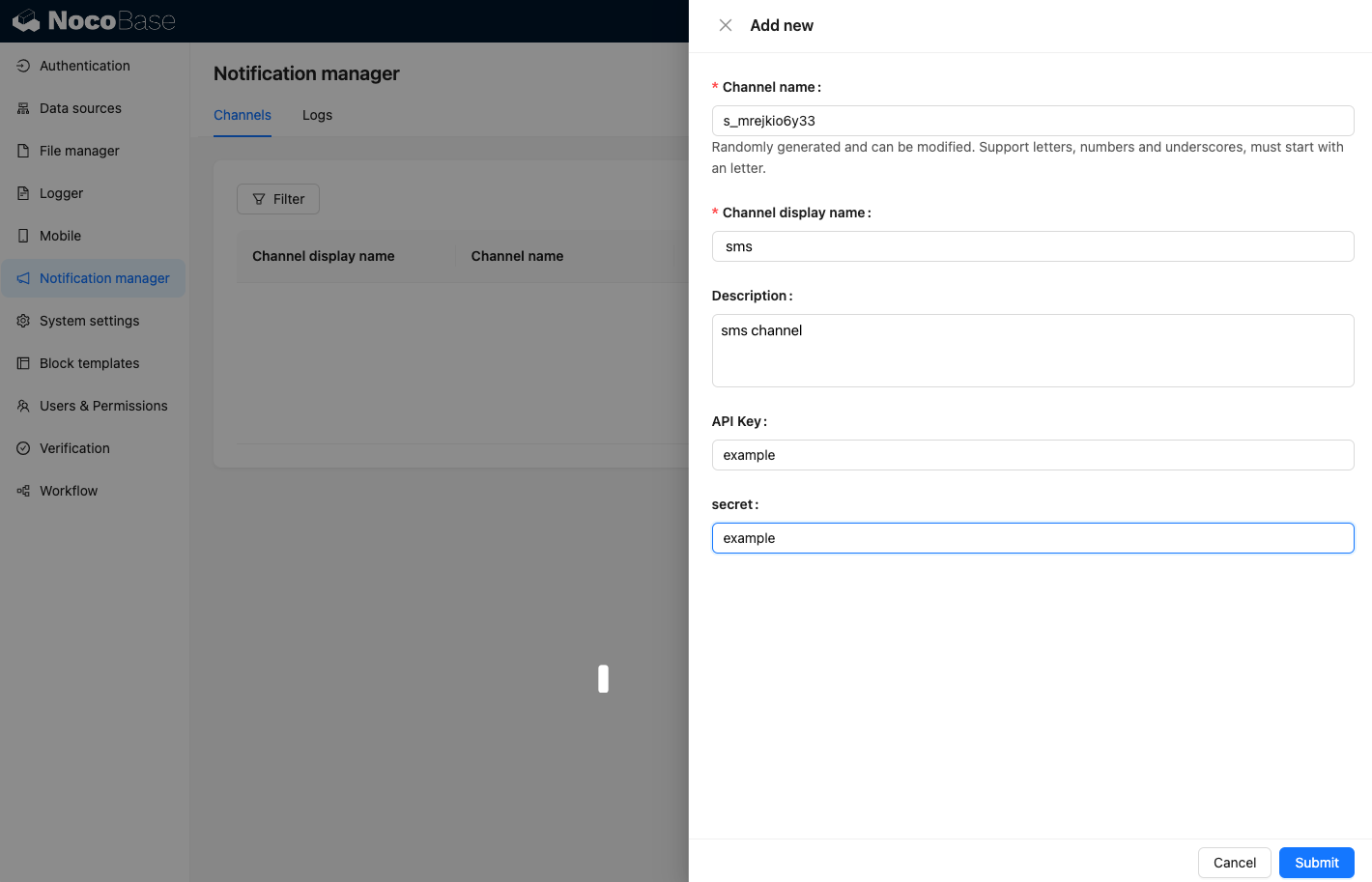
Bir platform üzerinden SMS göndermek için bir API anahtarı ve bir gizli anahtar (secret) gereklidir. Bu nedenle, kanal formumuzun içeriği başlıca bu iki öğeyi içerecektir. src/client dizini altında ChannelConfigForm.tsx adında yeni bir dosya oluşturun, dosya içeriği aşağıdaki gibidir:
import React from 'react';
import { SchemaComponent } from '@nocobase/client';
import useLocalTranslation from './useLocalTranslation';

const ChannelConfigForm = () => {
  const t = useLocalTranslation();
  return (
    <SchemaComponent
      scope={{ t }}
      schema={{
        type: 'object',
        properties: {
          apiKey: {
            'x-decorator': 'FormItem',
            type: 'string',
            title: '{{t("Taşıyıcı")}}',
            'x-component': 'Input',
          },
          secret: {
            'x-decorator': 'FormItem',
            type: 'string',
            title: '{{t("Taşıyıcı")}}',
            'x-component': 'Input',
          },
        },
      }}
    />
  );
};

export default ChannelConfigForm;
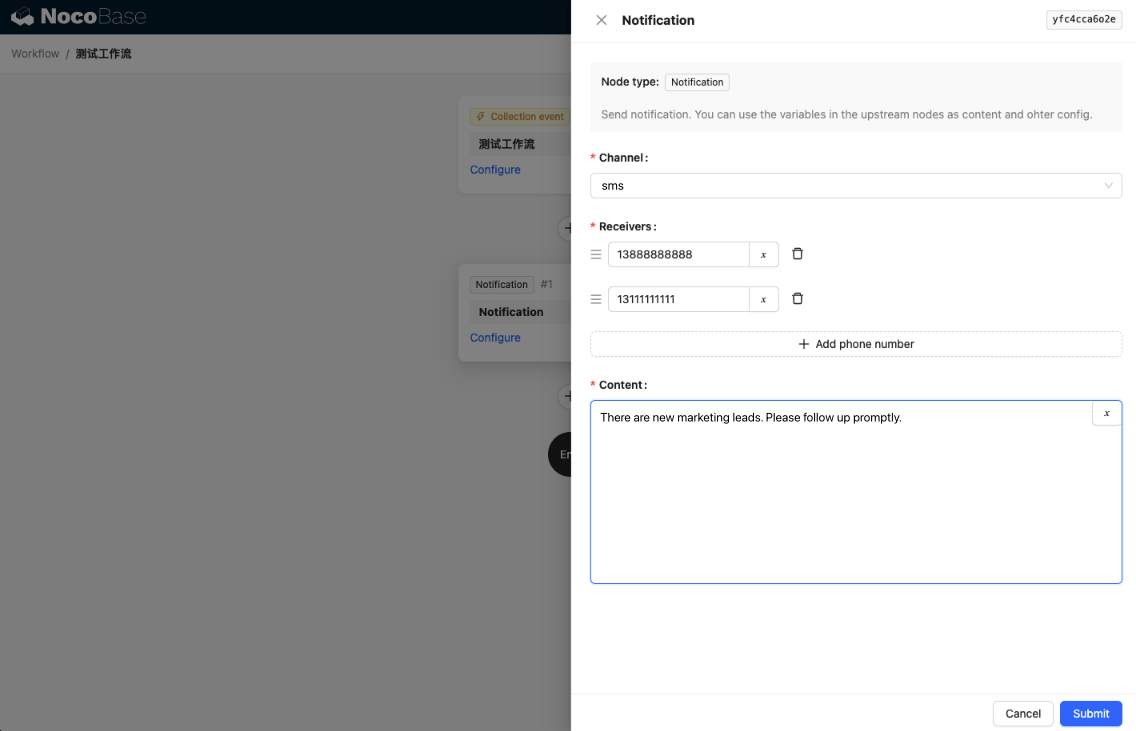
Mesaj yapılandırma formu, başlıca alıcılar (receivers) ve mesaj içeriği (content) yapılandırmasını içerir. src/client dizini altında MessageConfigForm.tsx adında yeni bir dosya oluşturun. Bileşen, variableOptions değerini bir değişken parametresi olarak alır. İçerik formu, iş akışı düğümünde yapılandırılır ve genellikle iş akışı düğüm değişkenlerini tüketmesi gerekir. Dosyanın içeriği aşağıdaki gibidir:
import React from 'reac
import { SchemaComponent } from '@nocobase/client';
import useLocalTranslation from './useLocalTranslation';

const MessageConfigForm = ({ variableOptions }) => {
  const { t } = useLocalTranslation();
  return (
    <SchemaComponent
      scope={{ t }}
      schema={{
        type: 'object',
        properties: {
          to: {
            type: 'array',
            required: true,
            title: `{{t("Alıcılar")}}`,
            'x-decorator': 'FormItem',
            'x-component': 'ArrayItems',
            items: {
              type: 'void',
              'x-component': 'Space',
              properties: {
                sort: {
                  type: 'void',
                  'x-decorator': 'FormItem',
                  'x-component': 'ArrayItems.SortHandle',
                },
                input: {
                  type: 'string',
                  'x-decorator': 'FormItem',
                  'x-component': 'Variable.Input',
                  'x-component-props': {
                    scope: variableOptions,
                    useTypedConstant: ['string'],
                    placeholder: `{{t("Telefon numarası")}}`,
                  },
                },
                remove: {
                  type: 'void',
                  'x-decorator': 'FormItem',
                  'x-component': 'ArrayItems.Remove',
                },
              },
            },
            properties: {
              add: {
                type: 'void',
                title: `{{t("Telefon numarası ekle")}}`,
                'x-component': 'ArrayItems.Addition',
              },
            },
          },
          content: {
            type: 'string',
            required: true,
            title: `{{t("İçerik")}}`,
            'x-decorator': 'FormItem',
            'x-component': 'Variable.RawTextArea',
            'x-component-props': {
              scope: variableOptions,
              placeholder: 'Hi,',
              autoSize: {
                minRows: 10,
              },
            },
          },
        },
      }}
    />
  );
};

export default MessageConfigForm
İstemci Bileşeni Kaydı
Form yapılandırma bileşenleri geliştirildikten sonra, bunları bildirim yönetimi çekirdeğine kaydetmeniz gerekir. Platform adımızın "Example" olduğunu varsayarsak, src/client/index.tsx dosyasının düzenlenmiş içeriği aşağıdaki gibidir:
import { Plugin } from '@nocobase/client';
import PluginNotificationManagerClient from '@nocobase/plugin-notification-manager/client';
import { tval } from '@nocobase/utils/client';
import ChannelConfigForm from './ChannelConfigForm';
import MessageConfigForm from './MessageConfigForm';

class PluginNotificationExampleClient extends Plugin {
  async afterAdd() {}

  async beforeLoad() {}

  async load() {
    const notification = this.pm.get(PluginNotificationManagerClient);
    notification.registerChannelType({
      title: tval('Example SMS', { ns: '@nocobase/plugin-notification-example' }),
      type: 'example-sms',
      components: {
        ChannelConfigForm,
        MessageConfigForm,
      },
    });
  }
}

export default PluginNotificationExampleClient;
Bu noktada, istemci tarafı geliştirme tamamlanmıştır.
Sunucu Geliştirme
Sunucu tarafı geliştirmenin temelinde, BaseNotificationChannel soyut sınıfını genişletmek ve send yöntemini uygulamak yer alır. send yöntemi, genişletme eklentisinin bildirim gönderme iş mantığını içerir. Bu bir örnek olduğu için, alınan argümanları basitçe konsola yazdıracağız. src/server dizini altında example-server.ts adında yeni bir dosya oluşturun, dosya içeriği aşağıdaki gibidir:
import { BaseNotificationChannel } from '@nocobase/plugin-notification-manager';

export class ExampleSever extends BaseNotificationChannel {
  async send(args): Promise<any> {
    console.log('ExampleSever send', args);
    return { status: 'success', message: args.message };
  }
}
Ardından, sunucu genişletme eklentisini kaydetmek için bildirim sunucusu çekirdeğinin registerChannelType yöntemini çağırmanız gerekir. Düzenlenmiş src/server/plugin.ts dosyasının içeriği aşağıdaki gibidir:
import PluginNotificationManagerServer from '@nocobase/plugin-notification-manager';
import { Plugin } from '@nocobase/server';
import { ExampleSever } from './example-server';
export class PluginNotificationExampleServer extends Plugin {
  async load() {
    const notificationServer = this.pm.get(PluginNotificationManagerServer) as PluginNotificationManagerServer;
    notificationServer.registerChannelType({ type: 'example-sms', Channel: ExampleSever });
  }
}

export default PluginNotificationExampleServer;
Eklenti Kaydı ve Başlatma
- Kayıt komutunu çalıştırın:
yarn pm add @nocobase/plugin-notification-example
- Etkinleştirme komutunu çalıştırın:
yarn pm enable @nocobase/plugin-notification-example
Kanal Yapılandırması
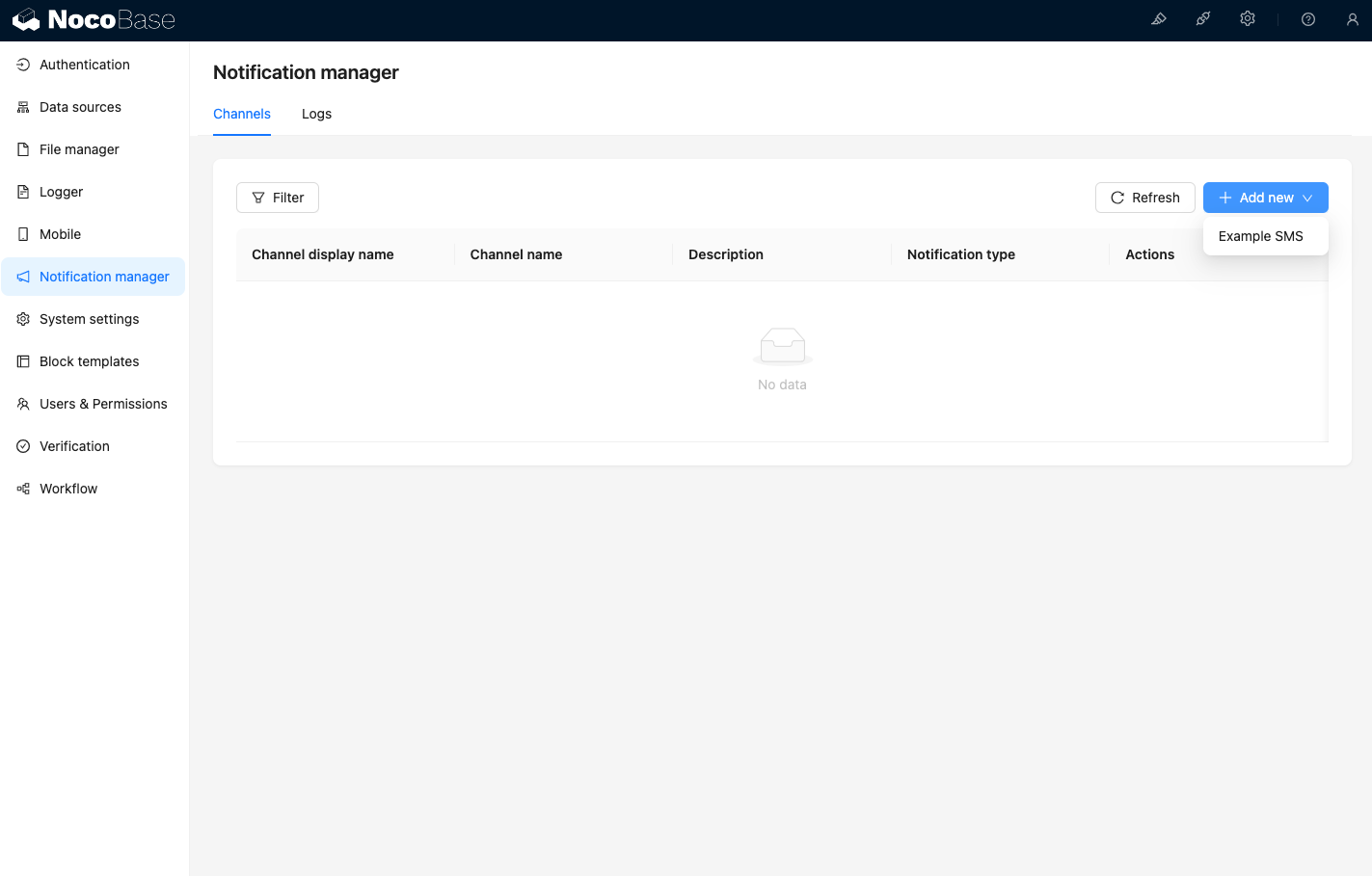
Bu aşamada, Bildirim yönetimi kanal sayfasını ziyaret ettiğinizde, Example SMS kanalının etkinleştirildiğini görebilirsiniz.
Bir örnek kanal ekleyin.
Yeni bir iş akışı oluşturun ve bildirim düğümünü yapılandırın.
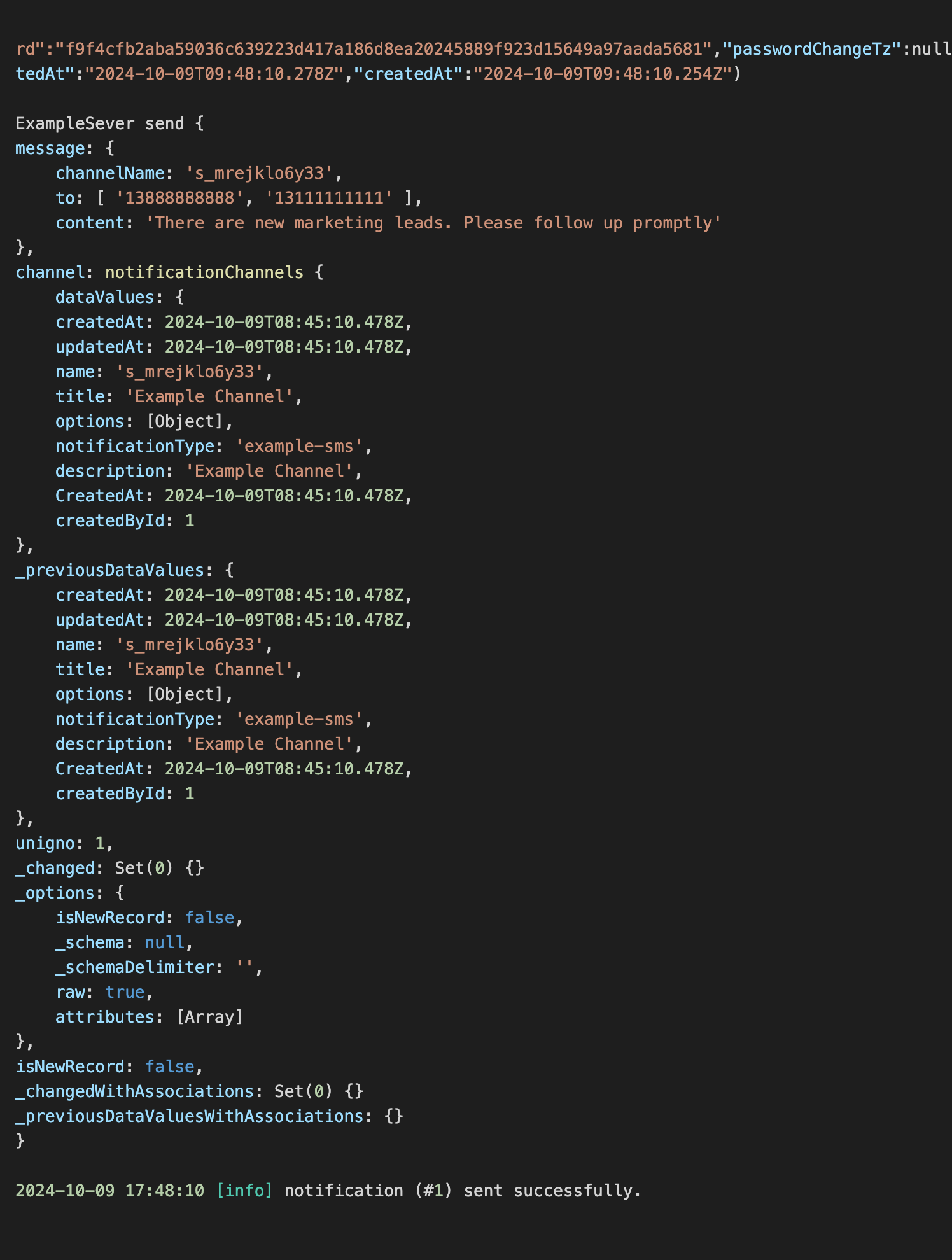
İş akışı yürütmesini tetiklediğinizde, konsolda aşağıdaki bilgilerin çıktısını görebilirsiniz.