TIP
Dit document is vertaald door AI. Voor onnauwkeurigheden, raadpleeg de Engelse versie
Notificatiekanaaltypes uitbreiden
NocoBase ondersteunt het naar behoefte uitbreiden van notificatiekanaaltypes, zoals sms-notificaties en app-pushberichten.
Client
Registratie van kanaaltypes
De configuratie-interfaces voor clientkanalen en berichten worden geregistreerd via de registerChannelType-methode die wordt aangeboden door de client van de notificatiebeheer plugin:
import PluginNotificationManagerClient from '@nocobase/plugin-notification-manager/client';

class PluginNotificationExampleClient extends Plugin {
  async afterAdd() {}

  async beforeLoad() {}

  async load() {
    const notification = this.pm.get(PluginNotificationManagerClient);
    notification.registerChannelType({
      title: 'Example SMS', // Naam van het kanaaltype
      type: 'example-sms', // Identificatie van het kanaaltype
      components: {
        ChannelConfigForm, // Configuratieformulier voor het kanaal
        MessageConfigForm, // Configuratieformulier voor het bericht
      },
    });
  }
}

export default PluginNotificationExampleClient;
Server
Abstracte klasse uitbreiden
De kern van serverontwikkeling is het uitbreiden van de abstracte klasse BaseNotificationChannel en het implementeren van de send-methode. Deze methode bevat de bedrijfslogica voor het verzenden van notificaties via de uitgebreide plugin.
import { BaseNotificationChannel } from '@nocobase/plugin-notification-manager';

export class ExampleServer extends BaseNotificationChannel {
  async send(args): Promise<any> {
    console.log('ExampleServer send', args);
    return { status: 'success', message: args.message };
  }
}
Serverregistratie
Vervolgens moet u de registerChannelType-methode van de notificatieserver-kernel aanroepen om de ontwikkelde serverimplementatieklasse in de kernel te registreren:
import PluginNotificationManagerServer from '@nocobase/plugin-notification-manager';
import { Plugin } from '@nocobase/server';
import { ExampleServer } from './example-server';
export class PluginNotificationExampleServer extends Plugin {
  async load() {
    const notificationServer = this.pm.get(PluginNotificationManagerServer) as PluginNotificationManagerServer;
    notificationServer.registerChannelType({ type: 'example-sms', Channel: ExampleServer });
  }
}

export default PluginNotificationExampleServer;
Volledig voorbeeld
Hieronder beschrijven we aan de hand van een voorbeeld van een notificatie-uitbreidingsplugin hoe u een uitbreidingsplugin kunt ontwikkelen. Stel dat we sms-notificaties willen toevoegen aan NocoBase met behulp van de sms-gateway van een bepaald platform.
Plugin aanmaken
- Voer het commando uit om de plugin aan te maken:
yarn pm add @nocobase/plugin-notification-example
Clientontwikkeling
Voor de client moeten we twee formuliercomponenten ontwikkelen: ChannelConfigForm (configuratieformulier voor het kanaal) en MessageConfigForm (configuratieformulier voor het bericht).
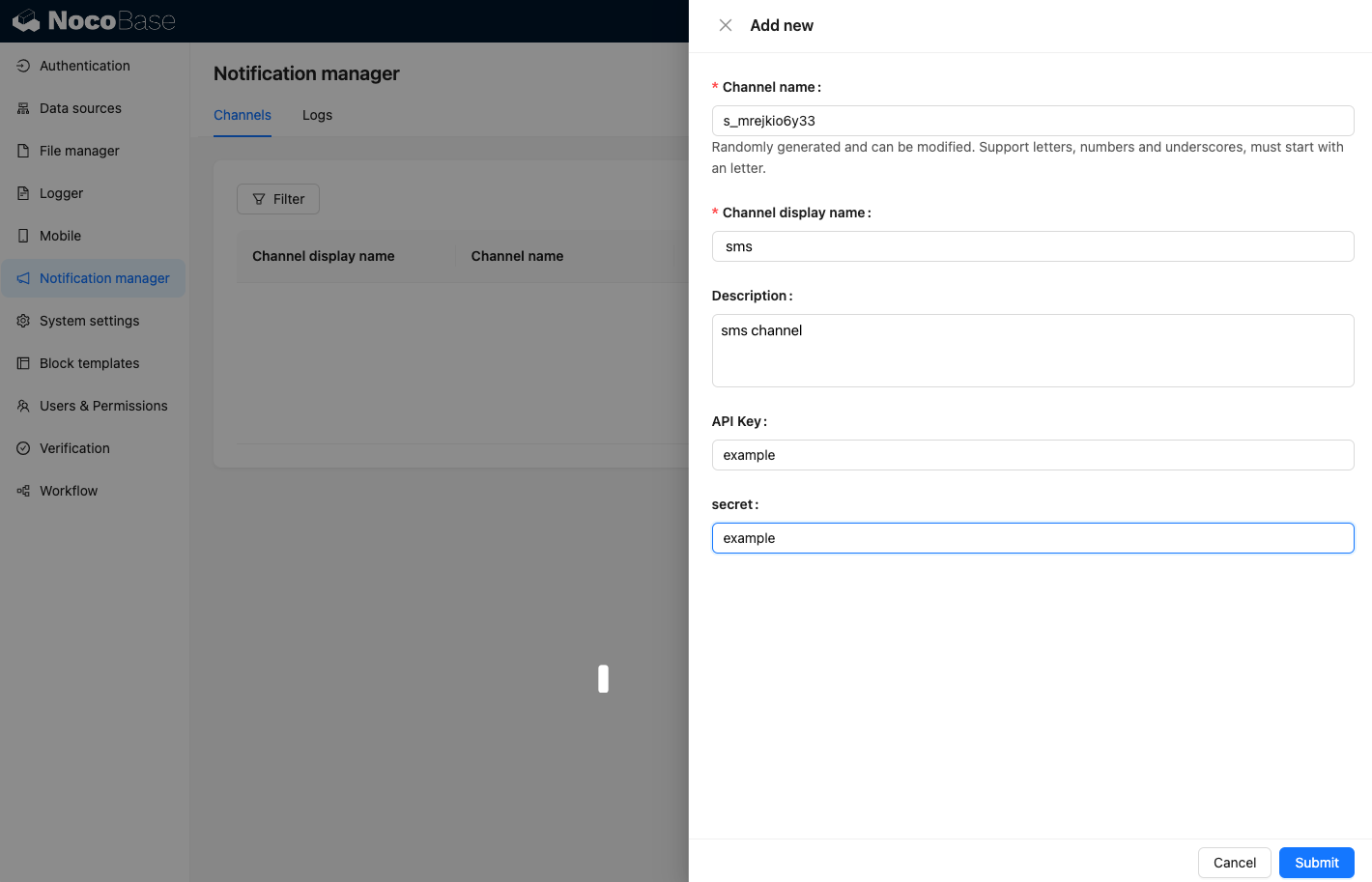
Om sms-berichten te verzenden, zijn een API-sleutel en een secret vereist. Ons kanaalformulier zal daarom voornamelijk deze twee items bevatten. Maak een nieuw bestand aan met de naam ChannelConfigForm.tsx in de map src/client. De inhoud van het bestand is als volgt:
import React from 'react';
import { SchemaComponent } from '@nocobase/client';
import useLocalTranslation from './useLocalTranslation';

const ChannelConfigForm = () => {
  const t = useLocalTranslation();
  return (
    <SchemaComponent
      scope={{ t }}
      schema={{
        type: 'object',
        properties: {
          apiKey: {
            'x-decorator': 'FormItem',
            type: 'string',
            title: '{{t("Transport")}}',
            'x-component': 'Input',
          },
          secret: {
            'x-decorator': 'FormItem',
            type: 'string',
            title: '{{t("Transport")}}',
            'x-component': 'Input',
          },
        },
      }}
    />
  );
};

export default ChannelConfigForm;
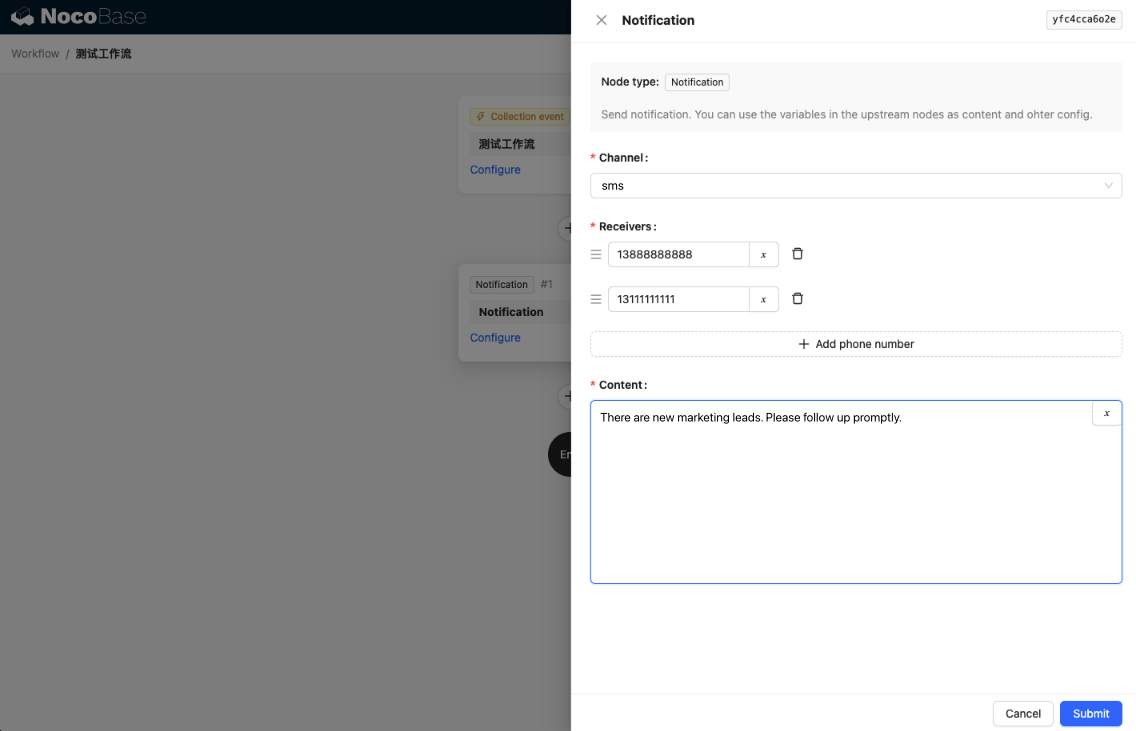
Het configuratieformulier voor berichten omvat voornamelijk de configuratie voor ontvangers (receivers) en de inhoud van het bericht (content). Maak een nieuw bestand aan met de naam MessageConfigForm.tsx in de map src/client. De component ontvangt variableOptions als variabele parameter. Het inhoudsformulier wordt geconfigureerd in de workflow-node en moet doorgaans workflow-nodevariabelen verbruiken. De specifieke bestandsinhoud is als volgt:
import React from 'react';
import { SchemaComponent } from '@nocobase/client';
import useLocalTranslation from './useLocalTranslation';

const MessageConfigForm = ({ variableOptions }) => {
  const { t } = useLocalTranslation();
  return (
    <SchemaComponent
      scope={{ t }}
      schema={{
        type: 'object',
        properties: {
          to: {
            type: 'array',
            required: true,
            title: `{{t("Receivers")}}`,
            'x-decorator': 'FormItem',
            'x-component': 'ArrayItems',
            items: {
              type: 'void',
              'x-component': 'Space',
              properties: {
                sort: {
                  type: 'void',
                  'x-decorator': 'FormItem',
                  'x-component': 'ArrayItems.SortHandle',
                },
                input: {
                  type: 'string',
                  'x-decorator': 'FormItem',
                  'x-component': 'Variable.Input',
                  'x-component-props': {
                    scope: variableOptions,
                    useTypedConstant: ['string'],
                    placeholder: `{{t("Phone number")}}`,
                  },
                },
                remove: {
                  type: 'void',
                  'x-decorator': 'FormItem',
                  'x-component': 'ArrayItems.Remove',
                },
              },
            },
            properties: {
              add: {
                type: 'void',
                title: `{{t("Add phone number")}}`,
                'x-component': 'ArrayItems.Addition',
              },
            },
          },
          content: {
            type: 'string',
            required: true,
            title: `{{t("Content")}}`,
            'x-decorator': 'FormItem',
            'x-component': 'Variable.RawTextArea',
            'x-component-props': {
              scope: variableOptions,
              placeholder: 'Hi,',
              autoSize: {
                minRows: 10,
              },
            },
          },
        },
      }}
    />
  );
};

export default MessageConfigForm
Clientcomponentregistratie
Nadat de formulierconfiguratiecomponenten zijn ontwikkeld, moeten ze worden geregistreerd in de notificatiebeheer-kernel. Stel dat de naam van ons platform 'Example' is, dan is de bewerkte inhoud van het bestand src/client/index.tsx als volgt:
import { Plugin } from '@nocobase/client';
import PluginNotificationManagerClient from '@nocobase/plugin-notification-manager/client';
import { tval } from '@nocobase/utils/client';
import ChannelConfigForm from './ChannelConfigForm';
import MessageConfigForm from './MessageConfigForm';

class PluginNotificationExampleClient extends Plugin {
  async afterAdd() {}

  async beforeLoad() {}

  async load() {
    const notification = this.pm.get(PluginNotificationManagerClient);
    notification.registerChannelType({
      title: tval('Example SMS', { ns: '@nocobase/plugin-notification-example' }),
      type: 'example-sms',
      components: {
        ChannelConfigForm,
        MessageConfigForm,
      },
    });
  }
}

export default PluginNotificationExampleClient;
Hiermee is de ontwikkeling van de client voltooid.
Serverontwikkeling
De kern van serverontwikkeling is het uitbreiden van de abstracte klasse BaseNotificationChannel en het implementeren van de send-methode. Deze methode bevat de bedrijfslogica voor de uitbreidingsplugin om notificaties te verzenden. Aangezien dit een voorbeeld is, zullen we de ontvangen argumenten eenvoudigweg afdrukken. Voeg in de map src/server een nieuw bestand toe met de naam example-server.ts. De inhoud van het bestand is als volgt:
import { BaseNotificationChannel } from '@nocobase/plugin-notification-manager';

export class ExampleServer extends BaseNotificationChannel {
  async send(args): Promise<any> {
    console.log('ExampleServer send', args);
    return { status: 'success', message: args.message };
  }
}
Vervolgens moet u de registerChannelType-methode van de notificatieserver-kernel aanroepen om de serveruitbreidingsplugin te registreren. De bewerkte inhoud van het bestand src/server/plugin.ts is als volgt:
import PluginNotificationManagerServer from '@nocobase/plugin-notification-manager';
import { Plugin } from '@nocobase/server';
import { ExampleServer } from './example-server';
export class PluginNotificationExampleServer extends Plugin {
  async load() {
    const notificationServer = this.pm.get(PluginNotificationManagerServer) as PluginNotificationManagerServer;
    notificationServer.registerChannelType({ type: 'example-sms', Channel: ExampleServer });
  }
}

export default PluginNotificationExampleServer;
Plugin registratie en opstarten
- Voer het registratiecommando uit:
yarn pm add @nocobase/plugin-notification-example
- Voer het activeringscommando uit:
yarn pm enable @nocobase/plugin-notification-example
Kanaalconfiguratie
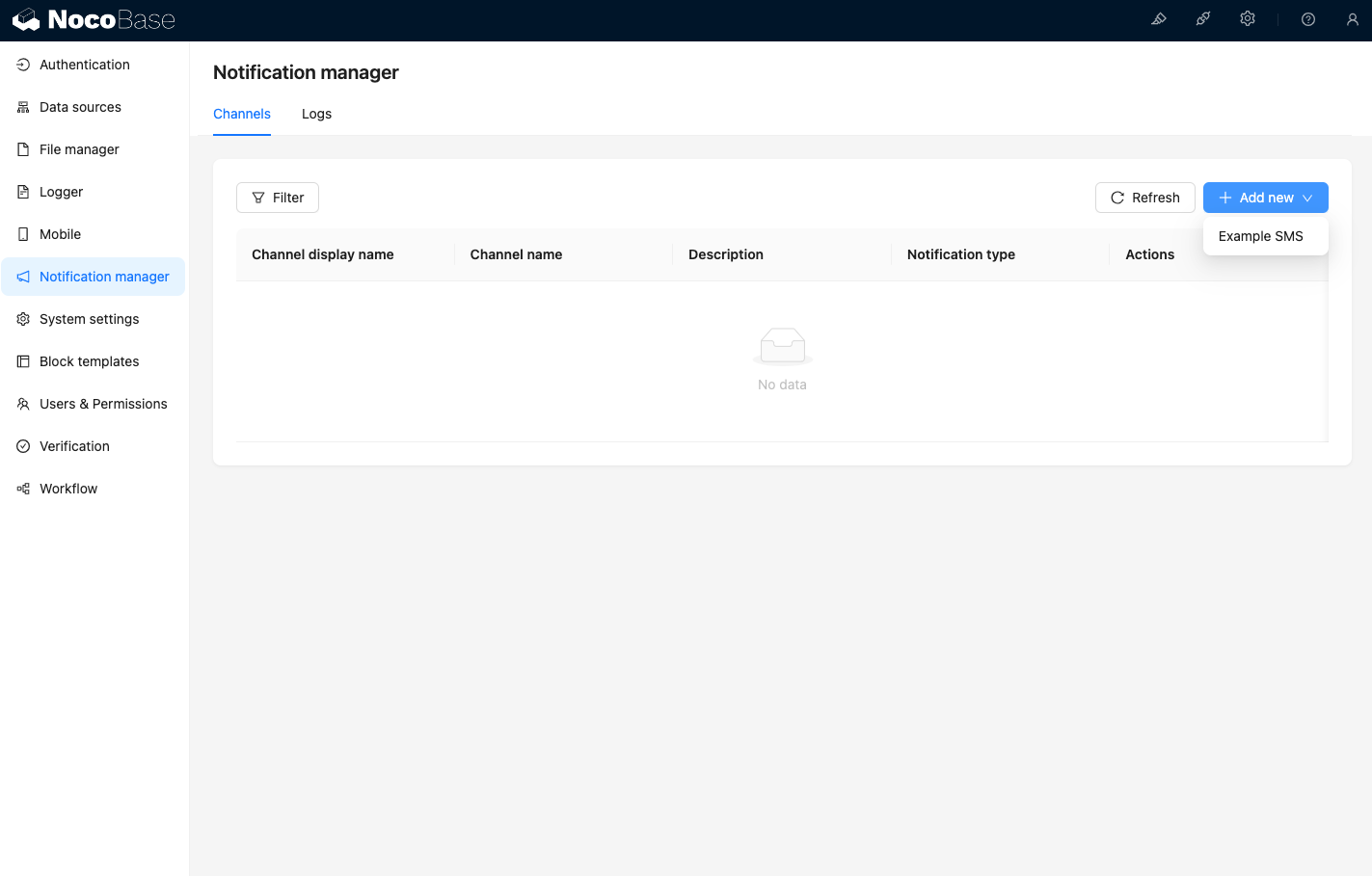
Wanneer u nu de kanaalpagina van het notificatiebeheer bezoekt, ziet u dat het Example SMS-kanaal is geactiveerd.
Voeg een voorbeeldkanaal toe.
Maak een nieuwe workflow aan en configureer de notificatie-node.
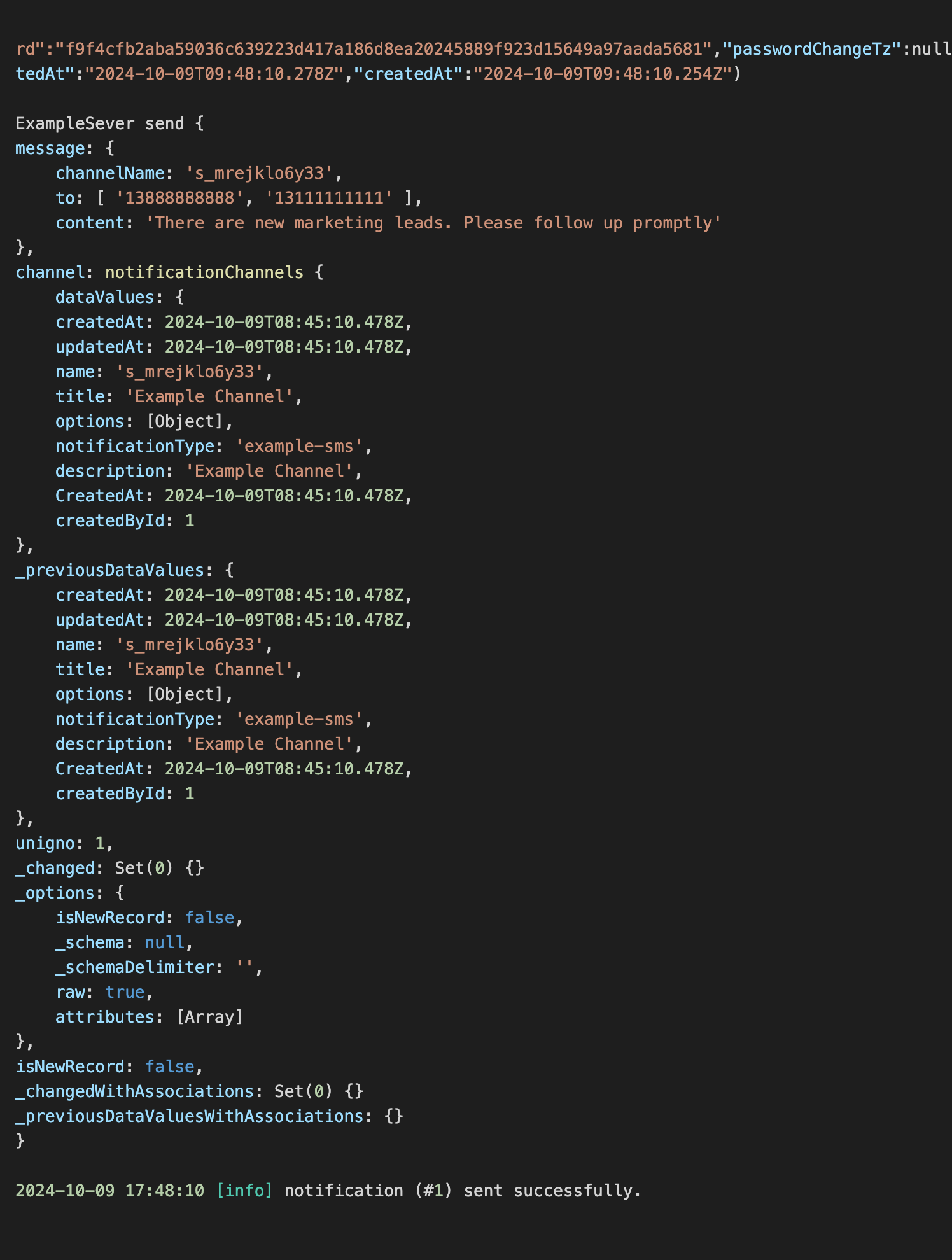
Activeer de workflow-uitvoering om de volgende informatie in de console te zien.