Mở rộng loại kênh thông báo
NocoBase hỗ trợ mở rộng các loại kênh thông báo theo nhu cầu, như thông báo SMS, push thông báo, v.v.
Client
Đăng ký loại kênh
Giao diện cấu hình kênh và cấu hình tin nhắn phía client được đăng ký thông qua interface registerChannelType mà plugin client quản lý thông báo cung cấp:
import PluginNotificationManagerClient from '@nocobase/plugin-notification-manager/client';

class PluginNotificationExampleClient extends Plugin {
  async afterAdd() {}

  async beforeLoad() {}

  async load() {
    const notification = this.pm.get(PluginNotificationManagerClient);
    notification.registerChannelType({
      title: 'Example SMS', // Tên loại kênh
      type: 'example-sms', // Định danh loại kênh
      components: {
        ChannelConfigForm, // Form cấu hình kênh
        MessageConfigForm, // Form cấu hình tin nhắn
      },
    });
  }
}

export default PluginNotificationExampleClient;
Server
Kế thừa class trừu tượng
Cốt lõi của phát triển server là cần kế thừa class trừu tượng BaseNotificationChannel và triển khai phương thức send. Bên trong phương thức send là logic nghiệp vụ gửi thông báo của plugin mở rộng.
import { BaseNotificationChannel } from '@nocobase/plugin-notification-manager';

export class ExampleSever extends BaseNotificationChannel {
  async send(args): Promise<any> {
    console.log('ExampleSever send', args);
    return { status: 'success', message: args.message };
  }
}
Đăng ký phía server
Tiếp theo cần gọi phương thức registerChannelType của kernel server thông báo để đăng ký class triển khai phía server đã phát triển vào kernel:
import PluginNotificationManagerServer from '@nocobase/plugin-notification-manager';
import { Plugin } from '@nocobase/server';
import { ExampleSever } from './example-server';
export class PluginNotificationExampleServer extends Plugin {
  async load() {
    const notificationServer = this.pm.get(PluginNotificationManagerServer) as PluginNotificationManagerServer;
    notificationServer.registerChannelType({ type: 'example-sms', Channel: ExampleSever });
  }
}

export default PluginNotificationExampleServer;
Ví dụ đầy đủ
Dưới đây mô tả chi tiết cách phát triển một plugin mở rộng thông qua một ví dụ plugin mở rộng thông báo.
Giả sử chúng ta muốn sử dụng SMS gateway của một nền tảng nào đó để thêm tính năng thông báo SMS cho NocoBase.
Tạo plugin
- Thực hiện lệnh tạo plugin
yarn pm add @nocobase/plugin-notification-example
Phát triển client
Phần client chúng ta cần phát triển hai component form, ChannelConfigForm (form cấu hình kênh) và MessageConfigForm (form cấu hình tin nhắn).
Một số nền tảng khi gửi SMS cần APIkey và secret, do đó nội dung form kênh của chúng ta chủ yếu bao gồm hai mục trên. Trong thư mục src/client tạo file mới ChannelConfigForm.tsx, nội dung file như sau:
import React from 'react';
import { SchemaComponent } from '@nocobase/client';
import useLocalTranslation from './useLocalTranslation';

const ChannelConfigForm = () => {
  const t = useLocalTranslation();
  return (
    <SchemaComponent
      scope={{ t }}
      schema={{
        type: 'object',
        properties: {
          apiKey: {
            'x-decorator': 'FormItem',
            type: 'string',
            title: '{{t("Transport")}}',
            'x-component': 'Input',
          },
          secret: {
            'x-decorator': 'FormItem',
            type: 'string',
            title: '{{t("Transport")}}',
            'x-component': 'Input',
          },
        },
      }}
    />
  );
};

export default ChannelConfigForm;
Form cấu hình tin nhắn chủ yếu bao gồm cấu hình người nhận receivers và nội dung tin nhắn content. Trong thư mục src/client tạo file mới MessageConfigForm.tsx. Component nhận variableOptions làm tham số biến. Hiện tại form nội dung sẽ được cấu hình ở node workflow, thông thường cần consume biến node workflow. Nội dung file cụ thể như sau:
import React from 'react';
import { SchemaComponent } from '@nocobase/client';
import useLocalTranslation from './useLocalTranslation';

const MessageConfigForm = ({ variableOptions }) => {
  const { t } = useLocalTranslation();
  return (
    <SchemaComponent
      scope={{ t }}
      schema={{
        type: 'object',
        properties: {
          to: {
            type: 'array',
            required: true,
            title: `{{t("Receivers")}}`,
            'x-decorator': 'FormItem',
            'x-component': 'ArrayItems',
            items: {
              type: 'void',
              'x-component': 'Space',
              properties: {
                sort: {
                  type: 'void',
                  'x-decorator': 'FormItem',
                  'x-component': 'ArrayItems.SortHandle',
                },
                input: {
                  type: 'string',
                  'x-decorator': 'FormItem',
                  'x-component': 'Variable.Input',
                  'x-component-props': {
                    scope: variableOptions,
                    useTypedConstant: ['string'],
                    placeholder: `{{t("Phone number")}}`,
                  },
                },
                remove: {
                  type: 'void',
                  'x-decorator': 'FormItem',
                  'x-component': 'ArrayItems.Remove',
                },
              },
            },
            properties: {
              add: {
                type: 'void',
                title: `{{t("Add phone number")}}`,
                'x-component': 'ArrayItems.Addition',
              },
            },
          },
          content: {
            type: 'string',
            required: true,
            title: `{{t("Content")}}`,
            'x-decorator': 'FormItem',
            'x-component': 'Variable.RawTextArea',
            'x-component-props': {
              scope: variableOptions,
              placeholder: 'Hi,',
              autoSize: {
                minRows: 10,
              },
            },
          },
        },
      }}
    />
  );
};

export default MessageConfigForm
Đăng ký component client
Sau khi component form cấu hình được phát triển xong, cần gọi kernel quản lý thông báo để đăng ký. Giả sử tên nền tảng của chúng ta là Example, nội dung file src/client/index.tsx sau khi chỉnh sửa như sau:
import { Plugin } from '@nocobase/client';
import PluginNotificationManagerClient from '@nocobase/plugin-notification-manager/client';
import { tval } from '@nocobase/utils/client';
import ChannelConfigForm from './ChannelConfigForm';
import MessageConfigForm from './MessageConfigForm';

class PluginNotificationExampleClient extends Plugin {
  async afterAdd() {}

  async beforeLoad() {}

  async load() {
    const notification = this.pm.get(PluginNotificationManagerClient);
    notification.registerChannelType({
      title: tval('Example SMS', { ns: '@nocobase/plugin-notification-example' }),
      type: 'example-sms',
      components: {
        ChannelConfigForm,
        MessageConfigForm,
      },
    });
  }
}

export default PluginNotificationExampleClient;
Đến đây, phát triển client đã hoàn thành.
Phát triển server
Cốt lõi của phát triển server là cần kế thừa class trừu tượng BaseNotificationChannel và triển khai phương thức send. Bên trong phương thức send là logic nghiệp vụ gửi thông báo của plugin mở rộng. Vì đây là ví dụ, chỉ đơn giản in ra các tham số nhận được. Trong thư mục src/server thêm file mới example-server.ts, nội dung file như sau:
import { BaseNotificationChannel } from '@nocobase/plugin-notification-manager';

export class ExampleSever extends BaseNotificationChannel {
  async send(args): Promise<any> {
    console.log('ExampleSever send', args);
    return { status: 'success', message: args.message };
  }
}
Tiếp theo cần gọi phương thức registerChannelType của kernel server thông báo để đăng ký plugin server mở rộng. Nội dung file src/clinet/plugin.ts sau khi chỉnh sửa như sau:
import PluginNotificationManagerServer from '@nocobase/plugin-notification-manager';
import { Plugin } from '@nocobase/server';
import { ExampleSever } from './example-server';
export class PluginNotificationExampleServer extends Plugin {
  async load() {
    const notificationServer = this.pm.get(PluginNotificationManagerServer) as PluginNotificationManagerServer;
    notificationServer.registerChannelType({ type: 'example-sms', Channel: ExampleSever });
  }
}

export default PluginNotificationExampleServer;
Đăng ký và khởi động plugin
- Thực hiện lệnh đăng ký
yarn p add @nocobase/plugin-notification-example
- Thực hiện lệnh kích hoạt
yarn pm enable @nocobase/plugin-notification-example
Cấu hình kênh
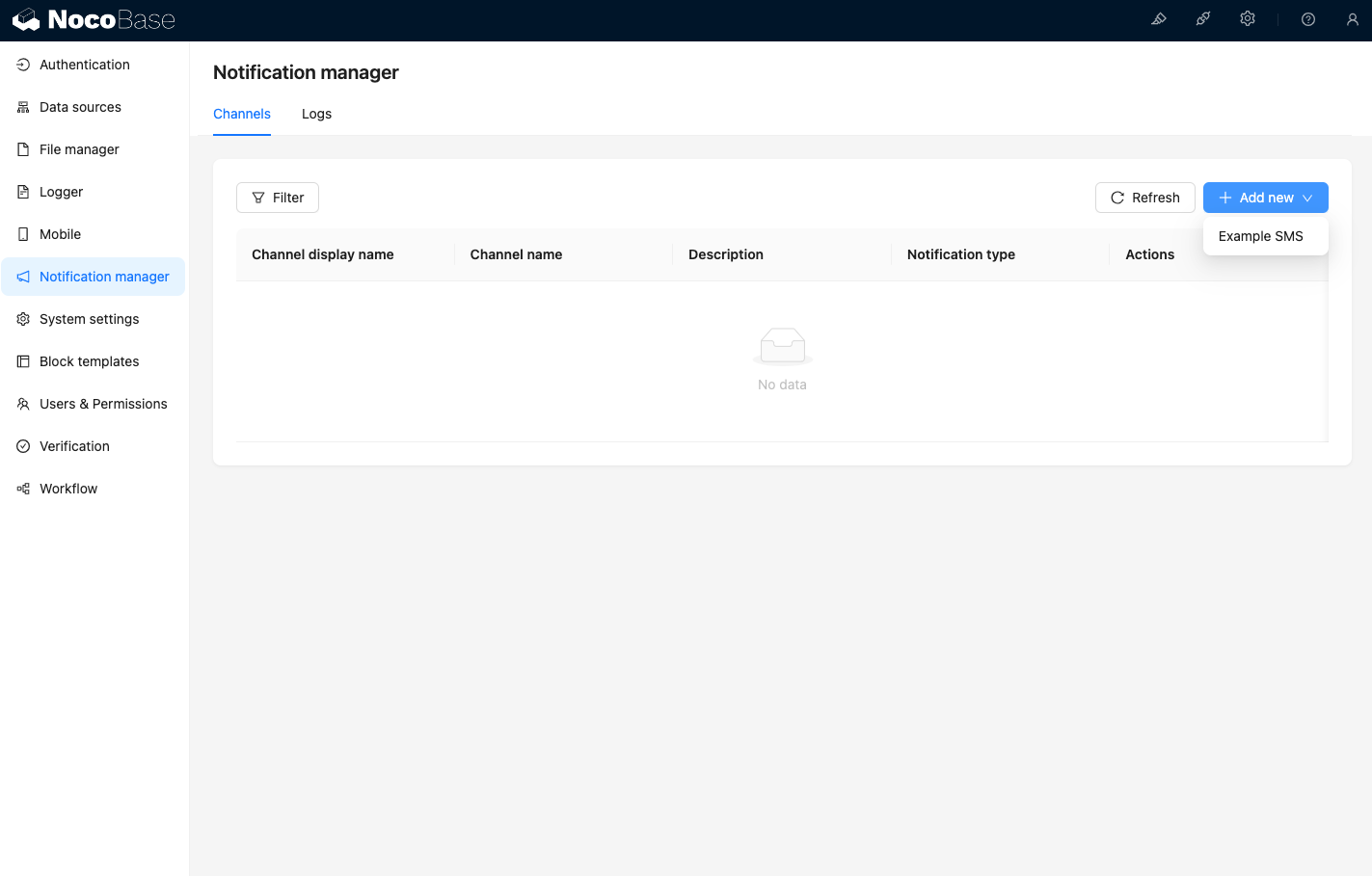
Lúc này truy cập trang kênh của Quản lý thông báo, có thể thấy Example SMS đã được kích hoạt
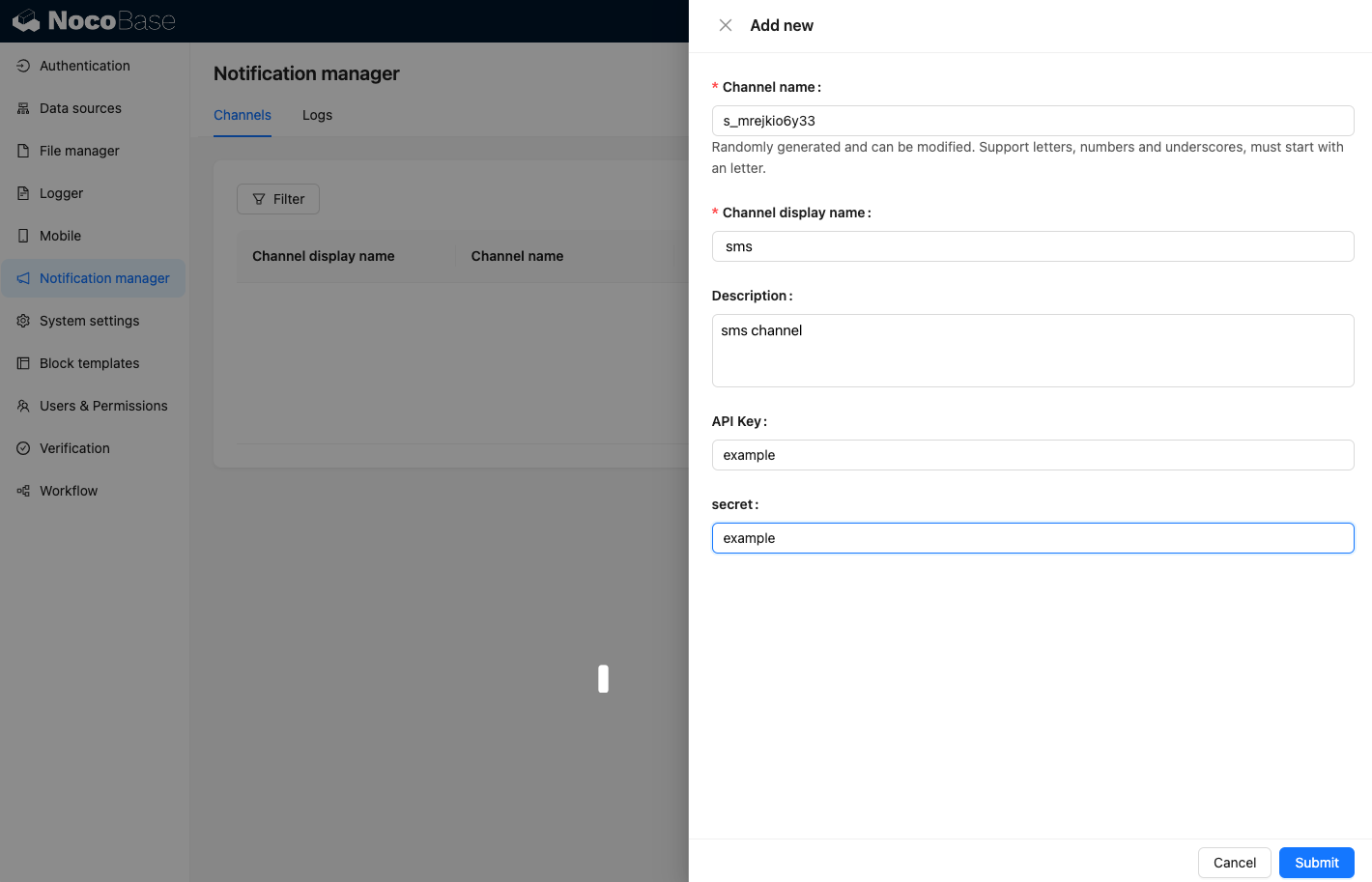
Thêm một kênh ví dụ
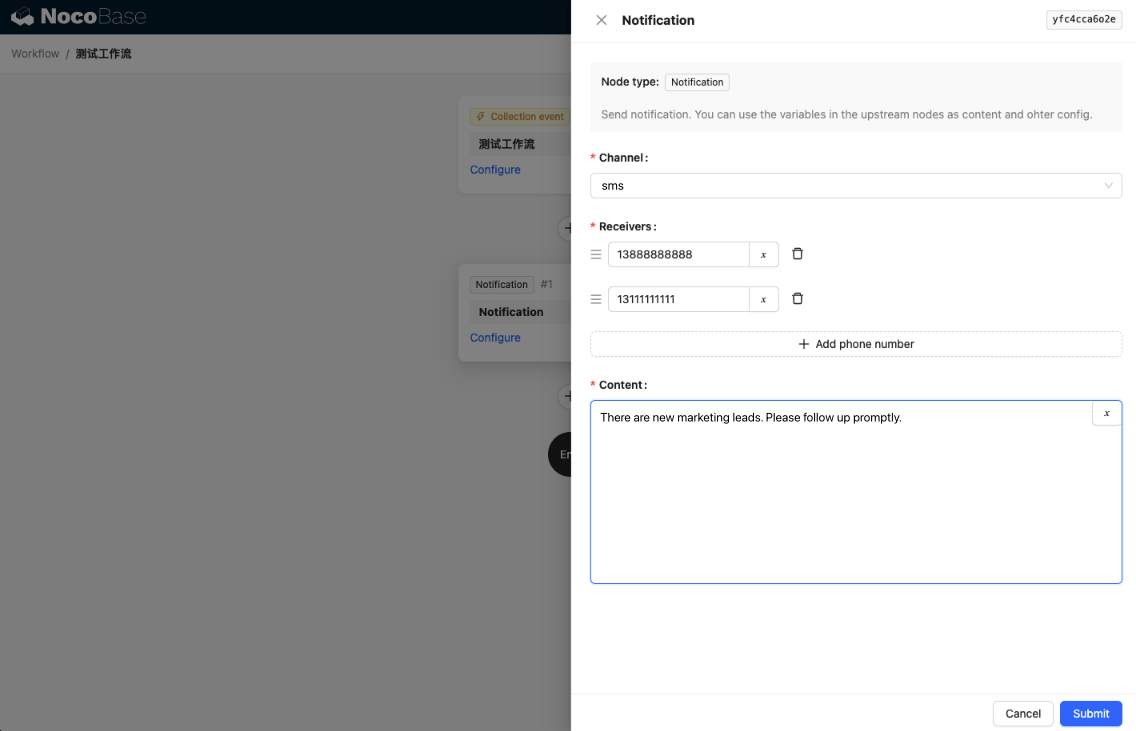
Thêm một workflow và cấu hình node thông báo
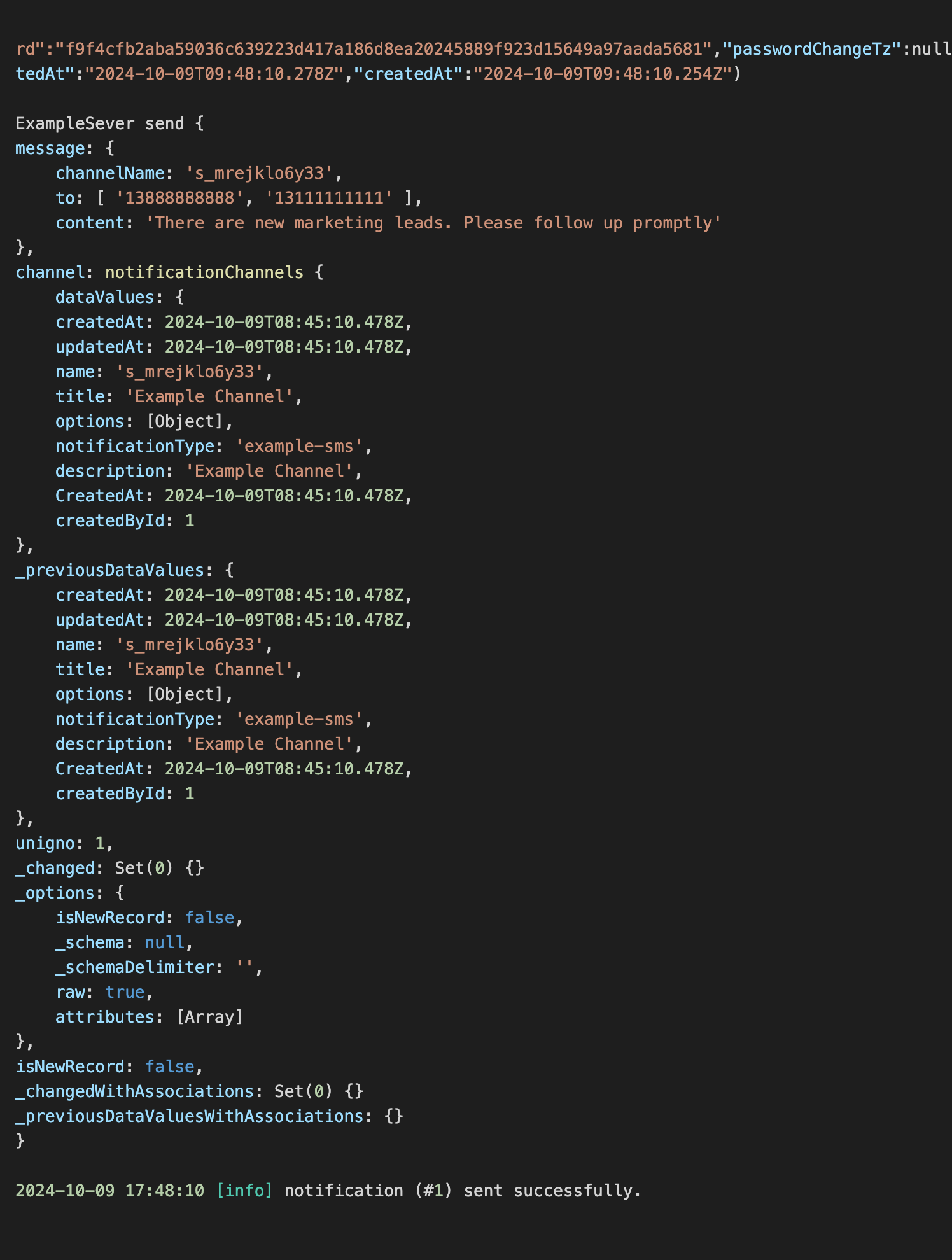
Kích hoạt thực thi workflow, có thể thấy thông tin sau được output trong console